Source-backed review

Flux Charts review: choose the toolkit by task

Flux Charts offers TradingView toolkits for signals, price action, and multi-timeframe supply and demand, along with screeners and backtesters. Its premium indicators are invite-only. The right choice depends on whether you need SFX signals, PAT structure drawings, or a separate supply-and-demand workflow; a single review rating cannot answer that for you.

This review compares public documentation and access terms. We have not used a paid account, audited private code, or measured trade outcomes. Trustpilot posts are individual reports, not product-performance evidence.

Compare the features

Pineify product evidence

Signals & Overlays

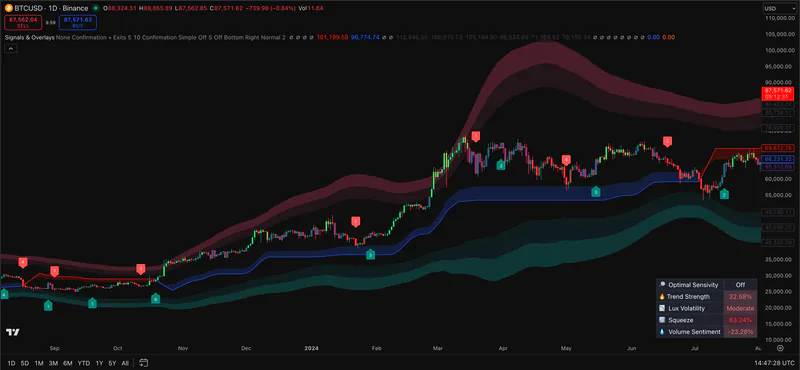
Pineify Signals & Overlays on a TradingView price chart with trend bands and signal markers
Pineify screenshot. It does not show Flux Charts software.

Public sources checked 2026-09-24.

What to check before choosing

The details below determine whether the named tool fits the job behind the search.

The suite’s appeal

Flux Charts separates signal analysis from price-action structure and supplies supporting screeners and backtesters. This may reduce the need to assemble several independent studies, provided your subscription includes the exact tools you use.

Plan and platform checks

Its FAQ says premium indicators appear under TradingView invite-only scripts after account activation. Check plan contents, username linking, alert limits, and the tools you need before buying.

Where Pineify differs

Pineify Premium Scripts is a separate, smaller collection described as including full Pine Script source. That can suit a user who wants to inspect or modify a script. It does not include Flux Charts’ proprietary SFX, PAT, screener, or backtester system.

Feature comparison

Descriptions are drawn from the linked public sources. Similar categories do not imply matching formulas or performance.

Flux Charts and Pineify Premium Scripts feature comparison
QuestionFlux ChartsPineify Premium Scripts
Suite designToolkits, screeners, and backtestersCurated editable indicator scripts
TradingView accessPremium scripts are invite-onlyProduct page states full source is provided
Performance evidenceNo account-level benchmark in this reviewNo comparative accuracy benchmark claimed

Scroll sideways to read the full table.

Related Pineify workflow

Where Premium Scripts fits

Adjacent: an editable indicator collection for a different workflow.

Check the current script list and access terms on the product page before choosing a plan.

View Premium Scripts

Common questions

Does Flux Charts work on TradingView?

Yes. Flux Charts documents its premium tools as TradingView invite-only indicators tied to an account username.

Does a Trustpilot rating prove trading performance?

No. A rating can reflect support or satisfaction, but it does not verify future returns or signal accuracy.

Can Pineify replace every Flux Charts toolkit?

No. Pineify’s collection has its own indicator scope and does not claim Flux Charts’ integrated screeners or backtesters.

Sources and review scope

Provider documentation, author-published scripts, and linked review profiles checked 2026-09-24. Features and access can change; confirm current terms with each provider.

This page is for information and education. Indicator output is not investment advice or a guarantee of trading results. Test scripts with your own rules, data, and risk limits.