Source-backed review

AlgoPro reviews: what the TradingView suite delivers

AlgoPro offers TradingView indicators and strategies alongside research and automation tools. Its documentation distinguishes a Signals indicator from a Strategy version that submits simulated orders. This review checks public descriptions and access instructions; it does not establish that every advertised function works, rate customer support, or measure trading profitability.

Published by Pineify, which offers competing scripts and coding tools. No paid-account trial, live execution test or independent signal-accuracy dataset was produced for this review.

Compare the features

Pineify product evidence

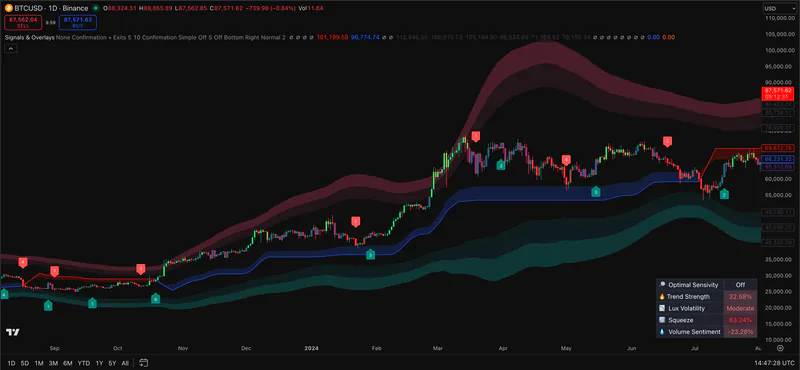
Signals & Overlays

Pineify Signals & Overlays on a TradingView price chart with trend bands and signal markers
Pineify screenshot. It does not show AlgoPro software.

Public sources checked 2026-10-20.

What to check before choosing

The details below determine whether the named tool fits the job behind the search.

Indicator signals and strategy tests are different outputs

The official Signals guide describes separate indicator and strategy versions, configurable entries, filters and exits. For a reproducible test, record the exact script version, symbol, timeframe, settings, candle type, commissions and slippage. Inspect individual simulated trades rather than accepting an aggregate result.

Access, purchase terms and legitimacy checks

The official access workflow uses TradingView invite-only permissions. Follow links from algopro.us to its guide and confirm the account receiving access. Inspect the current checkout, renewal terms, refund conditions and required third-party subscriptions. A website or review profile does not independently establish service quality, regulatory status or investment performance.

Confirmation and repainting require specific checks

The Signals guide describes completed higher-timeframe states for its higher-timeframe agreement mode. That is a documented design claim, not an independent audit of every tool or setting. Chart-bar close alone cannot rule out all historical/live differences. Compare saved live alerts with later chart reloads and identify when pivot-based information first became available.

Automation is a separate dependency

AlgoPro advertises AutoPilot and connected execution. We did not verify an account connection or live order. Before enabling any integration, inspect supported venues, permissions, failure handling, duplicate-order protection and paper-mode behavior. A TradingView strategy backtest does not itself prove broker execution.

Feature comparison

Descriptions are drawn from the linked public sources. Similar categories do not imply matching formulas or performance.

AlgoPro and Pineify Premium Scripts feature comparison
QuestionAlgoProPineify Premium Scripts
Source accessDocumented TradingView access is invite-only; do not assume editable source is includedPremium Scripts provides source for inspecting and editing the selected scripts; check current library access terms
Testing workflowSignals documentation separates indicator display and simulated strategy ordersInspect the supplied script and its type; a strategy requires TradingView execution assumptions and trade review
Purchase decisionVerify the exact bundle and external platform requirements at checkoutVerify the selected script and plan; source access is not a performance guarantee

Scroll sideways to read the full table.

Related Pineify workflow

Where Premium Scripts fits

Pineify Premium Scripts is an adjacent option when editable formulas matter. Source access helps inspection but does not establish profitability, remove repainting risk from custom changes or replace testing.

Check the current script list and access terms on the product page before choosing a plan.

View Premium Scripts

Common questions

Is AlgoPro legit or a scam?

The linked official site and documentation describe a commercial TradingView product and its access process. This documentation review does not establish a blanket legitimacy rating, customer-service quality or investment outcomes. Verify the seller, current terms and delivered access before relying on any purchase claim.

Do customer reviews prove AlgoPro signal accuracy?

No. Testimonials and star ratings are not a controlled performance dataset. Define entry, exit, timing and costs, preserve the selected settings, and evaluate unseen data before drawing conclusions about a strategy.

Can you edit AlgoPro indicators in Pine Script?

The documented delivery uses invite-only access. That permission lets you use the script; it should not be interpreted as a source-code license. Confirm any separate source offer with the provider. Settings exposed by a script can be adjusted without access to its internal formula.

Sources and review scope

Consult the provider documentation, author-published scripts, and review profiles linked below. Sources checked 2026-10-20. Features and access can change; confirm current terms with each provider.

This page is for information and education. Indicator output is not investment advice or a guarantee of trading results. Test scripts with your own rules, data, and risk limits.