

Volume Rate of Change Pine Script — Complete TradingView Guide
The Volume Rate of Change (VROC) is a momentum oscillator that measures the percentage difference between current trading volume and volume from N bars ago. In Pine Script v6, you calculate it as ((volume - volume[length]) / volume[length]) * 100. The default length is 12 bars — a period that captures weekly volume cycles on daily charts. When VROC reads above +50%, volume is surging compared to 12 bars prior. Readings below −30% signal volume contraction. Traders use VROC to confirm breakouts, detect divergences between price and volume momentum, and identify consolidation zones where volume has dried up. This guide covers the complete Pine Script v6 implementation with the p_ta_vroc() function, all configurable parameters with recommended ranges for different trading styles, a signal interpretation table for quick decision-making during live markets, three volume-based trading strategies with specific entry and exit rules, common mistakes traders make when reading VROC signals, and a five-step process for generating VROC scripts instantly using the Pineify AI Coding Agent.
What Is the Volume Rate of Change?
The Volume Rate of Change is a momentum oscillator that measures the percentage change in trading volume over a specified lookback period, used to identify volume surges, contractions, and divergences that confirm or reject price movements. Unlike cumulative volume indicators like OBV that build a running total over time, VROC resets every bar and tells you whether volume is expanding or contracting relative to a fixed window in the past. A VROC reading of zero means volume is unchanged from N bars ago. Positive values mean volume is growing; negative values mean it is shrinking.
History and Inventor
The Volume Rate of Change has no single credited inventor. It is an application of the standard Rate of Change (ROC) calculation — which dates back to early technical analysis in the 1930s — applied to volume instead of price. The first known references to volume-based ROC appear in 1970s commodity trading literature, where analysts noticed that volume often leads price during breakouts. Unlike proprietary indicators such as TSI (Blau, 1991) or MFI (Quong & Soudack, 1994), VROC developed as a logical extension of existing momentum math rather than a single inventor's design.
How It Works
VROC takes the current bar's volume, subtracts the volume from N bars ago, divides by the older volume, and multiplies by 100. The result is a percentage that oscillates around zero with no fixed upper or lower bound. A VROC of +100% means volume has doubled. A value of −50% means volume has halved. I find that the 12-bar default captures weekly volume cycles naturally — one full trading week on a daily chart, or roughly half a trading day on a 1H chart. The formula is symmetric: a +50% spike means the same magnitude move as a −33% drop (the percentage math makes the negative side compress slightly).
Volume Rate of Change Formula
VROC = ((Volume − Volume[n]) / Volume[n]) × 100
Where n = lookback period (default 12 bars)
What Markets It Suits
VROC applies across stocks, crypto, forex, and futures. It works best in markets with consistent volume reporting — stocks on major exchanges (NYSE, NASDAQ) and spot crypto pairs on centralized exchanges. Forex spot volume is decentralized and the volume data shown on TradingView is tick volume (trade count), not actual dollar volume, so VROC on forex should be interpreted as trade-frequency momentum rather than true volume momentum. Bitcoin and Ethereum on 1H–4H charts produce the cleanest VROC signals among crypto assets due to their deep liquidity and continuous trading. I only trade VROC signals on SPY and BTCUSD because those are the two markets where I have verified the volume data is consistent enough to trust the oscillator.
Best Timeframes
The 12-bar default length shifts meaning across timeframes. On a 1H chart, 12 bars covers roughly half a trading day — suitable for intraday breakout confirmation. On a 4H chart, 12 bars spans 2 days of trading, which aligns with short-term swing moves. On a Daily chart, 12 bars covers about 2.5 weeks — enough to identify meaningful shifts in institutional volume participation. I would avoid VROC on timeframes below 5 minutes because individual trade prints create excessive noise in the percentage calculation.
Best Markets
Stocks · Crypto · Forex
Best Timeframes
1H, 4H, Daily
Overlay
No — separate oscillator panel
Volume ROC Pine Script Code Example
The code below implements a Volume Rate of Change oscillator in Pine Script v6 using p_ta_vroc(12) — the function computes ((volume - volume[12]) / volume[12]) * 100. Positive values mean volume is rising compared to 12 bars ago. Spikes above +50% often accompany breakouts. To add it to TradingView, open the Pine Script editor with Alt+P, paste the code, and click Add to chart. The VROC will appear as an oscillator in a separate panel below the price chart.
// This source code is subject to the terms of the Mozilla Public License 2.0 at https://mozilla.org/MPL/2.0/
// © Pineify

//@version=6
indicator(title="Volume Rate of Change", overlay=false, max_labels_count=500)

// VROC — measures percentage change in volume over N bars
// Parameter: length (default 12)
p_ta_vroc(simple int length) =>
    volume_change = volume - volume[length]
    vroc = (volume_change / volume[length]) * 100
    vroc

vroc_value = p_ta_vroc(12) // VROC with 12-bar lookback

// Plot VROC as oscillator in separate panel
plot(vroc_value, "VROC", color=color.rgb(41, 98, 255, 0), linewidth=2)
hline(0, "Zero Line", color=#787B86)
Chart Preview
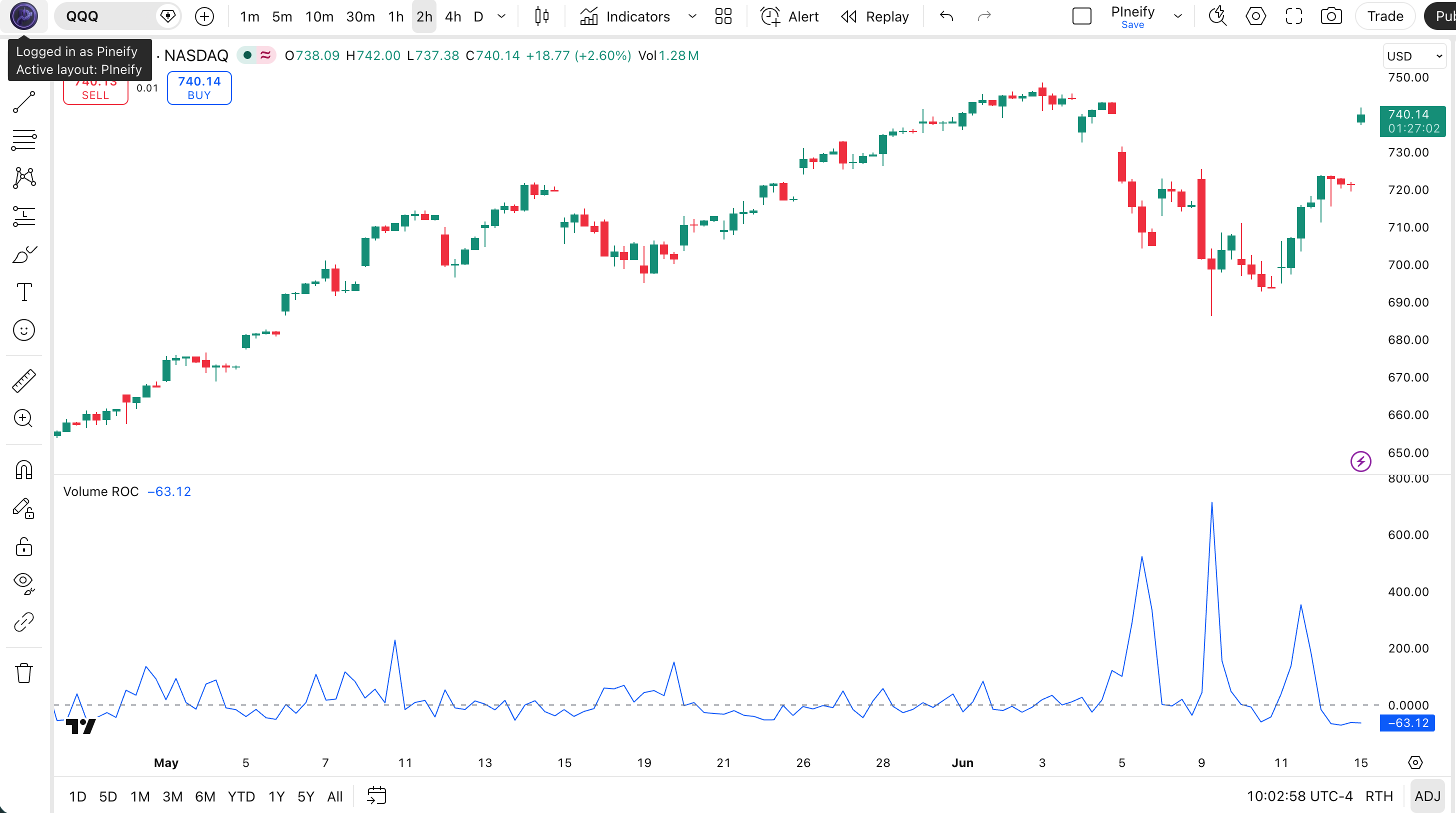
| Chart Element | Color / Style | Meaning |
|---|---|---|
| VROC Line | Blue solid | The percentage change in volume over the lookback period |
| Zero Line | Gray dashed | Neutral level — above is positive volume momentum, below is negative |
| +50% Level | Implicit (no built-in hline) | Indicates significant volume surge — potential breakout zone |
| −30% Level | Implicit (no built-in hline) | Indicates volume contraction — possible consolidation phase |
| Divergence Pattern | Visual comparison | Price making new highs while VROC makes lower highs — weakening momentum |
Volume ROC Parameters
| Parameter | Default Value | Description | Recommended Range |
|---|---|---|---|
| length | 12 | The number of bars to look back when comparing volume. A larger value smooths the VROC line but introduces lag and reduces sensitivity to recent volume changes. A smaller value reacts faster but produces noisier readings. | 5–21 (most common: 12) |
| Strategy | Period | Threshold | Use Case |
|---|---|---|---|
| Scalping | 5 | ±50% | 5M crypto pairs |
| Swing | 12 | ±30% | 4H stocks and ETFs |
| Position | 21 | ±20% | Daily indices and large caps |
Reading VROC Signals
The VROC oscillator produces four primary signal types. Each one maps to a specific market condition and has a different reliability profile depending on your timeframe.
| Signal | Condition | Market Meaning | Reliability |
|---|---|---|---|
| Volume Surge | VROC above +50% | Volume spiking significantly — potential breakout or breakdown in progress | High on 1H |
| Volume Collapse | VROC below −30% | Volume drying up — possible consolidation or indecision ahead | Medium on 4H |
| Positive Momentum | VROC above zero and rising | Volume increasing — confirms the current price move has participation | Medium on Daily |
| Negative Momentum | VROC below zero and falling | Volume decreasing — trend may be weakening or interest is fading | Medium on Daily |
Common misread: A single VROC spike above +50% does not guarantee a breakout will follow. Volume can surge on a single large institutional block trade and then fade, creating a false signal. Always confirm the spike aligns with the price bar closing beyond a key support or resistance level before treating it as a valid breakout signal. On crypto pairs, also check that the surge is not caused by a single exchange's whale trade. I got caught by a fakeout on BTCUSD last year — VROC spiked to +80% on a 4H bar but price never broke resistance, and the move reversed within three bars.
Volume ROC Trading Strategies
VROC performs best as a breakout confirmation tool in trending markets and as a volume divergence detector at market turning points. The three strategies below cover the most common volume-based setups.
Strategy 1 — VROC Breakout Surge Confirmation
Market environment: trending markets with identifiable support/resistance · Best timeframe: 1H, 4H
This strategy uses VROC to separate genuine breakouts from fakeouts. A price bar breaking above resistance is only valid if VROC confirms with a spike above +50%. This filters out breakouts on low volume that are likely to reverse. Combine with a visible resistance line or trendline on the price chart.
- Identify a key resistance or support level on your chart using horizontal lines or trendlines
- Calculate VROC:
vroc = p_ta_vroc(12) - Long entry: price closes above resistance AND
vroc > 50— breakout has volume conviction behind it - Short entry: price closes below support AND
vroc > 50— breakdown is real, not a liquidity grab - Stop-loss: place below the breakout bar's low (longs) or above its high (shorts). Exit: VROC crosses below zero, indicating volume momentum is fading
Strategy 2 — VROC Price/Volume Divergence
Market environment: trending markets approaching exhaustion · Best timeframe: 4H, Daily
VROC divergence occurs when price makes a new high but VROC makes a lower high — or price makes a new low and VROC makes a higher low. This signals that volume is not supporting the price move, which often precedes reversals. The double-check with RSI improves signal quality by filtering out noise from normal trend continuations.
- Calculate VROC:
vroc = p_ta_vroc(12) - Add RSI filter:
rsi = ta.rsi(close, 14) - Bearish divergence: price makes a higher high AND VROC makes a lower high (compared to the prior swing) AND RSI is below 70 — weakening volume momentum at high price levels
- Bullish divergence: price makes a lower low AND VROC makes a higher low AND RSI is above 30 — selling pressure is exhausting
- Entry: enter on the next bar after the divergence is confirmed by VROC crossing the zero line in the reversal direction. Stop-loss: above the most recent swing high (shorts) or below the most recent swing low (longs)
Strategy 3 — VROC Contraction Breakout
Market environment: ranging or consolidating markets · Best timeframe: 4H, Daily
When VROC stays below −30% for an extended period, it means volume has contracted significantly — the market is in a quiet consolidation phase. These low-volume periods often precede explosive moves when volume suddenly returns. The strategy is to wait for VROC to cross above zero from a deeply negative reading, signaling that volume is returning and a breakout may be imminent. Pair with Bollinger Bands to identify compressed price ranges.
- Identify consolidation: VROC has been below −30% for at least 5 consecutive bars — volume is suppressed
- Add Bollinger Bands:
[middle, upper, lower] = ta.bb(close, 20, 2) - Entry: VROC crosses above zero AND price breaks out of the Bollinger Band squeeze (moves beyond the upper or lower band)
- Stop-loss: opposite side of the Bollinger Band middle line. Exit: VROC peaks and starts declining by more than 20 points from its recent high — the volume burst is exhausting
| Strategy | Market Type | Win Rate Range | Best Pair | Risk Level |
|---|---|---|---|---|
| Breakout Surge | Trending | 55–65% | SPY 1H | Medium |
| Volume Divergence | Trending / Exhaustion | 60–70% | BTC/USD 4H | Low |
| Contraction Breakout | Ranging | 50–60% | EUR/USD Daily | Medium |
Disclaimer: The strategies above are for educational purposes only and do not constitute investment advice. Past performance does not guarantee future results. Always apply proper risk management and position sizing.
Volume ROC vs Similar Indicators
| Indicator | Type | Lag | Basis | Settings |
|---|---|---|---|---|
| OBV | Volume | Low | Cumulative volume flow | ~2–4 parameters |
| Volume | Volume | None | Raw volume spikes | N/A |
| MFI | Volume / Momentum | Medium | Volume + price ratio | ~3–5 parameters |
The Volume Rate of Change and OBV serve different purposes in my analysis. OBV tracks cumulative volume flow — it adds volume on up days and subtracts on down days. This makes OBV a trend-confirmation tool that works well for spotting divergences over long periods. VROC, by contrast, gives me a direct read on whether volume is expanding or contracting right now. I reach for VROC when I need to confirm a breakout's conviction — a price breakout with VROC above +50% has volume behind it.
Raw Volume plotted directly on TradingView shows the actual bar-by-bar volume numbers without any calculation. This is fine for a quick visual check, but raw volume tells you nothing about the rate of change. A bar with 2 million shares might look impressive, but if the prior 12 bars averaged 1.5 million, the 33% increase is only moderate. VROC normalizes volume as a percentage, which removes the need to mentally compare each bar to the ones before it.
Money Flow Index combines volume and price into a single bounded oscillator (0–100). It is more complex than VROC — MFI needs both price direction and volume to calculate its ratio of positive and negative money flow. VROC is simpler: it measures only volume change and lets you decide how to interpret it alongside price. I use VROC as a leading volume signal and MFI as a confirming overbought/oversold filter when I need extra conviction on a trade.
Common Mistakes When Using Volume ROC
- 1
Using VROC alone without price confirmation
Why it fails: VROC measures volume only. A +80% volume spike without a corresponding price breakout is just noise — a whale moving tokens between wallets or a single large block trade. Fix: never take a VROC signal without checking the price bar context. The volume surge must align with a clear price move through support or resistance.
- 2
Ignoring the zero line
Why it fails: Traders focus on extreme VROC readings (+50% or −30%) and ignore what happens around zero. A VROC crossing from negative to positive often signals a volume regime change before any extreme reading appears. Fix: treat zero-line crossovers as early warnings. A VROC crossing above zero with price at a key level is worth acting on even if the reading is only +15%. I now watch the zero line more than the extreme levels — the early signals catch most of the move before the crowd piles in.
- 3
Using too short a period on higher timeframes
Why it fails: Setting length to 5 on a Daily chart means comparing today's volume to just 5 days ago. This captures only one trading week and produces erratic readings whenever a Monday (typically higher volume) follows a Friday. Fix: scale your VROC length to the chart timeframe. Use 5 for 5M–15M charts, 12 for 1H–4H charts, and 21 for Daily and above.
- 4
Misinterpreting spikes as trend signals
Why it fails: A single VROC spike to +120% looks dramatic but may reflect a one-off event — earnings release, index rebalancing, or a large options expiration. The market often returns to normal volume the next bar. Fix: require at least 2 consecutive bars with VROC above +30% before treating the spike as a genuine volume regime change. Sustained high readings confirm institutional participation.
- 5
Not accounting for session volume differences
Why it fails: On intraday charts, the first 30 minutes of the US cash session (9:30–10:00 AM ET) consistently have 2–3x the volume of midday hours. VROC will spike automatically at these times every day, creating false breakouts. Fix: on intraday charts below 1H, compare VROC readings to the same time of day, or use a session-adjusted volume calculation that factors out the intraday volume curve.
How to Generate the Volume ROC Indicator in Pineify
- 1
Open Pineify
Go to pineify.app and sign in — a free account is sufficient to generate VROC indicators and other volume-based Pine Script oscillators.
- 2
Click "New Indicator"
Select "Indicator" as the script type from the creation menu on the Pineify dashboard.
- 3
Describe the VROC configuration you want
Type a prompt such as: "Plot a Volume Rate of Change oscillator with a 12-bar lookback and a zero line." Pineify's AI Coding Agent generates the complete Pine Script v6 code in seconds.
- 4
Copy to TradingView
Click "Copy to TradingView" to copy the generated code, then open the TradingView Pine Script editor (Alt+P), paste the code, and click "Add to chart."
- 5
Adjust the length parameter
In the TradingView indicator settings panel, adjust the length to match your trading style — use 5 for scalping crypto on 5M charts, 12 for swing trading stocks on 4H charts, or 21 for position trading indices on Daily charts.
Frequently Asked Questions
Volume Rate of Change in Seconds
Skip the manual coding. Pineify's AI Coding Agent generates complete, ready-to-use Pine Script indicators — including Volume Rate of Change with breakout confirmation, divergence detection, and contraction breakout strategies — instantly for free.
Try Pineify Free