

Supercharge Your TradingView Experience with AI
Pineify brings together Pine Script coding, parameter grid search and CSV backtest review. Optimization and backtest reports require Advanced or above. Market Insights provides a separate research dashboard in the Pineify app. Check the plan requirement for each tool before choosing a workflow.
Choose a plan for the tools you need. Market Insights requires Expert or above.
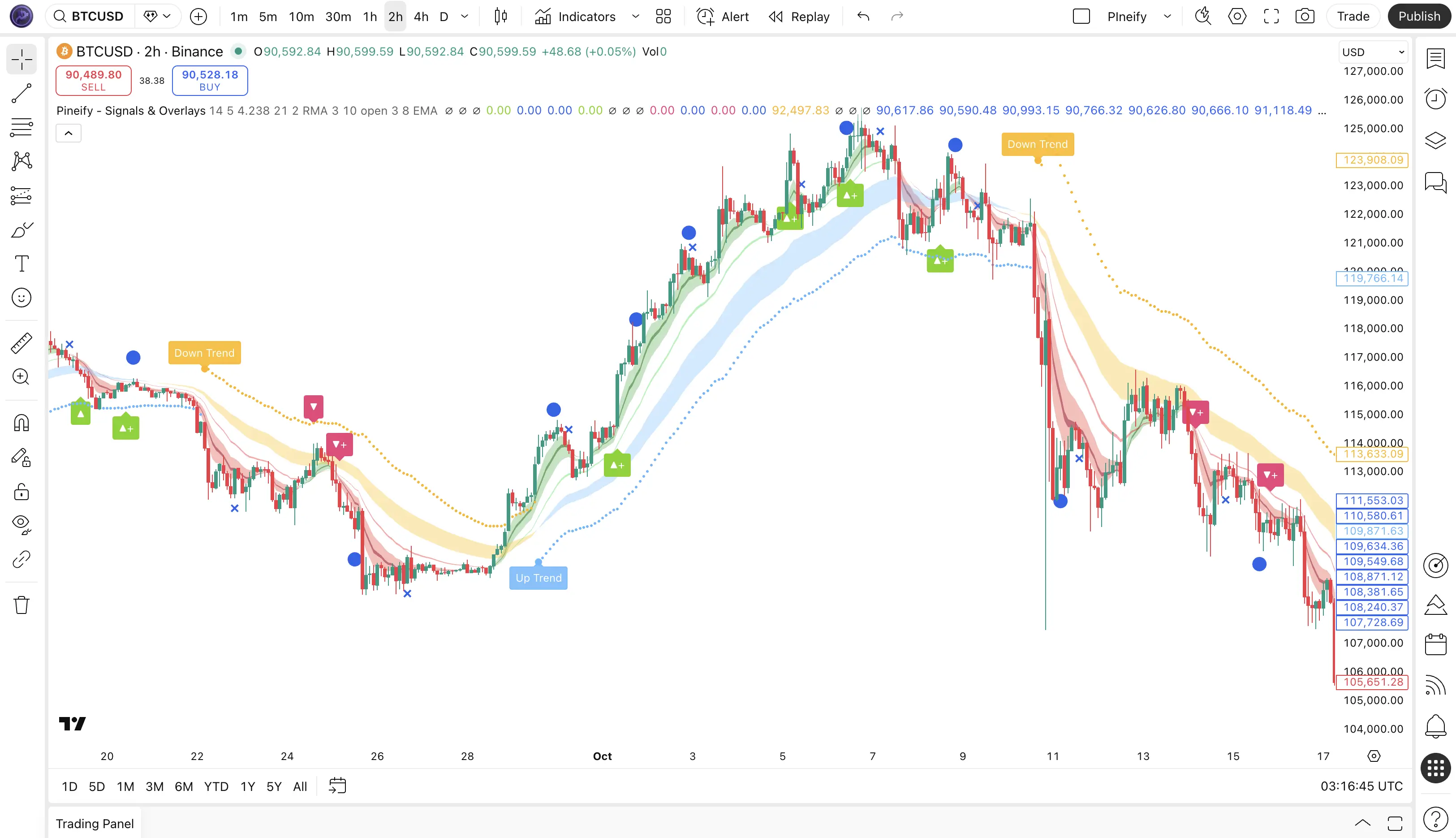
Sound Familiar?
Love TradingView, But Frustrated by Its Limits?
“I don't know how to code Pine Script.”
AI Coding Agent
Describe a Pine Script idea, review the generated code, and validate it in TradingView.
Learn more“I want to combine indicator logic.”
Visual Editor
Combine selected indicator logic into one script. TradingView plan and script resource limits still apply.
Learn more“Manual backtesting takes forever.”
Strategy Optimizer
Compare configured parameter combinations on a chosen historical interval with the Chrome extension.
Learn moreCore Tools
Tools for Coding, Testing and Market Research
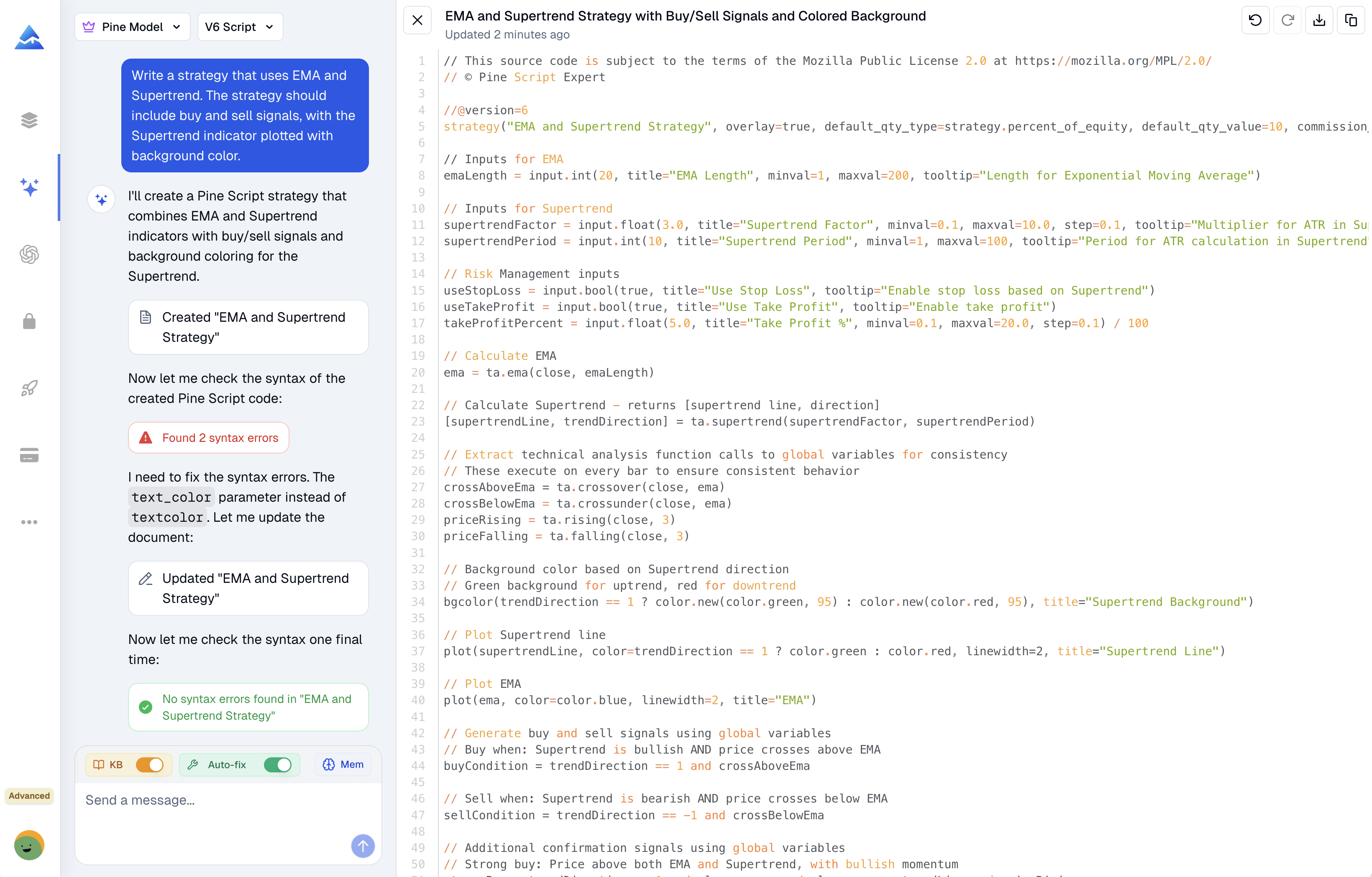
Pine Script AI Coding Agent
Describe an indicator or strategy, inspect the generated Pine Script, and iterate with the coding agent. Validate the output and its trading behavior in TradingView before use.
- Natural language to Pine Script conversion
- Syntax diagnostics and suggested fixes to review
- Pine Script v6 documentation support
- Context-aware memory for iterative coding
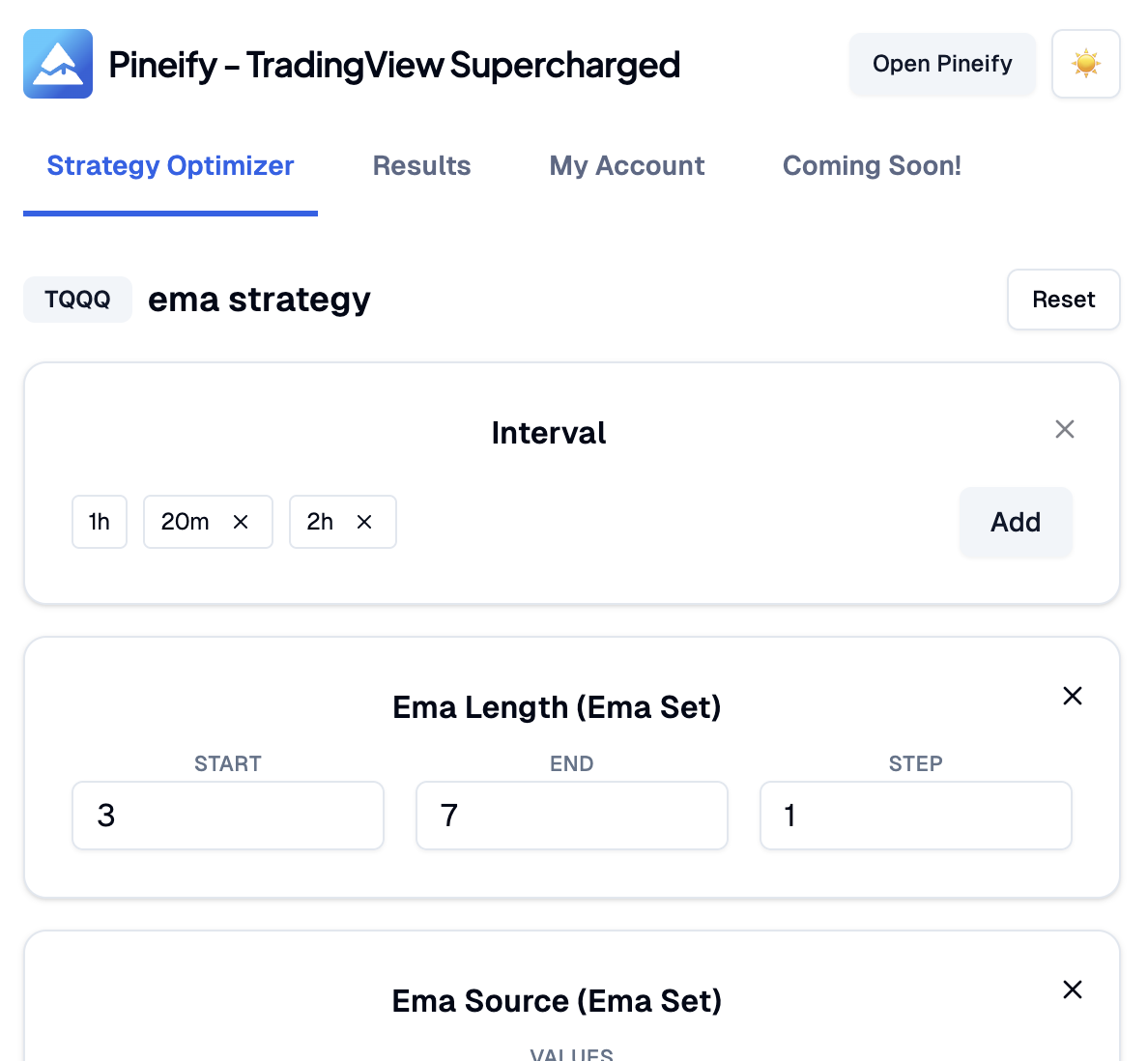
Strategy Optimizer Chrome Extension
Run a grid search over selected strategy inputs in TradingView. Compare historical results and test chosen parameters on a separate period; the best sample result does not establish future profitability.
- Multi-parameter grid search with ranges and steps
- Sortable results with best-combo highlight
- Support timeframe, number, checkbox and dropdown inputs
- Export results to CSV for further analysis
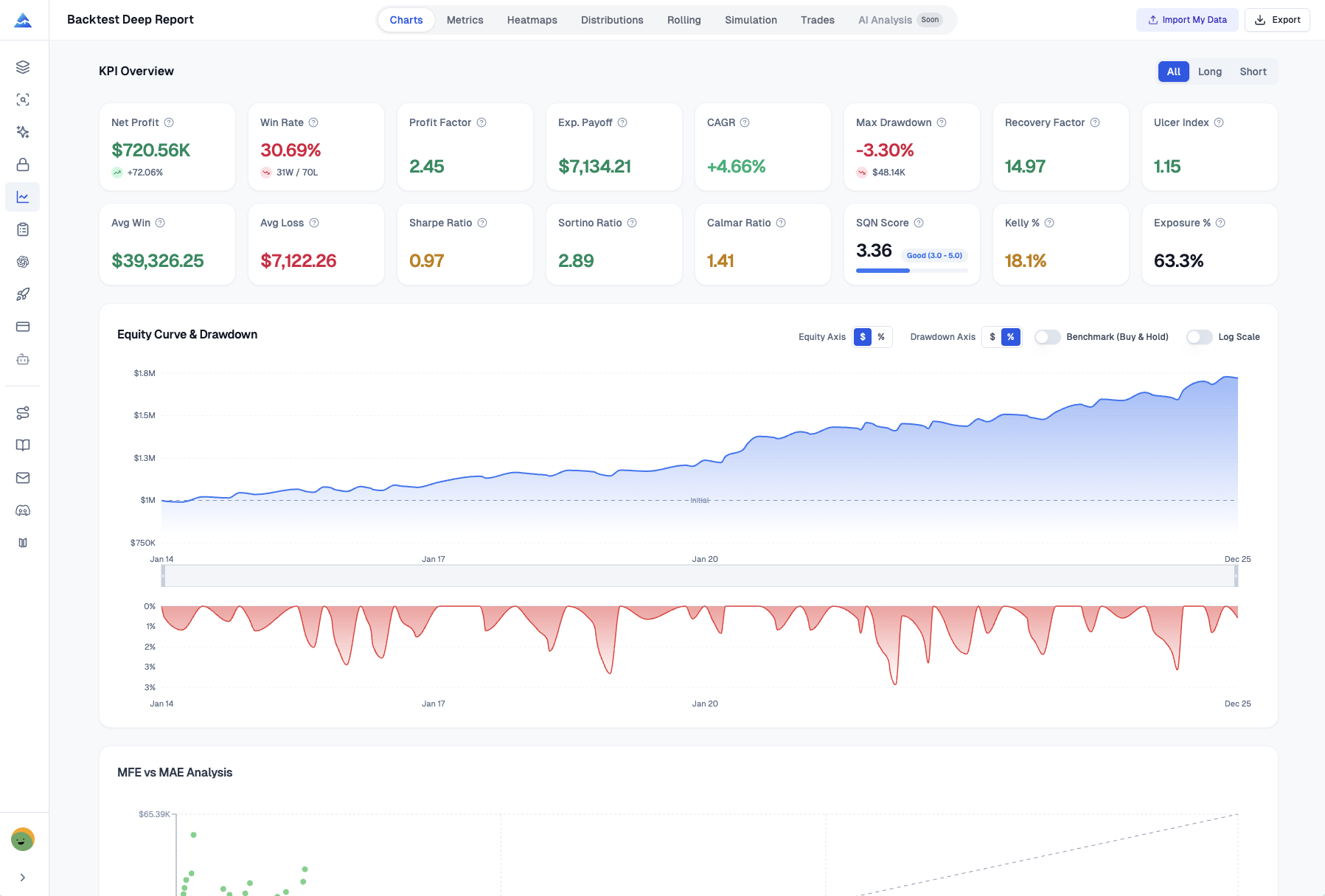
Backtest Deep Report
Import a supported TradingView trade CSV to inspect metrics, distributions, heatmaps, and bootstrap Monte Carlo scenarios. Review the assumptions and imported records. Advanced or above is required.
- Risk and performance metrics (Sharpe, Sortino, VaR, UPI)
- Monte Carlo Stress Testing & Returns Distribution
- Visual Heatmaps (Monthly/Weekly/Daily)
- Excel report export
Options Flow and Dark Pool Research
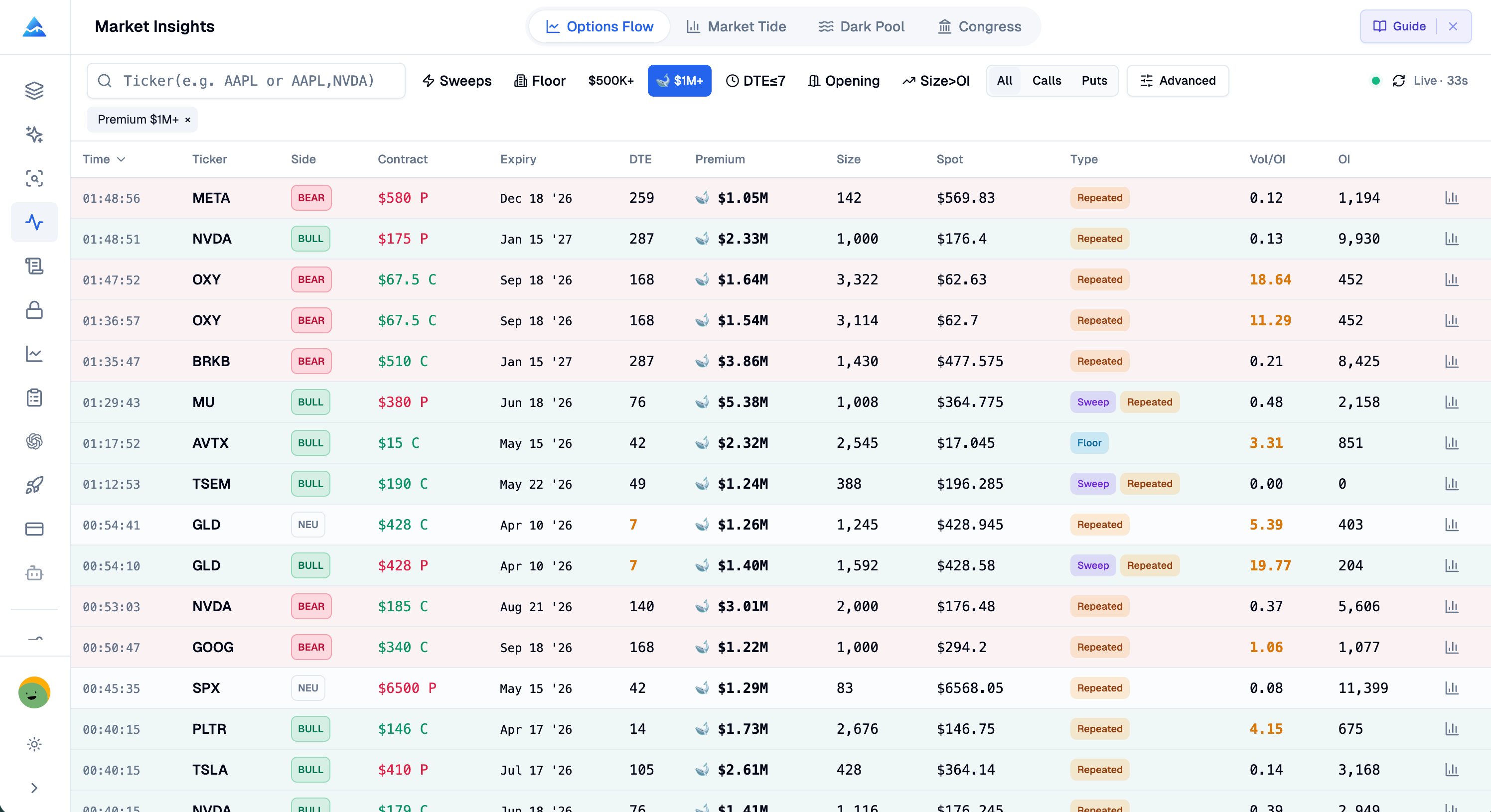
Inspect options flow, dark pool records, and congressional disclosures in the Pineify web app. Check each record’s timestamps and data limitations. Full Market Insights requires Expert or above.
- Options flow alerts with contract details
- Dark pool block trade feed with size tiers
- Congress trade records and late-filing view
- Net premium sentiment & sector heatmap
10-in-1 Suite
More Tools for Your Trading Workflow
Use these separate research and recordkeeping features when they fit your task and selected plan.
Trading Journal
Record trades and review journal metrics, notes, and reports. Results depend on the records you enter.
ExploreAI Stock Picker
Review stocks, company details, and market context in a research workspace. Historical performance does not certify a selection strategy.
ExploreFinance AI Agent
Ask research questions using available financial tools and inspect the returned sources, periods, and limitations.
ExplorePremium Scripts
Browse the paid script library and check each item’s source access, instructions, and license before use.
ExplorePine Script Screener
Configure indicator conditions for multiple symbols and timeframes within TradingView script and data limits.
ExploreInvite-Only Signals
Invite-only chart signals and overlays. Inspect the rules and test performance for your chosen market and timeframe.
ExploreChoose Your Tools. Review the Plan Limits.
Review the current plan prices below. Access differs by feature; TradingView plans, market data, and additional AI credits may involve separate costs.
One purchase. Years of possibilities.
Get lifetime access today.Leave renewal bills behind.
Put your next trading idea to work. Choose your tools and AI limits below, pay once, and keep your plan for life.
Lifetime plans are ending soon. Annual subscriptions are next.
One payment
Your plan is yours for life
AI credits every month
Included in your lifetime plan
No renewal bills
No monthly or annual plan fees
Plus
AI usage included
- AI credits
- 500/ month
- Pine Model
- 100msgs / 5h
- AI Chart Analysis
- 2/ day
Pine Model messages use no AI credits.
Core tools
- Coding AI Agent
Multiple platforms · Knowledge Base, Auto Fix Error & Memory
- Visual Pine Script Editor
- Exclusive PineifyGPT access
- 18 premium scripts
Also included
- 1 month Wundertrading Pro
Included gift · Regular price $49
Advanced
AI usage included
- AI credits
- 1,000/ month
- Pine Model
- 200msgs / 5h
- AI Chart Analysis
- 5/ day
Pine Model messages use no AI credits.
Everything in Plus, plus:
Added in Advanced
- AI Finance Agent
- AI Stocks & Options PickerNew
- Strategy Optimizer Extension
- Backtest Report Deep Report
- Trading Journal
Invite-only indicator
Expert
AI usage included
- AI credits
- 3,000/ month
- Pine Model
- 600msgs / 5h
- AI Chart Analysis
- 20/ day
- Extra AI Credits
- 10,000creditsNever expires
Pine Model messages use no AI credits.
Everything in Advanced, plus:
Added in Expert
- Market InsightsHot
Options Flow, Opportunities, Dark Pool, Market Tide & more
- Market ScreenerNew
- Analyst RatingsNew
- MCP Access for AI Agents
- AI Trading Agent
- AI Daily Portfolio Report
- Access Mobile App
Also included
- Request custom indicators
- Priority access to new features
- Lifetime feature updates

Frequently Asked Questions
- Do I need a paid TradingView account to use Pineify?
- You can use generated Pine Script with a compatible TradingView account. Available history, chart limits, and export features depend on your TradingView plan. Pineify does not remove those platform limits.
- How does the Strategy Optimizer connect to TradingView?
- It is a Chrome extension that runs directly in your browser alongside TradingView, automating the process of testing different input parameters for your strategies.
- Can I use the code generated by Pineify on any TradingView chart?
- Copy generated code into the TradingView Pine Editor, check compilation, and inspect its behavior on the intended symbol and timeframe. Data availability and script requirements can limit where it works.
Ready to Supercharge Your Trading?
Compare the included tools and plan limits before purchasing. Build, inspect, and test your trading workflow with Pineify.