Source-backed review

Flux Charts SFX Algo: documented features and trade-offs

SFX Algo is Flux Charts’ invite-only signal toolkit. Its documentation describes Standard and Plus signals, trading-style and sensitivity controls, overlays, alerts, and separate backtesting tools. Pineify Signals & Overlays and Oscillator Matrix offer adjacent chart and momentum analysis, but they do not reproduce SFX’s proprietary rules.

This is a documentation review, not a test of signal accuracy. The provider’s backtester is a separate workflow, and historical signal plots should not be read as live execution results.

Compare the features

Pineify product evidence

Signals & Overlays

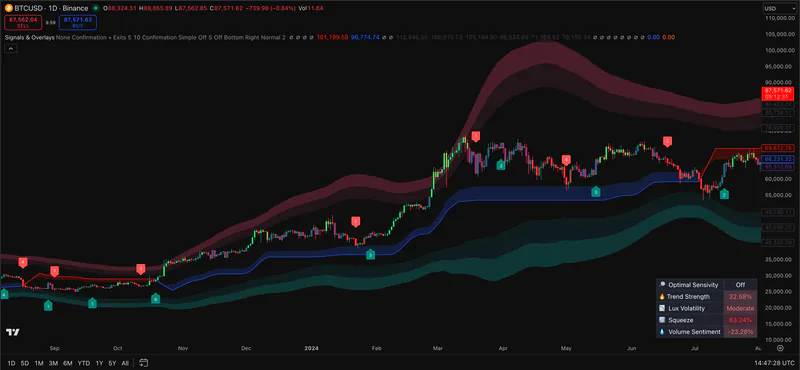
Pineify Signals & Overlays on a TradingView price chart with trend bands and signal markers
Pineify screenshot. It does not show Flux Charts software.

Public sources checked 2026-09-24.

What to check before choosing

The details below determine whether the named tool fits the job behind the search.

Signal controls

Flux Charts documents Scalper, Day Trader, and Swing Trader styles, trend length, sensitivity, and an optional sensitivity optimizer. Standard and Plus signals use different conditions. The controls matter more than a screenshot of one marker.

Overlay and exit context

The SFX guides list Gauss Ribbon, Volatility Bands, Retracement Wave, trend coloring, alerts, and take-profit/stop-loss display options. Dynamic target levels should be read as script outputs, not guaranteed fills.

Access and alternatives

Flux calls premium SFX invite-only. Its documentation does not describe an official free premium download. Pineify provides a separate script collection with source access if editing your own signal logic matters more than SFX-specific controls.

Feature comparison

Descriptions are drawn from the linked public sources. Similar categories do not imply matching formulas or performance.

Flux Charts and Pineify Premium Scripts feature comparison
QuestionFlux ChartsPineify Premium Scripts
Signal controlSFX styles, sensitivity, Standard and Plus signalsPineify-specific signal and oscillator inputs
BacktestingSeparate SFX Backtester documentedNo SFX backtester equivalence claimed
Source accessSFX is documented as invite-onlyPremium Scripts page states source is included

Scroll sideways to read the full table.

Related Pineify workflow

Where Premium Scripts fits

Adjacent: source-accessible chart and momentum scripts, not a copy of SFX Algo.

Check the current script list and access terms on the product page before choosing a plan.

View Premium Scripts

Common questions

Is Flux Charts SFX Algo free to download?

Flux Charts calls SFX Algo a premium invite-only toolkit. Verify access through its official account and TradingView instructions.

Does SFX Algo include a backtester?

Flux Charts documents a separate SFX Backtester that works with SFX features. Its availability and settings should be checked against the current plan.

Are SFX signals guaranteed to work?

No. A signal is a rule-based chart output. Market conditions, settings, and execution can change outcomes.

Sources and review scope

Provider documentation, author-published scripts, and linked review profiles checked 2026-09-24. Features and access can change; confirm current terms with each provider.

This page is for information and education. Indicator output is not investment advice or a guarantee of trading results. Test scripts with your own rules, data, and risk limits.