

Invalidation changes the chart
Flux Charts offers Close and Wick methods. A wick through a zone can invalidate it earlier than waiting for a candle close, so screenshots may differ even with the same ticker and timeframe.
Source-backed review
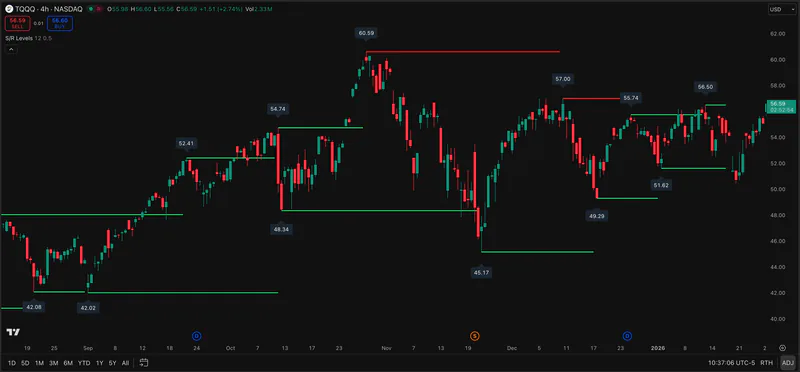
Flux Charts documents Order Blocks inside its Price Action Toolkit. The tool plots zones, lets users choose close or wick invalidation, and can add volume information. Pineify Support-Resistance Levels and the Smart Money Flow component of Oscillator Matrix provide separate level and activity views, but they are not the same order-block detector.
This review is based on Flux Charts documentation, not a paid-account test. A chart zone is an analytical estimate, not evidence of hidden orders or a guaranteed reaction.
Compare the featuresPineify product evidence
Support-Resistance Levels
The details below determine whether the named tool fits the job behind the search.
Flux Charts offers Close and Wick methods. A wick through a zone can invalidate it earlier than waiting for a candle close, so screenshots may differ even with the same ticker and timeframe.
The toolkit can show total volume, a high/low volume ratio, and volume bars within an order block. Those are the documented volumetric options; they do not reveal the actual identity of counterparties.
Pineify Support-Resistance Levels marks pivot-based levels and Oscillator Matrix includes Smart Money Flow as an activity view. Use them if your job is broader zone and flow context. Keep Flux Charts if its exact order-block rules or zone-merging settings are essential.
Descriptions are drawn from the linked public sources. Similar categories do not imply matching formulas or performance.
| Question | Flux Charts | Pineify Premium Scripts |
|---|---|---|
| Zone type | Price Action Toolkit order blocks | Pivot-based support and resistance levels |
| Volume | Optional volume display within order blocks | Smart Money Flow within Oscillator Matrix |
| Invalidation | Close or wick selection | No identical OB invalidation rule claimed |
Scroll sideways to read the full table.
Related Pineify workflow
Adjacent: pivot levels and an Oscillator Matrix component, not a volumized order-block replacement.
Check the current script list and access terms on the product page before choosing a plan.
Yes. Its documentation lists optional total volume, ratio, and visual volume bars for detected zones.
No. The Pineify product page describes pivot-based levels, while Flux Charts documents order-block-specific sensitivity and invalidation settings.
Consult the provider documentation, author-published scripts, and review profiles linked below. Features and access can change; confirm current terms with each provider.
This page is for information and education. Indicator output is not investment advice or a guarantee of trading results. Test scripts with your own rules, data, and risk limits.