

Find recent reported activity
Scan available House purchases, sales, and other transaction labels across representatives and listed owners.
Pineify Finance Agent lists recent House disclosures with representative, district, owner, asset, transaction type, value range, dates, and a filing link when one is supplied. It is for finding the primary filing. There is no ticker filter, and the amounts are ranges, not exact trade sizes.
Opens Finance Agent with the latest House-disclosure question ready to send.
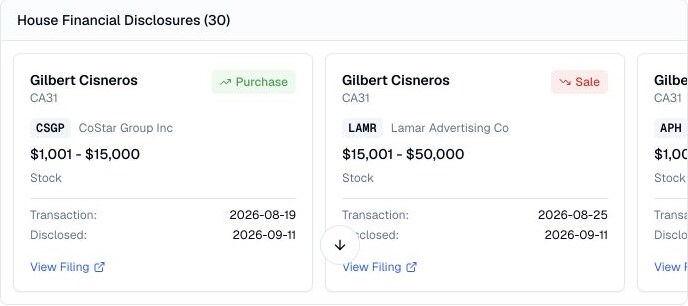
A source-first view of House trades
The latest House feed returns 30 records by default and up to 50 per page, with page numbers starting at zero. Ask for another page when the returned slice is too narrow.
The feed reports disclosed transactions, not the representative’s reasoning or complete portfolio. Broad value ranges and reporting delays matter, as do spouse and joint ownership. Treat each card as a pointer to the primary filing.
Use cases
Scan available House purchases, sales, and other transaction labels across representatives and listed owners.
Compare reported value ranges, transaction dates, disclosure dates, and asset types without losing the filing timeline.
Open the linked source to inspect transaction details, comments, and context that a summary card cannot explain.
Prompt examples
FAQ
Open the original House filing, check the owner and reporting window, and research the asset independently before interpreting a transaction.
Open Finance AgentFor informational and research use only. No output is investment advice or a guarantee of future performance.