

Name the screen in one question
State the market, sector, price, size, volume, beta, or dividend conditions in plain language. The screen uses a condition only when the source has a matching field.
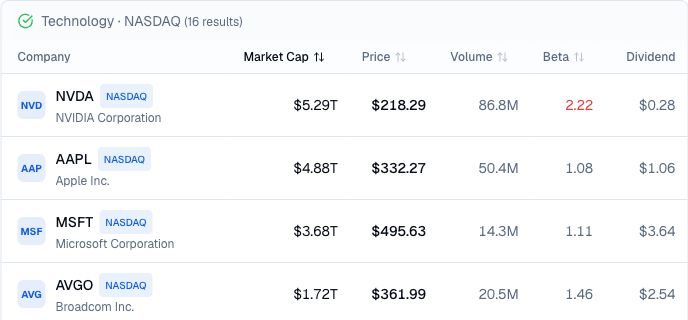
Asset Screener returns a table of up to 50 stocks, ETFs, or funds that match a plain-language screen, with sortable market cap, price, volume, and beta. It does not return a whole-market ranking, a dividend yield, a currency code, or investment advice. A September 14, 2026 capture of NASDAQ technology matches is a dated snapshot, not a recommendation or forecast.
Opens Finance Agent with a NASDAQ technology-stock screening question ready to send.
Natural-language asset screening
One question can name stocks, ETFs, or funds and the conditions you want: market, sector, industry, country, size, price, volume, beta, dividend, or active-trading status when the source has those fields. The card returns at most 50 matches.
Market cap, price, volume, and beta can be sorted inside that returned set. The sort does not rerun the screen across the whole market. Missing values can show as dashes and are treated as zero for sorting, so check those rows before you read the order.
Use cases
State the market, sector, price, size, volume, beta, or dividend conditions in plain language. The screen uses a condition only when the source has a matching field.
Review matching symbols side by side and sort the available figures to see how the candidates differ before choosing what to study.
Beta is historical sensitivity to a benchmark, not a cap on loss. The dividend column is an annual amount, not a yield or a payment guarantee.
Prompt examples
FAQ
Sorting applies only to the returned set of up to 50. Beta is historical sensitivity to a benchmark, and the dividend column is an annual amount, not a yield.
Open Finance AgentFor informational and research use only. No output is investment advice or a guarantee of future performance.