

What High Volume Boxes does
The author’s TradingView page describes pivot lookback, a delta-volume filter, box width, hold markers, and break labels. Open that listing if you need the actual source or want to inspect the threshold behavior.
Indicator alternative
ChartPrime’s High Volume Boxes script is public and open source. It uses pivots and a volume filter to draw support and resistance boxes, then marks holds and breaks. Pineify Support-Resistance Levels maps pivot-based levels, but is not a replica of the High Volume Boxes, Power Channel, or Market Shift Levels methods.
These scripts draw levels in different ways. A visual resemblance between boxes and levels does not establish the same calculation or trading result.
Compare the featuresPineify product evidence
Support-Resistance Levels
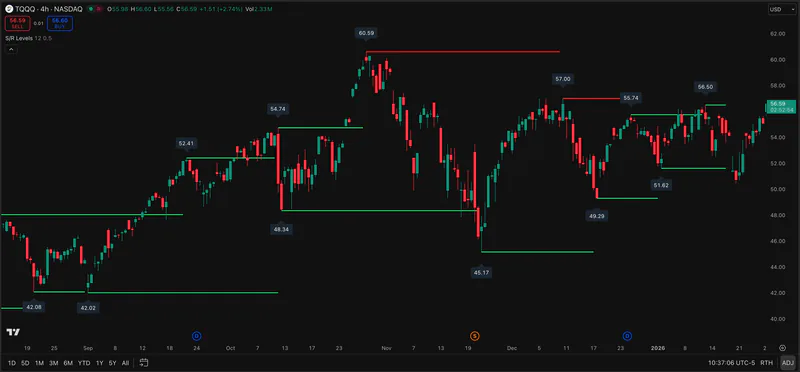
The details below determine whether the named tool fits the job behind the search.
The author’s TradingView page describes pivot lookback, a delta-volume filter, box width, hold markers, and break labels. Open that listing if you need the actual source or want to inspect the threshold behavior.
Power Channel and Market Shift Levels are separate ChartPrime searches. Compare whether you need a band, a state-change level, or volume-filtered zones before selecting one. Their names alone do not prove interchangeable output.
Pineify Support-Resistance Levels identifies levels from pivots and updates them with price. It is useful to inspect alongside the original ChartPrime script when you want a simpler level map.
Descriptions are drawn from the linked public sources. Similar categories do not imply matching formulas or performance.
| Question | ChartPrime | Pineify Premium Scripts |
|---|---|---|
| High Volume Boxes | Pivot and volume-filtered boxes | Pivot-based support and resistance levels |
| Original source | Public open-source TradingView script | Separate Premium Scripts source included |
| Exact box logic | Author-defined volume thresholds | No identical box algorithm claimed |
Scroll sideways to read the full table.
Related Pineify workflow
Adjacent: a separate pivot-level map after reviewing the original public script.
Check the current script list and access terms on the product page before choosing a plan.
Yes. The author’s TradingView listing is marked open source; use it for the current code and license.
No. Both concern chart levels, but the documented High Volume Boxes method adds its own volume-filtered box logic.
Consult the provider documentation, author-published scripts, and review profiles linked below. Features and access can change; confirm current terms with each provider.
This page is for information and education. Indicator output is not investment advice or a guarantee of trading results. Test scripts with your own rules, data, and risk limits.