Indicator alternative

ChartPrime Linear Regression Oscillator Pine Script

ChartPrime’s Linear Regression Oscillator is published as an open-source TradingView script. If you need its Pine Script, start with the author’s original listing rather than buying a substitute. Pineify Oscillator Matrix is an adjacent momentum tool, not a copy of the regression formula or a linear regression channel.

A regression oscillator and a regression channel answer different chart questions: one normalizes momentum around a baseline; the other draws a price envelope.

Compare the features

Pineify product evidence

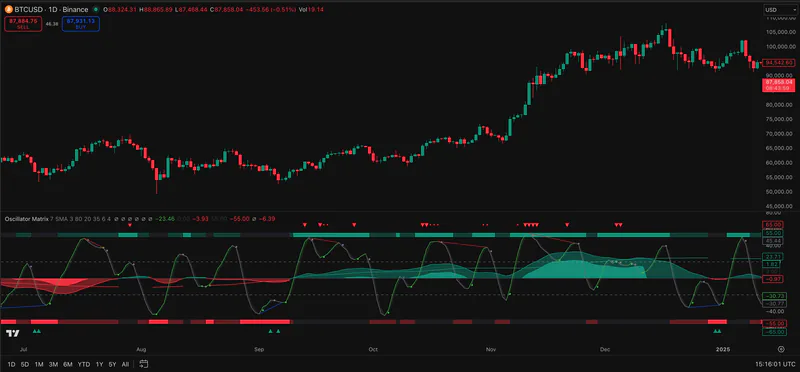
Oscillator Matrix

Pineify Oscillator Matrix screenshot showing momentum readings on a TradingView chart
Pineify screenshot. It does not show ChartPrime software.

Public sources checked 2026-10-21.

What to check before choosing

The details below determine whether the named tool fits the job behind the search.

Get the original source first

The author listing is marked open source and documents a default lookback of 20 with upper and lower thresholds of 1.5 and -1.5. These are published defaults, not recommended settings for every market. Read the actual source and its license before modifying or republishing it.

Oscillator versus channel

A linear regression channel plots boundaries around price. ChartPrime’s oscillator is a separate pane-style reading. If your goal is price bands, verify the channel script itself; a momentum matrix will not draw the same geometry.

When another oscillator helps

Pineify’s catalog names Hyper Wave, Smart Money Flow, and Reversal within Oscillator Matrix. Those names do not establish a regression formula or equivalence. Check the source available through your account before comparing calculations.

Check signal timing on one fixed chart

Record the exchange feed, timeframe, script version, lookback, and thresholds. Observe a threshold signal before and after bar close, then reload the chart and compare its bar and value. Keep regression and channel results separate. This procedure checks timing; it does not establish profitable entries.

Feature comparison

Descriptions are drawn from the linked public sources. Similar categories do not imply matching formulas or performance.

ChartPrime and Pineify Premium Scripts feature comparison
QuestionChartPrimePineify Premium Scripts
Original codePublic open-source listing availableSeparate editable script collection
MethodLinear regression over a lookback with thresholdsMulti-component momentum matrix
Channel drawingDifferent from the oscillatorNot presented as a regression channel

Scroll sideways to read the full table.

Related Pineify workflow

Where Premium Scripts fits

Adjacent: compare a different momentum workflow after obtaining the original public script.

Check the current script list and access terms on the product page before choosing a plan.

View Premium Scripts

Common questions

Is ChartPrime Linear Regression Oscillator source code available?

Yes. Its author-published TradingView listing is marked open source. Check that page for the current code and usage terms.

Is an oscillator the same as a linear regression channel?

No. The oscillator measures a derived reading, while a channel places bounds around price.

Sources and review scope

Consult the provider documentation, author-published scripts, and review profiles linked below. Sources checked 2026-10-21. Features and access can change; confirm current terms with each provider.

This page is for information and education. Indicator output is not investment advice or a guarantee of trading results. Test scripts with your own rules, data, and risk limits.