Built for thinkorswim

thinkorswim AI Coding AgentGenerate thinkScript Studies and Strategies

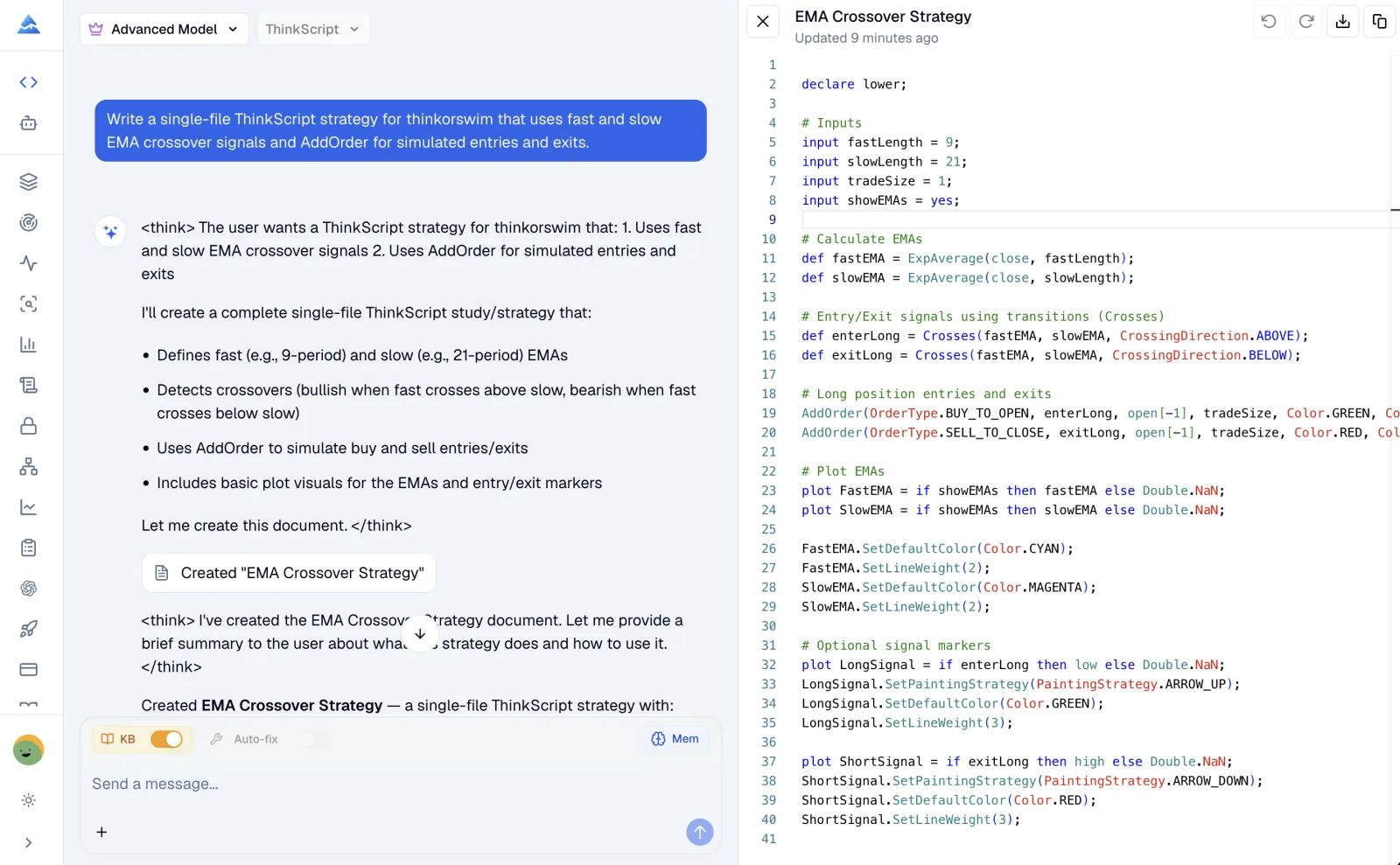
Turn trading logic into an editable, single-file thinkScript artifact. Build a chart study or strategy, inspect the complete source, and refine it before evaluating the result in thinkorswim.

Choose ThinkScript in the Coding Agent, then describe the study or strategy you want to build.

Pineify thinkorswim AI Coding Agent generating a single-file EMA crossover strategy in thinkScript
thinkorswim studies and strategies
Complete single-file output
Official-reference knowledge context
Editable code artifacts

A thinkScript-specific workspace

Keep Platform Semantics Close to the Code

thinkScript is a declarative, bar-by-bar language with its own series offsets, aggregations, visual APIs, and simulated order model. Pineify keeps those concepts inside the generation and editing workflow.

Generate thinkScript from Plain English

Describe the behavior of a chart study or strategy and receive a complete, editable thinkScript source artifact.

  • Configurable inputs and calculations
  • Plots, labels, alerts, and visual rules
  • Simulated strategy orders with AddOrder

Use a Built-In thinkScript Reference

The coding context uses a versioned reference assembled from official thinkScript Learning Center material.

  • Declarations, data types, and reserved words
  • Historical offsets and aggregation behavior
  • Functions, constants, and strategy semantics

Refine the Same Code Artifact

Keep the full source visible while you ask for focused edits, explanations, or a broader rewrite.

  • Targeted changes without starting over
  • Custom thinkScript syntax highlighting
  • Downloadable single-file source

Keep Language-Specific Context

Save thinkScript conventions separately from preferences used for Pine Script, MQL5, cTrader, or NinjaScript.

  • Dedicated thinkScript memory
  • Reusable naming and input conventions
  • Explain code before changing it

From idea to chart review

A Reviewable thinkScript Workflow

Keep the request, complete source, and follow-up edits together, then evaluate the study or strategy in the platform where it will run.

  1. STEP 01

    Describe the chart behavior

    Choose a study or strategy, then state its inputs, aggregation assumptions, calculations, plots, alerts, and simulated order rules.

    Example: Build a thinkorswim strategy that uses fast and slow EMA crossover signals with configurable lengths and simulated entries and exits.
  2. STEP 02

    Review the thinkScript artifact

    Inspect every input, def, plot, history reference, visual setting, and AddOrder condition in the complete source file.

    Example: Explain the crossover timing, then add a session filter without changing the EMA calculations.
  3. STEP 03

    Run and evaluate it in thinkorswim

    Open the source in the thinkScript Editor, add it to a chart, and inspect the visual or simulated strategy behavior across relevant symbols and aggregations.

    Example: List the assumptions I should review in thinkorswim before comparing the strategy on other chart aggregations.

Code you can inspect

Keep Every Calculation and Order Rule Visible

The artifact exposes inputs, series calculations, crossover conditions, simulated order prices, and plots. Ask for a focused edit without hiding the rest of the source.

Review every input and historical reference
Keep study visuals and strategy rules in one file
Explain platform assumptions before changing behavior
EmaCrossoverStrategy.ts
declare upper;

input fastLength = 9;
input slowLength = 21;
input tradeSize = 1;
input showAverages = yes;

def fastEMA = ExpAverage(close, fastLength);
def slowEMA = ExpAverage(close, slowLength);
def enterLong = Crosses(fastEMA, slowEMA, CrossingDirection.ABOVE);
def exitLong = Crosses(fastEMA, slowEMA, CrossingDirection.BELOW);

AddOrder(
    OrderType.BUY_TO_OPEN,
    enterLong,
    open[-1],
    tradeSize,
    Color.GREEN,
    Color.GREEN,
    "Long"
);

AddOrder(
    OrderType.SELL_TO_CLOSE,
    exitLong,
    open[-1],
    tradeSize,
    Color.RED,
    Color.RED,
    "Exit"
);

plot FastAverage = if showAverages then fastEMA else Double.NaN;
plot SlowAverage = if showAverages then slowEMA else Double.NaN;

FastAverage.SetDefaultColor(Color.CYAN);
SlowAverage.SetDefaultColor(Color.MAGENTA);
Review the complete source in Pineify, then evaluate its chart behavior in the thinkorswim thinkScript Editor.

A specialized coding workspace

Pineify vs a General AI Chat

Both can return code text. Pineify adds a thinkScript-specific reference, editable artifact, language-aware editor, and dedicated memory around the generation workflow.

TaskPineify thinkorswim AgentGeneral AI chat
thinkScript contextBuilt-in official-reference knowledge contextDepends on the model and prompt
Code outputEditable single-file artifactUsually a chat response
Continuing editsFocused changes to the current artifactContext must be managed in the conversation
Language preferencesDedicated thinkScript memoryVaries by product and session
Platform evaluationReview and run the source in thinkorswimReview and run the source in thinkorswim

Buy Once. All Tools. Forever.100,000+ Traders Already Upgraded

One-time payment · No subscriptions · Lifetime updates included

⏰ Lifetime pricing is going away

We're moving to annual subscriptions soon. This is your last chance to lock in a one-time payment and keep every future update at no extra cost.

💡 Once we switch, lifetime access will no longer be available

Plus

$129$99One-time payment
Advanced Model + 500 AI credits/month — pay once, use forever!
Save 20%
Get Lifetime Access
  • Visual Pine Script Editor
  • Coding AI Agent for Multiple Platforms (Knowledge Base, Auto Fix Error & Memory)
  • 500 AI credits monthly
  • Advanced Model (100 msgs / 5h, no credits required)
  • AI Chart Analysis (2 times/day)
  • Exclusive PineifyGPT access
  • 18 premium scripts
  • 🎁 Get 1 month Wundertrading Pro Plan (Reg. $49)
Best Value Plan
2xUsage

Advanced

$219$149One-time payment
2x AI power — 1000 credits/month + all premium tools included!
🔥 Save 30%
Get Lifetime Access
  • Everything in Plus plan
  • AI Finance Agent
  • Pineify® - Signals & Overlays™ (Invite-only indicator)
  • 1000 AI credits monthly
  • Advanced Model (200 msgs / 5h, no credits required)
  • AI Chart Analysis (5 times/day)
  • Trading Journal
  • Strategy Optimizer Extension
  • Backtest Report Deep Report
  • Lifetime feature updates
Maximum AI Power
5xUsage

Expert

$369$259One-time payment
Full access to every tool + 5x AI power — 2500 credits/month
🔥 Save 30%
Get Lifetime Access
  • Everything in Advanced plan
  • Custom ScreenerNew
  • AI Stocks & Options PickerNew
  • MCP Access for AI AgentsNew
  • Market Insights (Options Flow, Dark Pool, Market Tide & More)
  • 2500 AI credits monthly
  • Advanced Model (500 msgs / 5h, no credits required)
  • AI Chart Analysis (20 times/day)
  • Priority access to new features
  • Request custom indicators
  • AI Trading AgentSoon
  • AI Daily Portfolio ReportSoon
  • Agent Skills LibrarySoon
  • more coming soon...
See what's included in each plan
Payment Security

Clear answers

thinkorswim AI Coding Agent FAQ

What is a thinkorswim AI Coding Agent?
Pineify turns plain-language requirements into thinkScript for thinkorswim chart studies and strategies. The generated source stays in an editable code artifact so you can inspect it, request focused changes, and carry the file into thinkorswim.
What kind of thinkScript can Pineify generate?
The current workflow generates one complete source file for a thinkorswim chart study or chart strategy. It can define inputs, calculations, plots, labels, alerts, same-file script helpers, and simulated strategy orders when those behaviors are requested explicitly.
Does the agent use official thinkScript documentation?
Yes. The coding context includes a versioned reference assembled from the official thinkScript Learning Center. It covers language constructs, common functions, constants, historical offsets, aggregation, visual output, and strategy order semantics.
Can Pineify edit an existing thinkScript file?
Yes. Continue from an existing code artifact and ask for a targeted change, such as adding an input, changing a plot, refining a condition, or explaining a calculation before you edit it.
Is the output a single thinkScript file?
Yes. Pineify keeps the requested study or strategy and its reusable script helpers in one self-contained .ts source file. It does not turn the result into a multi-file project or add external dependencies.
Can a thinkScript strategy place live orders?
No. AddOrder represents simulated chart-strategy orders inside thinkorswim. Review the timing, price, size, and condition assumptions in the source and evaluate the strategy in the platform before relying on its results.
How is Pineify different from a general AI chat?
Pineify combines a built-in thinkScript reference, a dedicated language selector, an editable code artifact, syntax highlighting, and thinkScript-specific memory in one coding workflow. A general AI chat may produce code, but the surrounding workflow varies by product and session.
Can AI create a profitable thinkorswim strategy?
No result is guaranteed. Generated rules can contain unsuitable assumptions or behave differently across symbols, aggregations, and market conditions. Review the source, test it in thinkorswim, validate it on unseen data, and treat Pineify as a coding tool rather than investment advice.

Build Your thinkorswim Idea in thinkScript

Describe a chart study or strategy, review the complete source, and continue refining the same artifact before platform review.

Open the thinkorswim Coding Agent