TradingView Free Plan Limits (2026): Indicators & Alerts

TradingView Basic is free. In 2026 it allows one chart per tab, one saved layout, two indicators per chart, 30 drawings per chart and three active price alerts. If you write your own Pine indicators or strategies, the Basic upgrade dialog also shows a limit of one saved script. Which limit matters depends on what you were trying to do: saving your code, adding it to a chart and creating an alert each use a different allowance.
What are the TradingView Basic plan limits in 2026?
| Limit category | TradingView Basic (Free) | TradingView Essential | Where you notice the cap |
|---|---|---|---|
| Charts per tab | 1 | 2 | Viewing two charts side by side |
| Seconds intervals | Unavailable | Unavailable (starts on Plus) | Opening a 1-second or 5-second chart |
| Saved chart layouts | 1 | 5 | Saving a second named workspace |
| Indicators per chart | 2 | 5 | Adding a third indicator to the same chart |
| Custom indicator templates | 1 | More templates | Saving a second set of studies and settings |
| Saved Pine scripts | 1 | Unlimited | Creating another personal indicator or strategy |
| Drawings per chart | 30 | Unlimited | Adding another trendline, level or annotation |
| Price alerts | 3 active, up to 1 month each | 20 active | Monitoring several price levels at once |
| Technical alerts | 0 | 20 active | Creating an alert on an indicator condition |
| Watchlists | 1 list, up to 30 symbols | More lists and symbols | Adding a 31st ticker |
| Historical chart bars | 5,000 | 10,000 | Scrolling back on an intraday chart |
| Pine calculation time | 0.5 seconds | 40 seconds | Running a script that scans many bars |
We checked these allowances on November 26, 2026. The saved-script figure comes from the Basic plan's saved-script dialog. The other figures come from TradingView's official plan comparison.

Can I follow several symbols with one saved layout?
Yes. If you use the same moving averages on AAPL and MSFT, switch the ticker in your existing layout. The studies stay in place, and trendlines drawn on AAPL reappear when you switch back to AAPL. A second saved layout is useful when you want to reopen two different workspaces by name, each with its own interval, indicators and chart settings. See how to reuse your one saved chart layout or review the full TradingView layout setup guide.
If the warning says Add more drawings, open Object Tree → Manage layout drawings. Hidden objects and drawings on other symbols can count toward the 30-drawing limit even when the current chart looks empty. How TradingView counts the 30 drawings
Why can I add two indicators but save only one Pine script?
An indicator slot counts a study running on the chart. A saved-script slot holds personal source code in your account. For example, you can display TradingView's built-in RSI alongside your own moving-average indicator. That uses both chart slots, while only the moving-average source occupies your personal script slot. If you want to test a different script, keep a local copy of your original source before replacing it.
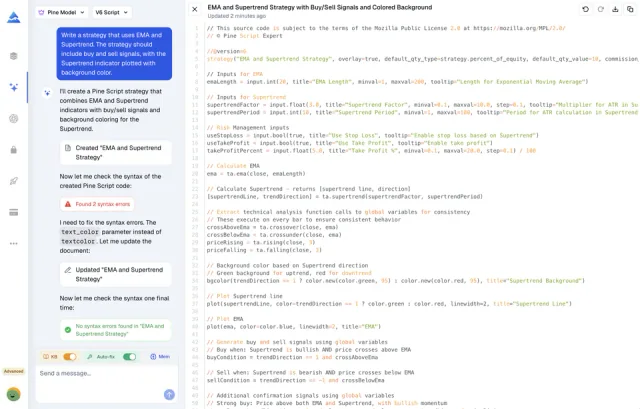
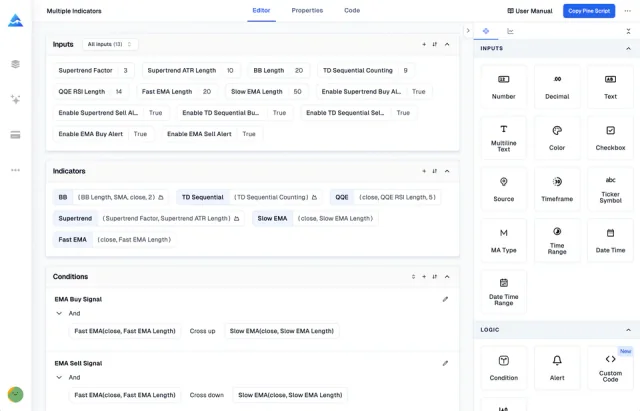
When two calculations belong together, such as fast and slow moving averages, they can share one indicator. On Pineify AI, use the Pine Script AI coding agent to combine their inputs and plots, or assemble them in the Pineify Visual Editor. For a step-by-step walkthrough, see how to combine multiple TradingView indicators in one script. Compare the exported indicator against the originals using the same symbol, interval and lengths. A combined script still has to finish within Basic's 0.5-second calculation limit.
Does TradingView Free include indicator alerts?
Basic includes three active price alerts, each with a maximum duration of one month. A price crossing a level you specify, such as AAPL crossing $200, is a price alert. An alert when RSI crosses 70 is a technical alert, even if RSI is the only indicator on the chart. Basic includes zero active technical alerts and zero watchlist alerts. Essential lists 20 active price alerts and 20 active technical alerts. Compare TradingView alert allowances
How do historical bar and watchlist limits affect free charts?
The 5,000 historical bar limit matters most on lower intraday timeframes. On a daily chart, 5,000 bars cover roughly two decades of trading sessions. On a 5-minute chart, 5,000 bars cover only a few weeks of market hours. Scrolling past that window stops loading older candles until you switch to a higher timeframe or upgrade.
The one watchlist of up to 30 symbols caps how many tickers you can keep in your sidebar list. You can still search for and open any supported ticker directly in the symbol search bar without adding it to the watchlist.
How much does it cost to upgrade from Basic?
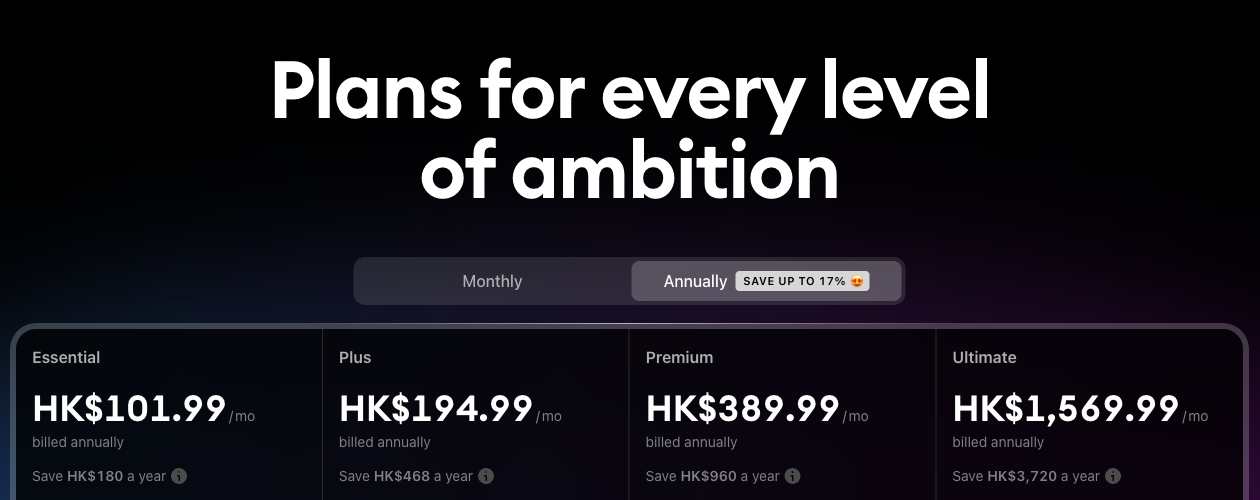
The screenshot below shows TradingView's official pricing page on November 26, 2026, displayed in Hong Kong dollars (HKD) with Annually selected. Essential showed HK$101.99 per month billed annually. Switching the same page to Monthly showed HK$116.99 for one month. Prices vary by region, currency, taxes and seasonal promotions such as Black Friday, so confirm live checkout rates in your own account. Check live prices in your currency
| Plan | Billed monthly (HKD) | Monthly equivalent when billed annually (HKD) |
|---|---|---|
| Basic | Free | Free |
| Essential | HK$116.99 | HK$101.99 |
| Plus | HK$233.99 | HK$194.99 |
| Premium | HK$469.99 | HK$389.99 |
| Ultimate | HK$1,879.99 | HK$1,569.99 |
For a third indicator, a second saved layout, an unlimited saved-script allowance or an RSI alert, Essential is the first paid tier that covers the requirement. For predefined 1-second or 5-second charts, you need Plus. If all you need is a second ticker with the same studies, switching symbols on Basic costs nothing. For exchange-data charges, higher-tier limits and billing terms, see our full TradingView plan comparison.
Frequently asked questions
How many indicators can you use on TradingView Free in 2026?
TradingView Basic allows two indicators per chart. You can combine compatible calculations, such as multiple moving averages, into one custom Pine script to stay within the two-indicator slot limit.
Does TradingView Free include indicator or technical alerts?
No. Basic includes three active price alerts lasting up to one month each, and zero technical alerts. Alerts triggered by an indicator such as RSI require Essential or higher.
How many saved chart layouts and Pine scripts do you get on Basic?
Basic includes one saved chart layout, one custom indicator template and one saved Pine script. Removing a script from a chart does not delete it from your saved-script slot.
Can I view a 1-second chart on TradingView Basic or Essential?
No. Predefined seconds intervals (1s, 5s, 10s, 15s, 30s and 45s) start on TradingView Plus. Custom seconds intervals such as 20s require Ultimate.
Which paid TradingView plan removes the most common Basic limits?
Essential is the first paid tier that raises charts per tab to 2, indicators per chart to 5, saved layouts to 5, price alerts to 20, technical alerts to 20 and Pine calculation time to 40 seconds.