

Volatility · Percentage units · Timeframe context
ATRP: check the price and timeframe behind the percentage
Average True Range Percentage divides ATR by a reference price and multiplies by 100. It removes the raw price scale from a volatility comparison, but it does not remove differences in sessions, bar length or calculation timing. Pineify's displayed implementation has an additional distinction: it requests ATR on a selected timeframe and divides by the chart's close.
Start with Wilder ATR, then normalize
TradingView's ATR documentation credits J. Welles Wilder's 1978 book and defines true range from the current range and the gaps from the previous close. The displayed ta.atr call uses Wilder RMA smoothing. It is not an ordinary EMA of the same length.
After initialization: ATR = previous ATR + (TR − previous ATR) / n
ATRP = 100 × ATR / reference price
For an initialized 14-period ATR of 2 and a new true range of 16, the next ATR is 3. With a close of 100, ATRP is 3%. RMA retains prior history recursively; length 14 is not a hard cutoff that discards all older observations.
| ATR | Close | ATRP | What changed? |
|---|---|---|---|
| 4 | 200 | 2% | Initial comparison |
| 4 | 20 | 20% | Same price distance, smaller denominator |
| 2 | 100 | 2% | Fixed ATR example |
| 2 | 80 | 2.5% | Percentage rises while ATR stays fixed |
The last pair explains why a rising percentage does not prove that candle ranges are growing or that a breakout is approaching. A higher price can also reduce the percentage with unchanged ATR, creating an apparent price/ATRP divergence mechanically.
A zero denominator makes the ratio undefined. Negative prices reverse its sign, which breaks the usual positive-volatility interpretation. The retained source has no explicit denominator guard; do not interpret such cases as ordinary cross-asset comparisons.
Two requested contexts, not one chart-bar average
The default call is daily ATR, lookback 14, smoothing enabled, SMA length 20. The first request calculates ATR on daily bars. Division by close happens outside that request, in the chart context. On a daily chart the timeframes align; on a 15-minute chart the white line divides a requested daily ATR by each chart close.
The green MA expression is evaluated inside a second daily request. Pine evaluates the expression and its required calculations in the requested context, including nested requests under v6 dynamic-request semantics. Consequently, this green line is not a simple 20-bar SMA of the intraday white line. Changing the chart timeframe can change their relationship.
For a controlled comparison, hold the requested daily ATR at 4. An intraday close of 200 gives 2%; a later intraday close of 202 gives approximately 1.980198%. This difference comes from the denominator alone. A 20-daily-value average and a 20-intraday-value average also cover different observations.
The source requests current values without an offset to a previously confirmed higher-timeframe bar. A developing daily ATR may change during the day, even after an individual intraday candle closes. TradingView's request documentation explains expression context, nested requests and historical/realtime differences. The displayed code does not implement a confirmed-only daily series.
If the requested ATR timeframe is lower than the chart timeframe, request.security does not expose every intrabar. Treat that configuration as a separate design decision. It is not a replacement for reviewing the full lower-timeframe sequence.
Inspect the existing Pine Script
The function and plotted outputs below match the existing calculation. It has no input declarations, alerts or strategy orders. Change the function arguments in source to change this copy; the parameter controls in Pineify are a separate configuration workflow.
// This source code is subject to the terms of the Mozilla Public License 2.0 at https://mozilla.org/MPL/2.0/
// © Pineify

//@version=6
indicator(title="Average True Range Percentage", overlay=false, max_labels_count=500)

p_ta_ma(series float source, simple int length, simple string ma_type) =>
    switch ma_type
        "SMA" => ta.sma(source, length)
        "EMA" => ta.ema(source, length)
        "RMA" => ta.rma(source, length)
        "HMA" => ta.hma(source, length)
        "WMA" => ta.wma(source, length)
        "TMA" => ta.sma(ta.sma(source, math.ceil(length / 2)), math.floor(length / 2) + 1)

p_ta_atrp(simple string atrTimeframe, simple int atrLookback, simple bool useMA, simple string maType, simple int maLength) =>
    atrValue = request.security(syminfo.tickerid, atrTimeframe, ta.atr(atrLookback))
    atrp = (atrValue / close) * 100
    atrpMA = useMA ? request.security(syminfo.tickerid, atrTimeframe, p_ta_ma(atrp, maLength, maType)) : na
    [atrp, atrpMA]

[p_ind_1_atrp, p_ind_1_atrpMA] = p_ta_atrp("1D", 14, true, "SMA", 20)

plot(p_ind_1_atrp, title="ATRP", color=color.new(color.white, 0), linewidth=2)
plot(p_ind_1_atrpMA, title="ATRP MA", color=color.new(#4CAF50, 0), linewidth=3)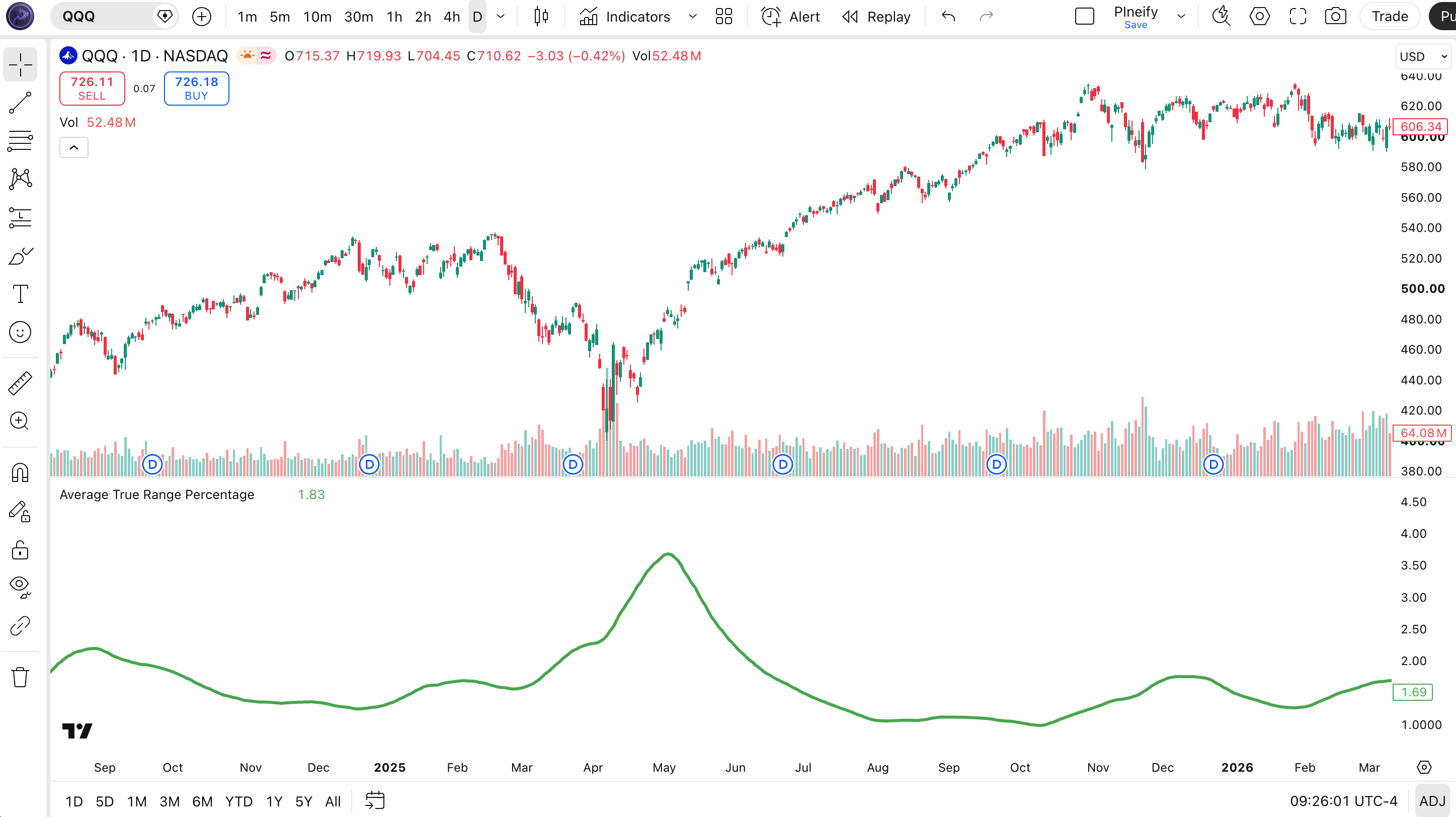
White is the main percentage series and green is the requested smoothing series. The screenshot illustrates their display, not a measured signal success rate. Open TradingView's Pine Editor from the right-side Pine icon, compile the complete source, and compare completed observations with an independent calculation.
Convert a percentage back to a price distance
Use the same reference price to reverse the normalization. At a reference close of 200 and ATRP of 2%, the ATR-equivalent distance is 200 × 0.02 = 4. A hypothetical long entry at 200 with an initial two-ATR distance would reference 192. That is a specified distance, not an observed support level or a guaranteed fill.
If a fixed loss budget is 400 in the quote currency and a share has an assumed 8-unit loss to that reference, the pre-cost quantity is 50 shares. An actual fill at 190 would lose 500 before fees. Contract multipliers, currency conversion, lot increments and gaps need separate treatment; ATRP is neither cash risk nor a maximum loss.
Do not reuse the percentage against a different price without acknowledging the change. Applying the same 2% to 210 gives 4.2, not the original ATR of 4. A trailing stop also needs a ratchet rule and an update time; multiplying the latest percentage by two does not create either.
Compare configurations without inventing a best setting
- Fix the symbol provider, chart and ATR timeframes, sessions, price adjustments and bar-completion policy. Start with matching daily contexts to check the arithmetic.
- Record ATR, the exact denominator and their ratio. Then verify the green MA in its requested context rather than averaging the displayed white values by eye.
- Compare a change of ATR length separately from an MA-length change. Neither produces a known number of spikes or a known false-signal rate.
- For a volatility filter, define the state precisely, such as percentage above its own baseline. Define direction elsewhere. ADX measures trend strength; ADX alone does not choose long or short.
- If testing a price breakout, use a level known before entry. A close cannot exceed a highest-high window that includes the same bar's high. Use a previously completed window when that is the intended rule.
- Record entries, exits, costs and unseen evaluation dates before comparing results. An ATRP line or MA crossing alone supplies no win rate.
Cross-asset comparisons need the same time horizon and a meaningful positive reference price. Equal percentages do not make execution costs, leverage, liquidity or gap risk equal. Raw ATR remains useful for price distances; ATR Bands add close-centered offsets, not proven support and resistance.
Pineify's ATRP configuration is marked as a paid indicator. Review access before using the builder. For a requested adaptation, specify whether you want a chart-context percentage, a fully requested-timeframe percentage or previously confirmed values; these are different calculations.
Describe an ATRP adaptation