

Choose the program type
An indicator displays calculations; an EA can respond to market events and submit orders; a script performs a one-off task. Ask for the smallest type that solves your problem.
MQL5 development · Pineify guide
You can start with a description instead of a blank source file. Pineify can help turn that description into editable MQL5, but choosing the rules and checking the result remain part of the job. Begin with behavior you can recognize on a chart.
Open PineifyOpen the Coding Agent and select MQL5. Account and plan usage limits apply.
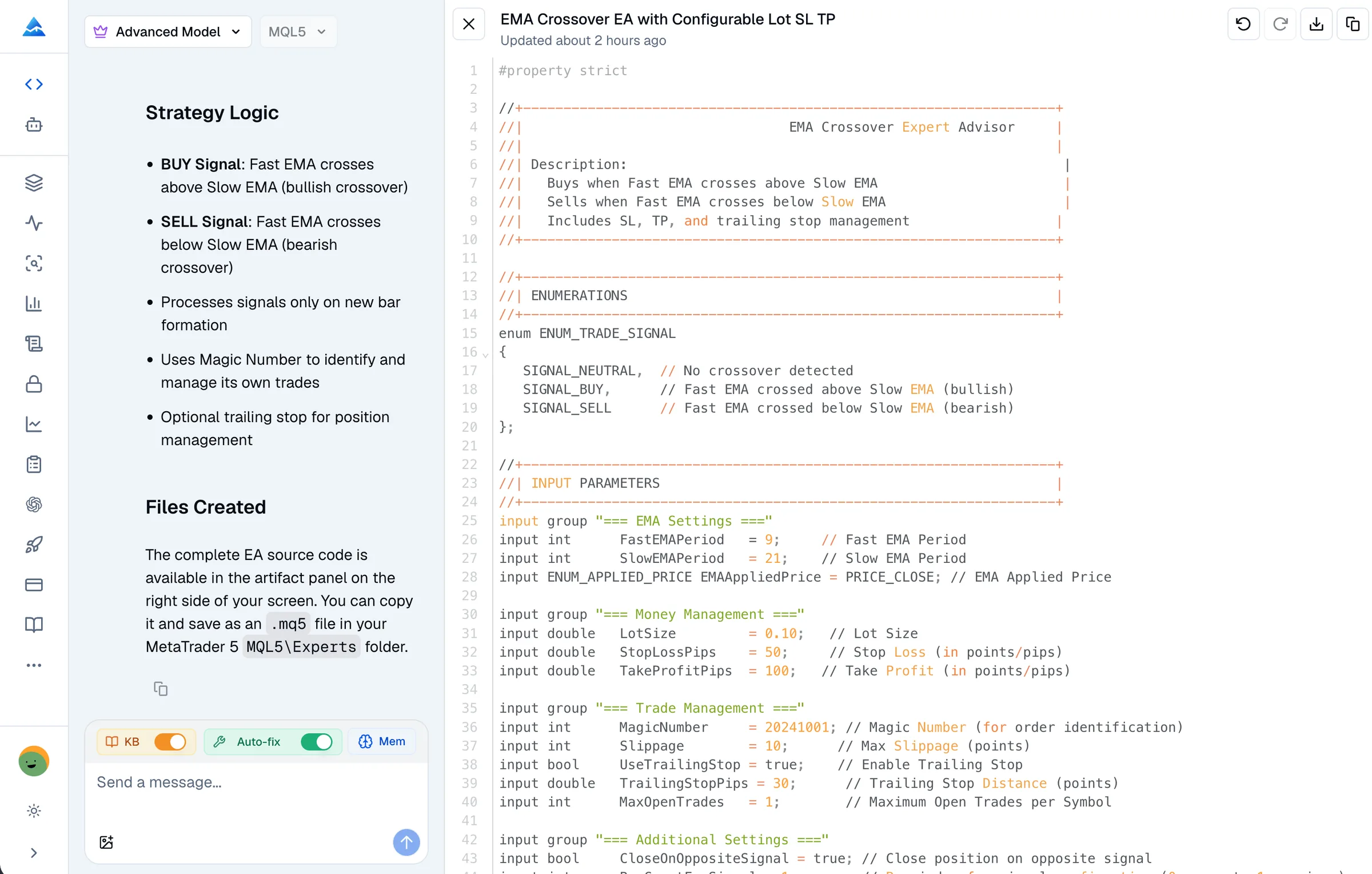
An indicator displays calculations; an EA can respond to market events and submit orders; a script performs a one-off task. Ask for the smallest type that solves your problem.
Name the symbol, timeframe, indicator parameters, and exact condition. Say whether the rule uses a completed candle or an updating candle, and whether one signal or repeated signals are expected.
For an indicator, specify plot placement and alerts. For an EA, specify order direction, exits, sizing, maximum positions, and behavior when trading is unavailable.
Describe a case that should trigger and a case that should not. Include invalid settings or missing data. These examples help you review the output without treating a plausible explanation as proof.
Illustrative request for your own development workflow, not a tested trading strategy.
Create an MQL5 indicator that marks a completed bar when its close crosses above a configurable moving average. Explain exactly which two bars are compared. Do not place orders. Describe the inputs and expected plot, handle unavailable data, and list anything I must install. Ask me whether to check the final source.
Have the assistant explain each input, signal condition, and dependency in plain language. Resolve ambiguity before adding another filter or timeframe.
In Pineify, explicitly ask to check or fix syntax errors. Review failures and retry after changes. If the service is unavailable, treat the source as unverified and compile it locally.
Save the source, compile it in MetaEditor, and compare chart behavior with your examples. For an EA, use Strategy Tester and demo testing before considering live execution.
You still need MetaEditor and a suitable MT5 environment to verify the final program. A source file does not become a tested trading system just because an AI generated it. MQL5 and MQL4 have different APIs; do not expect an MQL5 EA to run in MT4 through a general compatibility switch.
If the specification involves custom libraries, broker-specific execution, or portfolio-wide controls you cannot evaluate, obtain a qualified code review. An assistant can explain code, but that explanation is not an independent audit. Pineify’s current checker submits one source file and may not have your local dependencies.
For Pineify’s workflow and examples, see the MQL5 Coding Agent. Check the current pricing and your account allowance before starting a larger project.
No. You can ask Pineify to draft and revise the source from a written specification. You still need to understand the intended behavior and arrange review and testing when you cannot verify the implementation yourself.
Do not assume so. MQL5 targets MetaTrader 5, while MetaTrader 4 uses MQL4. Porting requires reviewing language and trading API differences and testing each implementation separately.
No. A program can compile while evaluating the wrong candle, opening duplicate trades, or using unsuitable inputs. Compare runtime behavior with your specification.
That depends on the task, current plan limits, and the review work required. This page does not claim a fixed freelancer price or a guaranteed time saving. Check Pineify pricing and obtain a project-specific quote when specialist review is needed.
Bring your requirements or existing source to Pineify. Review the draft, request diagnostics, and validate the final program in MT5.
Open Pineify