

MQL5 development guide · Published by Pineify
How to choose the best MQL5 code generator AI
Choose a tool that gives you editable source, useful compiler feedback, and a clear path to testing in MetaTrader 5. For EA and indicator developers, those checks matter more than an unsupported accuracy score.
This is a selection guide from Pineify, not an independent product test. Account and plan usage limits apply.
Compare evidence, not a league table
Use the same small specification for each tool. Keep the source, diagnostics, and test settings so you can check what actually changed between attempts. Unknown capabilities need verification, not a cross in a comparison chart.
| Criterion | Evidence to inspect | Decision question |
|---|---|---|
| Source you can review | A complete, editable .mq5 file and a list of required includes or custom indicators. | Can you inspect the trading rules and keep the source when you leave the tool? |
| Compiler feedback | Diagnostics tied to the current source, with a clear failure or timeout state. | Did a compiler check run, or did the assistant simply say the code looks correct? |
| MT5 testing | A repeatable Strategy Tester configuration and logs from the version you will use. | Who runs the test, on which data, and with which execution and cost assumptions? |
| Revision control | An explanation of changed conditions, inputs, and order handling after each revision. | Can you change one rule without silently changing the rest of the strategy? |
| Total cost | Current plan terms, model or credit limits, renewal terms, and any separate provider charges. | Does the quoted price cover your expected generation and debugging workload? |
Where Pineify and MetaEditor fit
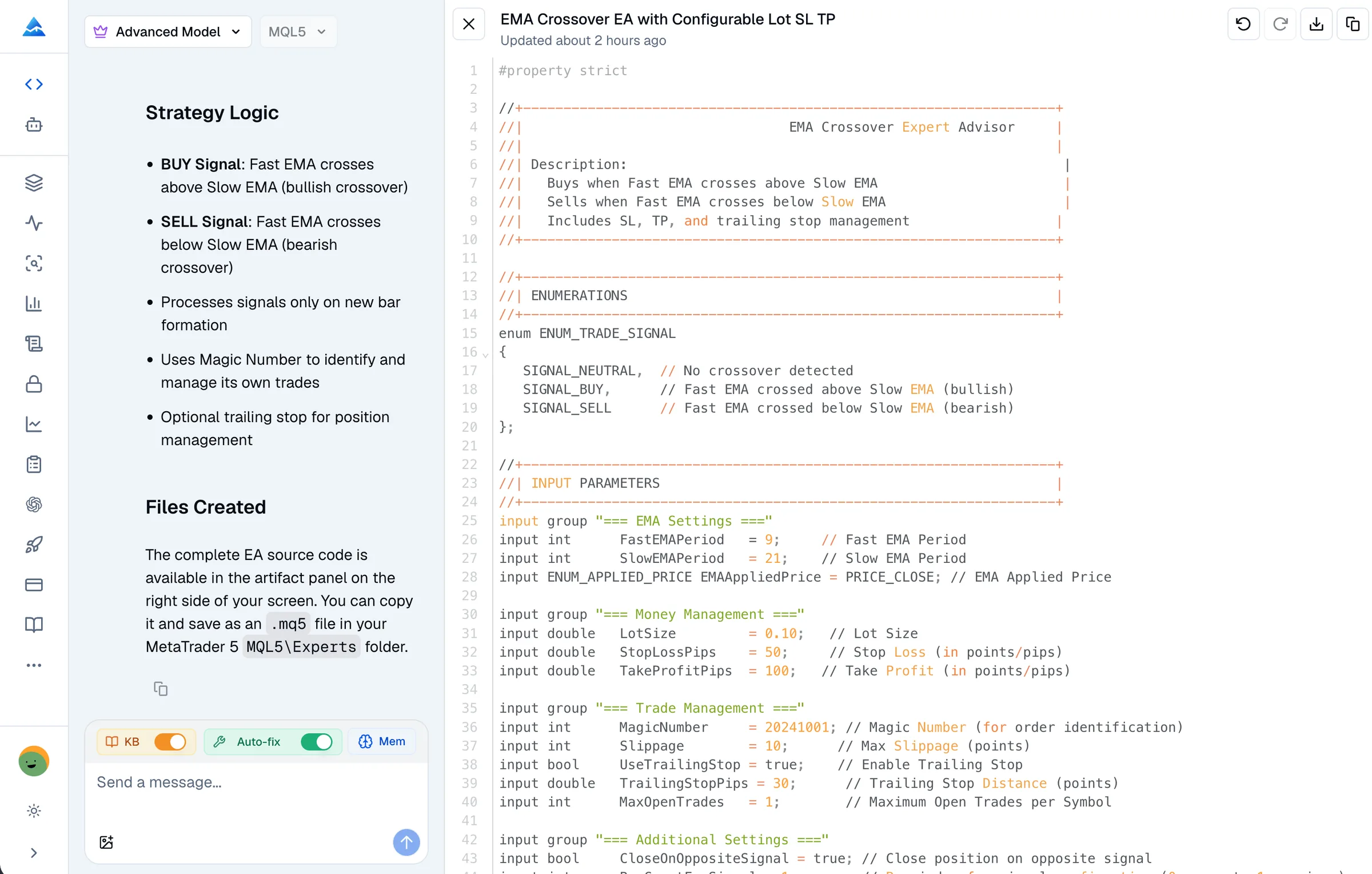
Pineify is an option when you want to describe a task in a browser, revise an editable MQL5 artifact, and request a syntax check in the same conversation. Its MQL5 checking service uses MetaEditor and returns compiler errors with source locations. The current request submits one source file; do not assume your local custom include files or third-party indicators are available to it.
Request the check explicitly. A generated document alone does not show that validation ran, and the service can fail or time out. Review the final file in your own MetaEditor environment, especially when it depends on local libraries or broker settings.
MetaEditor is also an AI development option. MetaQuotes’ build 6060 release notes describe generating MQL5 programs, reviewing existing code, suggesting fixes, and refactoring. MT5 supports MCP connections for compatible external agents, so a general agent is not necessarily limited to copying code from chat.
If you prefer working directly in the MT5 desktop environment, evaluate that workflow too. Review the current AI and MCP settings for model configuration and permissions, including trading, network, and command-line access. There is no controlled cross-tool experiment behind this page, so it does not rank either workflow by speed or accuracy.
For Pineify’s current allowances and prices, use the pricing section and your account details. For other tools, check their own current terms, including separate AI provider charges. An initial price alone does not describe the cost of repeated debugging.
Start with a specification you can verify
The following is an illustrative prompt for evaluating a coding workflow. It does not describe a tested or profitable strategy.
Create an MQL5 signal-only EA for EURUSD on H1. On each new bar, compare the 20-period and 50-period EMAs using the two most recent closed bars. Log a bullish or bearish crossover once per bar. Do not submit orders. Make the EMA periods configurable, reject invalid periods, and explain how indicator data is read and handles are released. List assumptions and dependencies, then ask me whether to run a compiler check.
Inspect whether the source matches those rules. Check repeated signals, unavailable history, invalid inputs, and the absence of order submission. Add execution only after this smaller behavior is understood.
1. Write the specification
Choose EA, indicator, or script. Define the symbol, timeframe, signal timing, inputs, and expected output. For an EA, specify position limits, exit rules, risk sizing, and what should happen after an order is rejected.
2. Generate and review the source
Ask for assumptions and dependencies alongside the code. Check whether the program acts on closed bars or live ticks, how it handles missing data, and whether it uses the intended account and symbol settings.
3. Request a compiler check
In Pineify, explicitly ask the agent to check or fix syntax errors. Review the returned diagnostics, revise the source, and check the final version again. A failed or timed-out check is not a pass.
4. Test in MetaTrader 5
Compile the saved source in MetaEditor. For an EA, use Strategy Tester to inspect orders and logs, then use a separate forward period and a demo account to assess behavior beyond the development sample.
A compiler pass is one checkpoint
MetaEditor compilation checks the source and produces an executable when it succeeds. It does not establish that an EA follows your intended rules. Inspect diagnostics and the program’s behavior separately.
For MQL5 EAs, use the MetaTrader 5 Strategy Tester. Record the symbol, date range, tick model, inputs, execution delay, and trading-cost assumptions with the report. Use the visual mode and logs to inspect individual decisions instead of judging the program only by an equity curve. Keep a separate forward period to check behavior outside the development sample.
TradingView cannot run MQL5 source. A Pine Script translation is a different implementation and does not substitute for testing the MT5 program. Historical tests and demo trading do not guarantee live performance or profits.
MQL5 generator questions
What is the best MQL5 code generator AI?
The right choice depends on your workflow. Pineify offers a browser coding workspace with editable MQL5 source and a syntax-check tool you can request. MetaEditor also has a built-in AI assistant. Compare the output, diagnostics, testing workflow, and current usage terms on a small task of your own; this guide does not claim a benchmark winner.
Does Pineify guarantee that generated MQL5 code compiles?
No. Generation and checking are separate steps. Ask Pineify to check or fix syntax errors and inspect the result. Errors, service failures, or timeouts can still occur. Even a successful compiler check does not establish correct trading behavior or profitability.
Can I backtest MQL5 code on TradingView?
No. MQL5 programs target MetaTrader 5. Compile the source with MetaEditor and test an Expert Advisor with the MT5 Strategy Tester. TradingView uses Pine Script; translating a strategy to Pine Script creates a separate implementation that needs its own validation.
Does MetaEditor now include AI code generation?
Yes. MetaTrader 5 build 6060 introduced expanded MetaEditor AI features for generating programs, reviewing code, suggesting fixes, and refactoring. MT5 also supports MCP connections for compatible external agents. Available models, usage limits, and permissions depend on your configuration; consult the current MetaQuotes documentation.
Can a beginner use an MQL5 AI generator?
You can describe a program in plain language, but you still need precise rules and a way to review the result. Start with an indicator or a signal-only prototype. Ask the assistant to explain the source and test its behavior before adding automated order execution.
Is Pineify MQL5 generation free or unlimited?
Do not assume either. Account, plan, and usage limits apply. Check the current Pineify pricing and your account allowance before starting a larger project. This guide does not promise free generation, unlimited revisions, or a fixed price.
Bring a clear MQL5 task to Pineify
Review the agent’s workflow and examples, then open the Coding Agent and select MQL5. Start with a small program you can inspect before adding trading operations.
Explore Pineify MQL5 Agent