

Gauge the recommendation mix
Compare the available Buy, Hold, and Sell counts and the number of contributing analysts to see whether the recorded views cluster or diverge.
Pineify Finance Agent turns the available analyst records for one stock into a compact research summary, showing the recommendation mix, number of contributing analysts, action counts, price-target outcomes, and closing-price gaps to targets for the selected window. Use it to compare recorded activity and identify questions for a separate individual-ratings search. Repeated calls from one analyst are separate events, so the rating mix is not one current vote per analyst.
Opens Finance Agent with an Apple ratings-summary question ready to send.
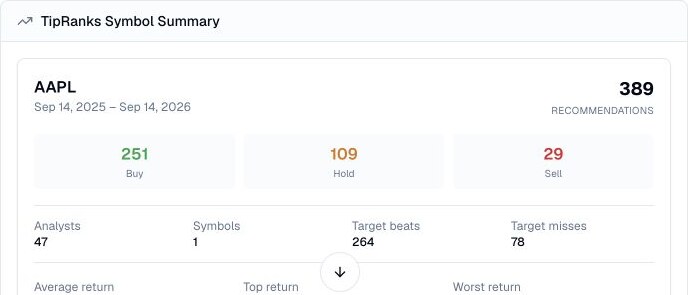
A dated recommendation summary
Reading every analyst call one by one can make the overall picture hard to see. Finance Agent condenses the available records for a single symbol into a date-bounded view so you can quickly understand the balance of Buy, Hold, and Sell opinions and the amount of activity behind it.
Choose a ticker and explicit start and end dates, or use the trailing-twelve-month default. The result includes counts of valid and scored targets. Ask for these counts before interpreting target comparisons; not every recommendation necessarily enters that calculation.
Use cases
Compare the available Buy, Hold, and Sell counts and the number of contributing analysts to see whether the recorded views cluster or diverge.
Review initiated, maintained, upgraded, downgraded, reiterated, and resumed actions to understand how the ratings picture changed during the window.
FMP compares the closing price on the window’s end date with each scored target. Its return fields summarize (end-date close − target) / target. They are price gaps, not gains from buying or selling the stock.
Prompt examples
FAQ
Use the summary to orient your research, then check the dates, definitions, target currency, source notes, and current company evidence behind the aggregate.
Open Finance AgentFor informational and research use only. No output is investment advice or a guarantee of future performance.