

Focus on one stock
Review recent off-exchange executions for a chosen ticker instead of sorting through an entire market-wide feed.
Pineify Finance Agent can focus off-exchange trade research on one ticker and show execution time, size, price, premium, market volume, nearby quote range, and settlement context together. Use the ticker view to investigate repeated or unusual prints, while remembering that execution records do not reveal initiating side, intent, or a complete liquidity picture.
Opens Finance Agent with a ticker-level off-exchange research question ready to send.
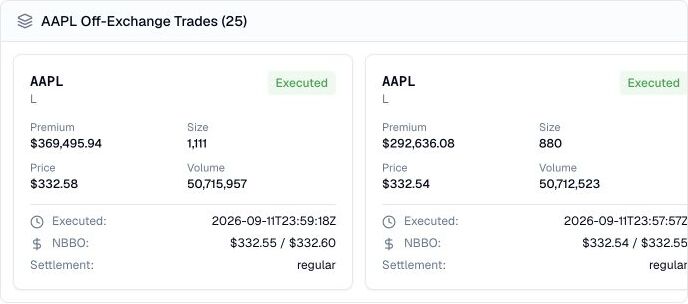
A focused execution trail for one ticker
Choose a ticker and market date, then narrow the result by execution-time bounds, size, premium, or consolidated daily volume. A request returns 25 records by default and at most 50. Without a date, the provider uses the current or last market day. Repeated requests can reuse a cached response for up to one hour.
The provider orders records by execution time, newest first, unless a different order is requested; this tool does not expose that order control. To investigate another interval, ask for narrower time bounds and check overlapping records by tracking ID. Ranking this result by premium finds the largest returned prints, not necessarily the day’s largest trades.
Use cases
Review recent off-exchange executions for a chosen ticker instead of sorting through an entire market-wide feed.
Compare timestamps, sizes, execution prices, premiums, quote ranges, and market volume to find patterns worth checking.
Use a ticker’s execution trail as a lead for checking news, price action, lit-market liquidity, and follow-on activity.
Prompt examples
FAQ
Compare the execution record with price action, lit-market volume, news, and liquidity before treating a print as meaningful.
Open Finance AgentFor informational and research use only. No output is investment advice or a guarantee of future performance.