

Confirm the reporting entity
Review the registrant name, CIK, exchange, incorporation state, and other available identifiers before using the company in further research.
Pineify Finance Agent retrieves FMP’s SEC-linked company profile for one stock ticker. It can show the registrant name, CIK, SIC classification, incorporation details, business description, and a filings link when supplied. This is a provider-assembled profile, not a fresh extraction of every field from the latest filing.
Opens Finance Agent with an AAPL due-diligence question ready to send.
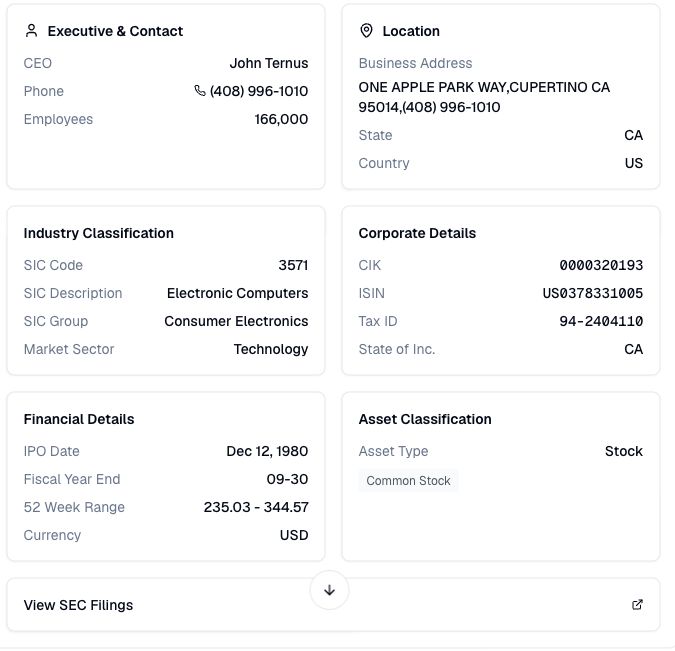
Regulatory company context
A ticker is only one layer of company identity. CIK, registrant name, incorporation state, SIC classification, fiscal year end, and filing history help establish which legal entity and reporting context you are researching.
Start with one ticker and check the returned registrant name and CIK. Comparisons across issuers require separate profile lookups. The tool does not accept a CIK search or historical as-of date, and it returns the first matching provider record rather than a filing history.
Use cases
Review the registrant name, CIK, exchange, incorporation state, and other available identifiers before using the company in further research.
Use the business description, SIC code and description, market sector, location, and fiscal-year details to frame later filing analysis.
Open the linked SEC filings page when available and verify company facts against the relevant disclosure before drawing a conclusion.
Prompt examples
FAQ
Start with the registrant identity and operating context, then open the company’s SEC filings to verify the details that matter to your research.
Open Finance AgentFor informational and research use only. No output is investment advice or a guarantee of future performance.