

Scan the latest off-exchange prints
Review a recent feed of stock executions across tickers without losing the time and market context around each trade.
Pineify Finance Agent can surface recent off-exchange stock trades and keep ticker, executed size, price, premium, market volume, quote context, settlement, and timestamp visible together. Use the feed to spot activity worth investigating, while treating each print as a point-in-time execution record—not proof of direction, intent, or a complete view of market liquidity.
Opens Finance Agent with an off-exchange activity question ready to send.
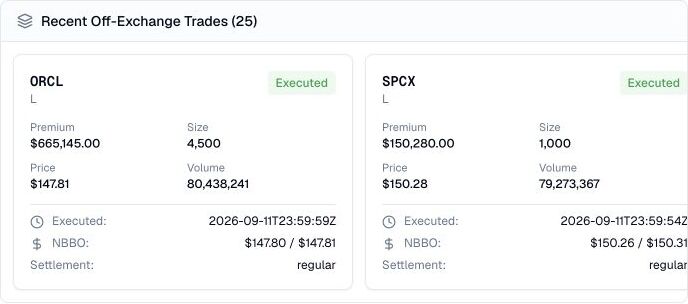
A timestamped view of off-exchange activity
Choose a market date and optional minimum or maximum notional value, share size, and consolidated daily volume. The tool requests 25 records by default, up to 50, and may reuse a response for one hour. It has no ticker, sector, time-of-day, pagination, sorting, or cancellation-status selector; this is a bounded retrieval, not a streaming tape.
An off-exchange execution does not reveal whether the initiating party was buying or selling, why the trade occurred, or how it will affect price. A premium, size, or repeated print is a clue to verify—not a directional signal on its own.
Use cases
Review a recent feed of stock executions across tickers without losing the time and market context around each trade.
See executed size, price, notional premium, daily volume, and the nearby quote range together to prioritize unusual activity.
Use a notable timestamp or ticker as a lead for checking price action, news, liquidity, and follow-on trades.
Prompt examples
FAQ
Check the execution context, compare it with volume and price action, and confirm the wider market story before treating a trade as meaningful.
Open Finance AgentFor informational and research use only. No output is investment advice or a guarantee of future performance.