

Scan the latest reported activity
Browse recent congressional purchases, sales, and other transaction labels across members and chambers.
Pineify Finance Agent retrieves Unusual Whales’ recent congressional transactions, with member name, ticker when supplied, purchase or sale label, reported amount range, transaction date, filing date, and household context. Filter by ticker or a transaction-date cutoff to select records for primary-disclosure research.
Opens Finance Agent with a recent congressional-trade research question ready to send.
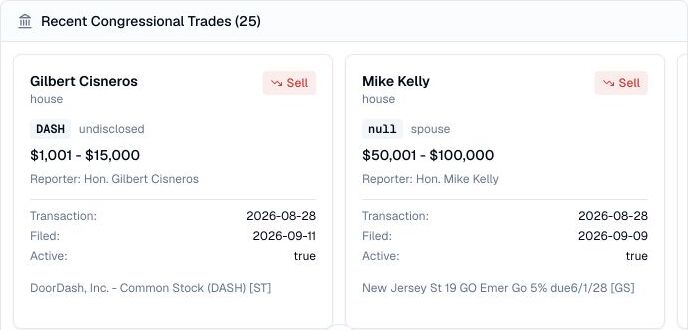
A bounded view of reported transactions
A request returns 25 records by default, up to 50. The optional date means transactions on or before that day, not filings submitted that day. There is no start date, page selector, sector filter, or member-name filter in this tool, and cached responses may be reused for an hour.
The provider describes this feed as the latest transacted trades, which need not be the latest filed reports. Read transaction and filing dates separately. A disclosure appearing later may describe an older trade; this bounded result cannot establish a complete event timeline.
Use cases
Browse recent congressional purchases, sales, and other transaction labels across members and chambers.
Keep the asset ticker, action, amount band, transaction date, filing date, and household context together. The provider field shown beside the ticker may say spouse or joint; it does not necessarily identify the company issuing the security.
Use the member and filing date to locate the original disclosure separately. These result cards contain no filing URL; verify amendments and the asset description before linking a transaction to a company event.
Prompt examples
FAQ
Choose a report, confirm the owner and dates in the source disclosure, and research the underlying company before drawing conclusions.
Open Finance AgentFor informational and research use only. No output is investment advice or a guarantee of future performance.