

Scan the overall financial profile
See an overall grade and score as a quick triage signal before deciding which parts of the company’s financial story need more attention.
Pineify Finance Agent retrieves FMP’s company rating for one stock ticker, with an overall grade and scores for DCF, ROE, ROA, debt to equity, P/E, and P/B. Use the component scores to choose which ratios or valuation inputs to examine next. This is a provider model output, not a brokerage recommendation history or a credit rating.
Opens Finance Agent with an Apple financial-ratings question ready to send.
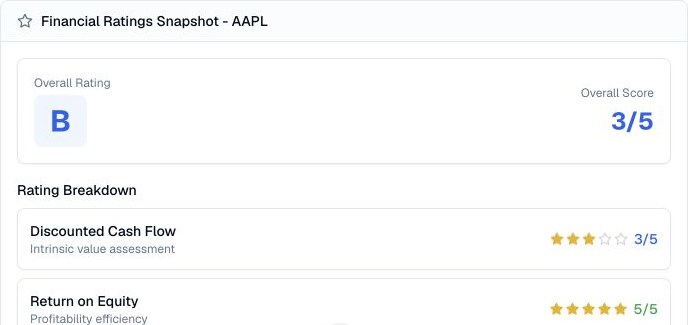
A multi-angle rating view
Read the component numbers as ratings on the provider’s scale. An ROE score of 5 is not ROE of 5%, and a DCF score of 3 is not a fair-value price. To assess the business, retrieve the actual financial ratios and statements separately.
FMP publishes threshold-based company-rating calculations. This response contains the resulting scores without a rating date, underlying ratios, input timestamps, or methodology version. It cannot establish which filing or price observation produced a score.
Use cases
See an overall grade and score as a quick triage signal before deciding which parts of the company’s financial story need more attention.
Review separate signals for discounted cash flow, return on equity, return on assets, debt to equity, price to earnings, and price to book.
Use outlier ratings to focus on valuation assumptions, profitability drivers, capital structure, asset efficiency, and the company disclosures that can confirm or challenge the signal.
Prompt examples
FAQ
Start with the overall grade and its dimensions, then verify definitions, dates, peer context, valuation inputs, and source data before relying on a comparison.
Open Finance AgentFor informational and research use only. No output is investment advice or a guarantee of future performance.