

Track the overall grade by date
Review historical letter grades and overall scores to see whether the company’s rating profile is stable, improving, or deteriorating.
Pineify Finance Agent displays FMP’s dated company grades and overall and component scores for DCF, ROE, ROA, debt to equity, P/E, and P/B. Ask for a ticker and a record count to compare the returned dates. These are provider-generated financial scores, not a history of brokerage upgrades or a credit rating.
Opens Finance Agent with an Apple historical-ratings question ready to send.
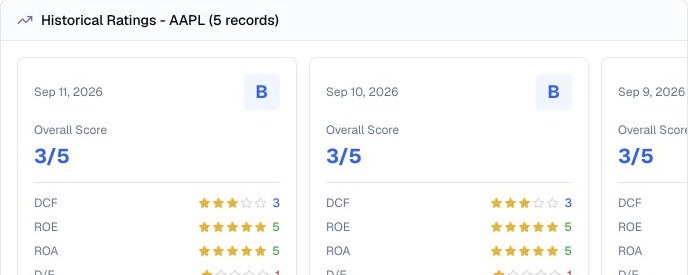
A dated rating timeline
The default request returns 10 dated records, with at most 50 per request. The tool has no start/end date, historical as-of date, or page selector. Read the actual dates returned; 50 records do not necessarily represent 50 calendar days or a complete financial history.
Compare scores only with scores: an ROE score of 5 is not ROE of 5%, and a DCF score is not a fair-value price. The response provides scores without the underlying ratios, input timestamps, calculation version, or an explanation of why a value changed.
Use cases
Review historical letter grades and overall scores to see whether the company’s rating profile is stable, improving, or deteriorating.
Compare DCF, ROE, ROA, debt-to-equity, P/E, and P/B ratings across the same dates to separate a broad shift from one changing component.
Use rating inflection points to focus on filings, earnings, price moves, peer changes, methodology updates, and the operating evidence that could explain them.
Prompt examples
FAQ
Start with the direction and component ratings, then verify methodology, dates, peer context, market prices, and source updates before relying on a trend.
Open Finance AgentFor informational and research use only. No output is investment advice or a guarantee of future performance.