

Review recent price movement
Inspect the available close, open, high, low, change, and volume to understand the contract's recent trading context.
Pineify Finance Agent retrieves a Massive snapshot for an underlying ticker and one exact option contract. Review the most recent daily bar, available quotes and trades, open interest, model sensitivities, and underlying context. This tool has no historical-date input and does not continuously refresh the result.
Opens Finance Agent with a specific AAPL options-contract snapshot question ready to send.
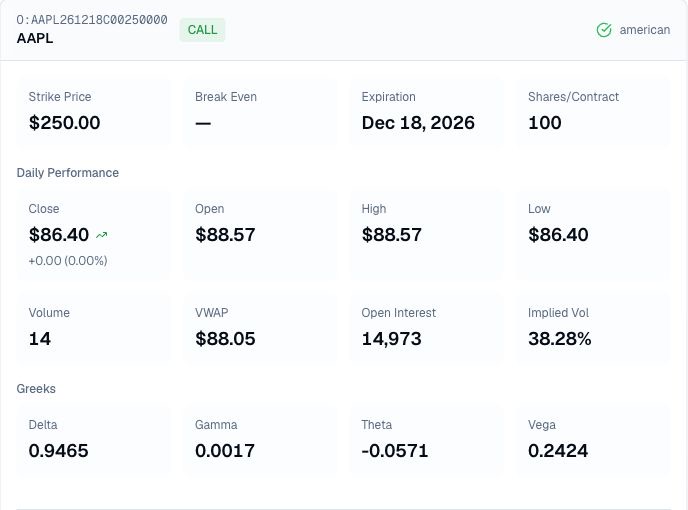
Point-in-time contract view
Supply both the underlying ticker and full option identifier, then distinguish the daily bar close from the last trade and bid/ask. The response may carry separate timestamps and delay flags, but the cards do not display them. Request those fields explicitly when available before combining values from different times.
Use the snapshot as a research checkpoint, not a trade recommendation. Values can be delayed, stale, or unavailable, and model-derived measures such as implied volatility and Greeks change as market inputs change.
Use cases
Inspect the available close, open, high, low, change, and volume to understand the contract's recent trading context.
Compare daily volume and VWAP with available quotes and trades. Open interest is measured at the end of the last trading day. Missing quote size remains unavailable; it must not be interpreted as zero available liquidity.
Review Delta, Gamma, Theta, and Vega alongside strike, expiration, and available underlying or break-even information to frame the contract's risk questions.
Prompt examples
FAQ
Review the available snapshot, then verify current quotes, timestamps, payoff, liquidity, assignment exposure, and strategy fit before making a decision.
Open Finance AgentFor informational and research use only. No output is investment advice or a guarantee of future performance.