

Verify the contract identity
Confirm that the underlying, call or put type, strike, and expiration match the option you intended to research.
Pineify Finance Agent retrieves Massive reference details for one exact options ticker, with an optional as-of date. Check the underlying, contract type, strike, expiration, exercise style, shares per contract, and primary exchange code before adding price or strategy analysis. The lookup does not retrieve live quotes.
Opens Finance Agent with a specific AAPL options-contract question ready to send.
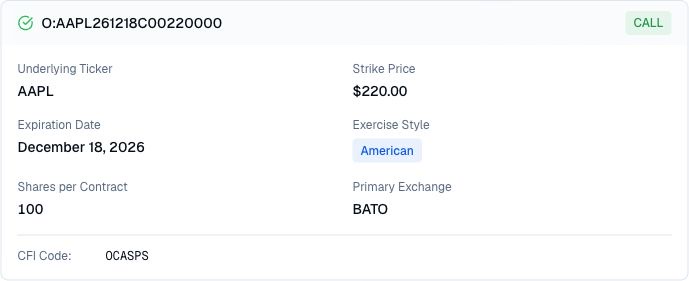
Contract identity check
Provide the full options ticker, including its O: prefix, and an as-of date in YYYY-MM-DD format when researching historical terms. Without that date, the provider uses today. This retrieves a reference record rather than relying only on decoding the symbol; preserve both the requested date and returned ticker in your notes.
The result defines the named contract; it is not a live market snapshot. Treat it as the reference layer before examining quotes, trades, open interest, implied volatility, Greeks, payoff, or strategy risk.
Use cases
Confirm that the underlying, call or put type, strike, and expiration match the option you intended to research.
Check exercise style, shares per contract, the primary exchange MIC code, and the CFI classification. When supplied, inspect the correction number and additional deliverables; a primary exchange is not evidence of where a particular trade executed.
Use the verified ticker as the starting point for current-price, liquidity, volatility, sensitivity, payoff, or portfolio research.
Prompt examples
FAQ
Check the contract identity and reference terms first, then continue with current pricing, liquidity, sensitivity, payoff, and risk research.
Open Finance AgentFor informational and research use only. No output is investment advice or a guarantee of future performance.