

Compare strikes and expirations
Review contract type, strike, and expiration together so you can distinguish nearby and longer-dated contracts without losing their identities.
Pineify Finance Agent retrieves a filtered options snapshot from Massive, with 10 contracts by default and a maximum of 50. Select an underlying, call or put type, strike and expiration bounds, and ordering. Compare each contract’s daily bar close, available bid/ask, volume, open interest, provider IV value, and Delta.
Opens Finance Agent with an options-chain research question ready to send.
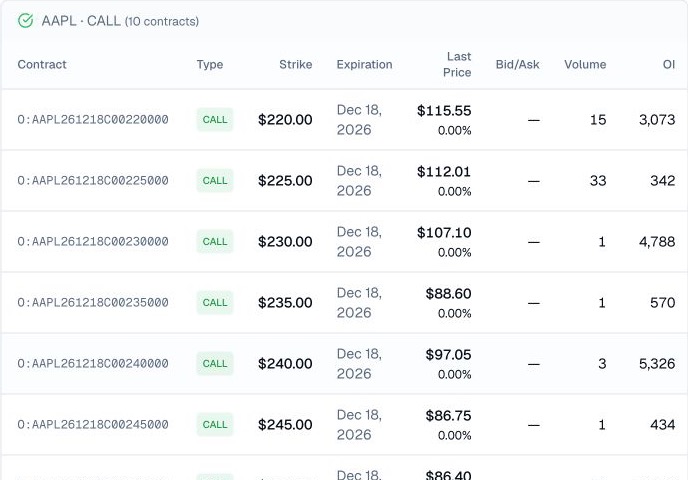
Contract comparison
Start with one underlying and a specific expiration or narrow strike range. The tool returns only the first response page and does not follow the provider’s next-page link. If a query reaches 50 contracts, narrow its filters before describing the result as covering the chain.
Use the snapshot to reduce a large search space, not to select a trade automatically. Quotes, volume, open interest, implied volatility, and Greeks can be missing, delayed, or change with the market, and each metric answers only one part of the risk question.
Use cases
Review contract type, strike, and expiration together so you can distinguish nearby and longer-dated contracts without losing their identities.
Compare the most recent daily bar close with available bid/ask quotes and daily volume. Open interest represents contracts outstanding at the end of the last trading day, so it is not a live count of today’s new positions.
The table displays Delta and the provider’s IV number as IV (raw). The response may also contain Gamma, Theta, Vega, and underlying details; ask for those separately when available. Confirm the IV scale before comparing it with percentage figures from another source.
Prompt examples
FAQ
Compare the contracts that matter to your question, then verify current quotes, liquidity, volatility, sensitivities, and strategy risk before making a decision.
Open Finance AgentFor informational and research use only. No output is investment advice or a guarantee of future performance.