Finance Agent capability

Review Trades from Your Own Journal

Pineify Finance Agent can read a filtered trade history or open a single trade for its notes and closing records. Results retain the ledger’s currency and timezone.

Opens Finance Agent with a journal request ready to send. Advanced or higher is required.

Finance Agent in actionAI Trading Journal Review
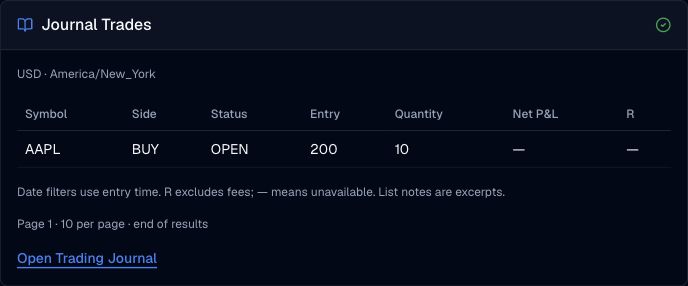
Synthetic AAPL trade list with entry price, quantity, status, net profit and R multiple.
Captured October 2, 2026 from synthetic AAPL bookkeeping in a USD journal. The displayed page is a bounded list, not market data.

Your personal trading records

Review Trades from Your Own Journal

Read a filtered trade history or open a single trade for its notes and closing records, with the ledger’s currency and timezone.

Journal capabilities are available in Finance Agent on Advanced or higher. Your journal content may enter the model context and your own chat history; this capability does not add a public conversation or sharing workflow.

Use cases

Ways to use this journal capability

Find a relevant trade group

Review recorded trades by entry dates, symbol, side, status, result, tags or setup.

Read the complete trade

Open a particular record to inspect its plan, review notes and recorded closes.

Follow a paginated history

Ask for the next page when a result contains more records than the current card shows.

FAQ

Questions about trading journal review

Continue with your own trading journal

Select an existing ledger, check its currency and timezone, and describe the record you want to read or save.

Open Finance Agent

For informational and research use only. No output is investment advice or a guarantee of future performance.