

Find potential new listings
Request a short date interval, then group the returned rows by date and exchange. If 30 rows are returned, narrow the interval before treating the calendar as complete; there is no next-page control for this tool.
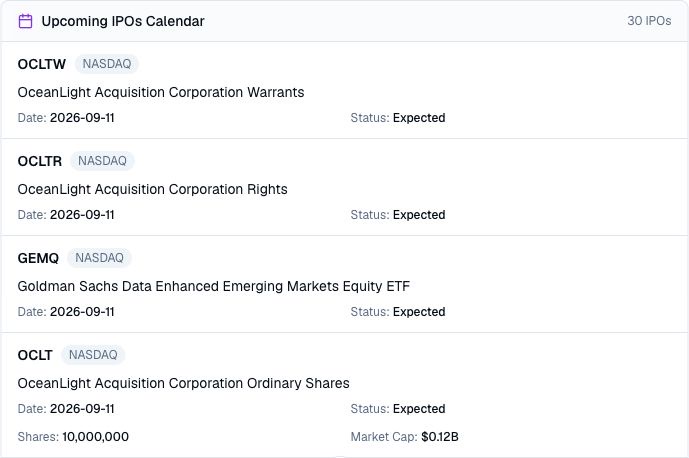
Pineify Finance Agent can review available IPO-calendar entries and organize the companies and securities by scheduled date, exchange, and provider status. Use the calendar to find potential new listings, compare the available offering details, and decide which issuers need deeper research before trading begins.
Opens Finance Agent with an IPO-calendar research question ready to send.
New-listing research
An IPO calendar can surface unfamiliar issuers before their securities begin trading. Finance Agent queries the FMP calendar with optional from/to dates and returns the first 30 provider rows. Responses can be cached for 24 hours. Request an explicit date interval; without one, the provider chooses the coverage. The tool has no symbol, exchange, status or page filter.
Calendar entries are starting points, not completed-listing confirmations. Offerings can be postponed, repriced, withdrawn, or represented by different security types such as shares, rights, warrants, acquisition vehicles, or funds. Verify every material detail in current offering documents and official market notices.
Use cases
Request a short date interval, then group the returned rows by date and exchange. If 30 rows are returned, narrow the interval before treating the calendar as complete; there is no next-page control for this tool.
Keep the symbol, security name, status, and any available share, price-range, or market-cap context together while deciding what to investigate next.
Separate operating companies from funds, acquisition vehicles, rights, and warrants, then prioritize the listings that match your research mandate.
Prompt examples
FAQ
Identify the issuers and securities that matter to you, then verify their schedules and offering documents before evaluating the business or the trade.
Open Finance AgentFor informational and research use only. No output is investment advice or a guarantee of future performance.