

See who made the trade
Connect each transaction with the reporting person, company role, direct or indirect ownership, and filing date.
Pineify Finance Agent brings a company’s recent insider transactions into one readable view: who traded, their role, whether shares were acquired or disposed, the transaction type, shares, price, value, ownership after the trade, and filing dates. Use the activity to build a research trail around executive and director behavior, then read the filing and business context before interpreting it.
Opens Finance Agent with an Apple insider-trades question ready to send.
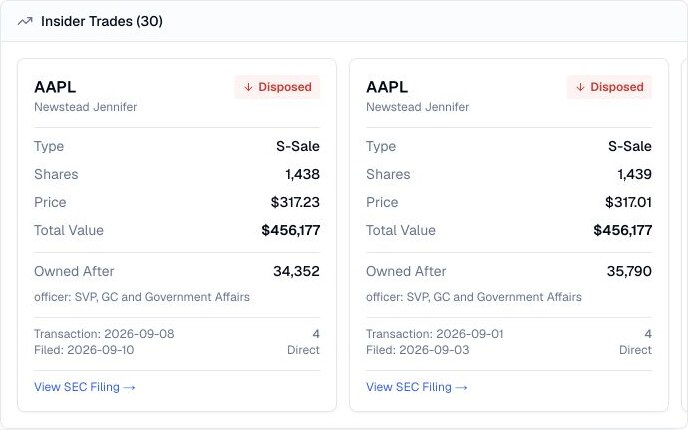
A readable insider-activity trail
Insider filings are useful only when the transaction and the person are kept together. Finance Agent makes it easier to see whether an executive or director acquired or disposed of shares, how large the trade was, and what ownership remained afterward.
A reported transaction can have many explanations, including compensation, tax withholding, planned selling, gifts, or automatic programs. Treat the card as a starting point for reading the original filing and surrounding company evidence, not as proof of intent.
Use cases
Connect each transaction with the reporting person, company role, direct or indirect ownership, and filing date.
Review shares, price, displayed total value, and ownership after the transaction to distinguish a small routine event from a material change.
Use the SEC filing trail to investigate transaction codes, awards, tax withholding, gifts, planned sales, and the details the summary cannot explain.
Prompt examples
FAQ
Use a trade as a lead, then verify the filing, transaction code, ownership context, any disclosed trading-plan details, and current company evidence.
Open Finance AgentFor informational and research use only. No output is investment advice or a guarantee of future performance.