

Find dominant sectors
See the largest allocations first to identify exposures worth investigating. Weight alone does not measure contribution to risk or return; sector volatility, correlations, and price changes also matter.
Pineify Finance Agent turns an ETF’s sector allocation into an easy-to-scan set of weights, from the largest exposure to the smallest. Use the breakdown to spot concentration, compare funds with similar names, and test whether a portfolio matches your intended exposure—then verify the holdings and methodology before making an investment decision.
Opens Finance Agent with an SPY sector-weighting question ready to send.
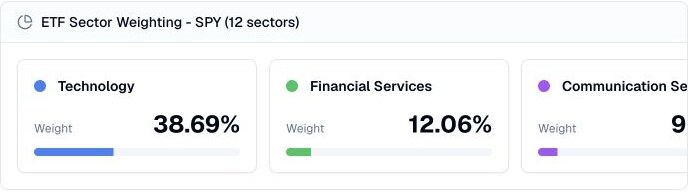
A sector-first view of fund exposure
An ETF described as broad market, growth, or thematic can still be heavily exposed to one or two sectors. Finance Agent makes the concentration visible by ranking sector weights and showing the full available allocation.
Sector labels depend on the provider and fund methodology, and the mix can change as holdings and prices move. Use the breakdown as a comparison aid, not as a substitute for the official holdings file or prospectus.
Use cases
See the largest allocations first to identify exposures worth investigating. Weight alone does not measure contribution to risk or return; sector volatility, correlations, and price changes also matter.
Contrast sector weights across ETFs to identify shared sector exposure and differences between similar strategies. Matching sector weights do not prove that two funds hold the same companies.
Use the allocation as a check against your intended diversification, then follow large or surprising weights back to the underlying holdings.
Prompt examples
FAQ
Use sector weights to identify concentration and overlap, then verify the fund’s holdings, classification rules, methodology, and latest disclosure.
Open Finance AgentFor informational and research use only. No output is investment advice or a guarantee of future performance.