

Choose the intended transcript
Match a fiscal quarter and year with its available call date before retrieving or citing the underlying earnings-call discussion.
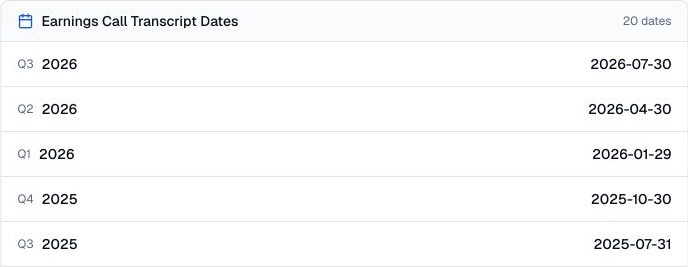
Pineify Finance Agent can show the available earnings-call transcript dates for a company, organized by fiscal quarter and year. Use the timeline to choose the right call, check the sequence of available periods, and plan cross-quarter research before opening full transcripts.
Opens Finance Agent with an Apple transcript-date question ready to send.
Transcript research planning
Choosing the wrong period can undermine an earnings-call comparison. The date card shows up to 20 records with fiscal quarter, fiscal year, and call date in the order received. Ask Finance Agent to arrange those returned entries chronologically before selecting calls to compare.
The date list is a research index, not proof that every call or every transcript is covered. Fiscal calendars differ across companies, dates can be revised, and a listed date does not establish that the underlying transcript is complete. Verify important periods with the company’s investor-relations record.
Use cases
Match a fiscal quarter and year with its available call date before retrieving or citing the underlying earnings-call discussion.
Put available calls into sequence so comparisons of guidance, priorities, and risk language remain tied to the correct reporting periods.
Use gaps or unusual spacing in the visible sequence as prompts to check the company’s fiscal calendar and official investor-relations archive.
Prompt examples
FAQ
Build the available quarter-by-quarter timeline first, then open the relevant transcripts and keep each statement tied to its fiscal period and call date.
Open Finance AgentFor informational and research use only. No output is investment advice or a guarantee of future performance.