

Move from a name to a research-ready ticker
Search with the full or partial name you know and review the candidate symbols before continuing with company research.
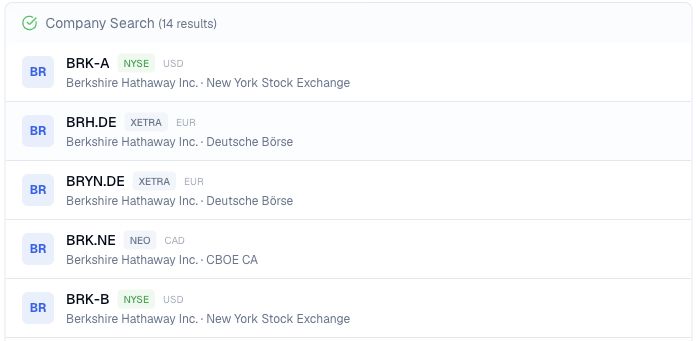
Pineify Finance Agent can search a company or asset name and show candidate ticker symbols with their exchange and trading currency, helping you identify the listing you mean before starting deeper research.
Opens Finance Agent with a Berkshire Hathaway ticker-search question ready to send.
Security identification
The same company name can appear across share classes, exchanges, depositary receipts, funds, and exchange-traded products. A familiar name alone may not identify the instrument you intend to research.
Finance Agent can surface candidate symbols together with their company or asset name, exchange, and trading currency. That context helps you choose a research-ready identifier before asking about filings, fundamentals, news, or valuation.
Use cases
Search with the full or partial name you know and review the candidate symbols before continuing with company research.
Compare exchanges and trading currencies when a company has multiple share classes or is available in more than one market.
Check the identity of a candidate instrument before using its ticker in later questions about news, filings, financials, or valuation.
Prompt examples
FAQ
Describe the company or asset you have in mind, compare the candidate listings, and continue your Finance Agent research with the appropriate ticker.
Open Finance AgentFor informational and research use only. No output is investment advice or a guarantee of future performance.