

Separate scheduled and completed reports
Identify future-dated records with estimates only and keep them distinct from quarters that already contain reported EPS and revenue.
Pineify Finance Agent can organize a company’s available earnings dates beside actual and estimated EPS, actual and estimated revenue, and record update dates. Use the history to distinguish scheduled reports from completed quarters, identify expectation gaps worth investigating, and decide where to examine guidance, margins, cash flow, or filings next.
Opens Finance Agent with a focused Apple earnings-report question ready to send.
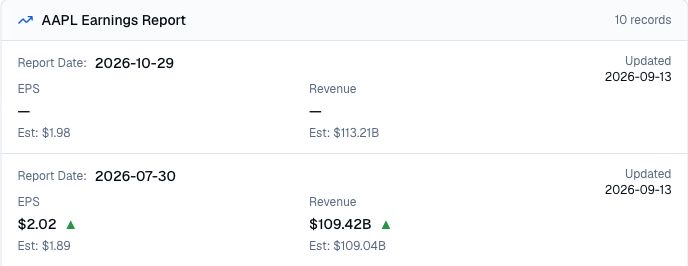
Earnings expectations at a glance
A headline beat or miss begins with a comparison. Finance Agent places the available actual EPS and revenue beside their estimates for each report date, making it easier to see which completed quarters exceeded or fell short of the expectations shown.
The same timeline can include a scheduled report whose actual values are not available yet. That is planning context, not a reported result. Estimate definitions, accounting bases, currencies, and later revisions may differ, so material conclusions should be checked against the company’s earnings release, SEC filing, and the relevant consensus methodology.
Use cases
Identify future-dated records with estimates only and keep them distinct from quarters that already contain reported EPS and revenue.
Review actual and estimated EPS and revenue side by side to spot positive or negative gaps that deserve closer examination.
Use the comparison to guide follow-up work on guidance, margins, cash flow, segment performance, one-time items, and source filings.
Prompt examples
FAQ
Compare reported results with the expectations shown, then verify the accounting basis and investigate guidance, margins, cash conversion, one-time items, and the market expectations already reflected in the price.
Open Finance AgentFor informational and research use only. No output is investment advice or a guarantee of future performance.