

Scan a watchlist together
Place several stocks in one view instead of repeating the same quote check for each company.
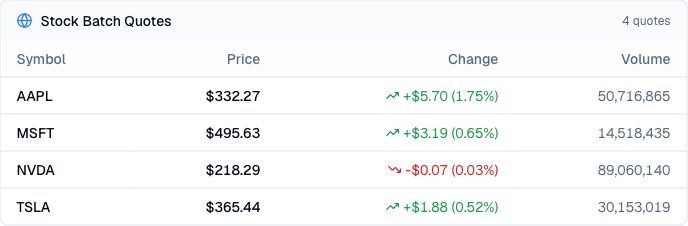
Pineify Finance Agent can compare the latest available quotes for several public stocks in one compact view, keeping each symbol’s price, session move, and trading volume together. Use it to scan a watchlist, notice which names are moving differently, and choose where deeper company or market research should begin.
Opens Finance Agent with a four-stock quote comparison ready to send.
A faster watchlist check
Checking stocks one at a time makes it harder to see differences across a watchlist. Finance Agent keeps the latest available price, absolute and percentage move, and volume aligned with each symbol so the group is easier to scan.
The view is a market snapshot, not a ranking of business quality or expected returns. Stocks can have very different share prices, normal trading volumes, volatility, and market sessions, so the figures need company and market context.
Use cases
Place several stocks in one view instead of repeating the same quote check for each company.
Review each price beside its absolute and percentage move and displayed volume to see where activity differs across the group.
Use an unusual move or volume difference to prioritize follow-up on news, earnings, filings, fundamentals, or market-wide events.
Prompt examples
FAQ
Start with the differences in price movement and volume, then investigate company news, filings, earnings, valuation, and broader market conditions before drawing a conclusion.
Open Finance AgentFor informational and research use only. No output is investment advice or a guarantee of future performance.