

Scan several watched stocks together
Put multiple symbols in a single view to inspect the available trade records. A missing result does not establish that a stock had little or no trading activity.
Pineify Finance Agent can place the latest available extended-hours trade records for several stocks in one view, keeping each symbol, displayed time, price, and reported size together. Confirm the session for each timestamp before using the records for a post-market review.
Opens Finance Agent with a four-stock after-hours comparison ready to send.
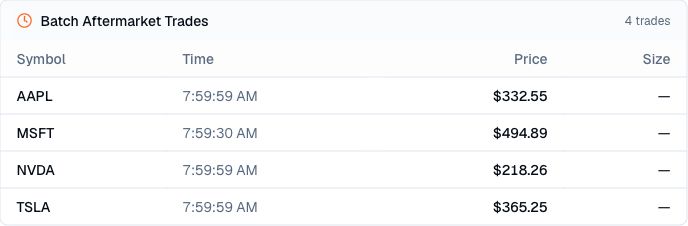
Your watchlist after the close
Reviewing one stock at a time makes it harder to see which names in a watchlist remained active after the regular session. Finance Agent brings the latest available post-market trades together so differences in timing, price, and reported size are easier to inspect.
The comparison shows completed trades, not a ranking of investment opportunities. After-hours markets can be thin and fragmented, and trades recorded at slightly different times should not be treated as perfectly synchronized market snapshots.
Use cases
Put multiple symbols in a single view to inspect the available trade records. A missing result does not establish that a stock had little or no trading activity.
Keep each displayed time, price, and reported size aligned with its stock, including a clear mark when size is unavailable.
Use the cross-stock view to decide which moves warrant a closer look at news, earnings, filings, regular-session prices, and current broker data.
Prompt examples
FAQ
Compare the available trades first, then check current quotes, company news, earnings, filings, and broader market moves before interpreting any difference between stocks.
Open Finance AgentFor informational and research use only. No output is investment advice or a guarantee of future performance.