

Fibonacci Zone Pine Script — Complete TradingView Guide
The Fibonacci Zone indicator does one thing well: it draws automatic support and resistance levels based on Fibonacci retracement ratios calculated from the highest high and lowest low over a user-defined period. Six horizontal lines appear on your chart at the 0%, 23.6%, 38.2%, 61.8%, 76.4%, and 100% levels, each with its own colored fill zone. In Pine Script v6, the indicator uses `ta.highest(high, length)` and `ta.lowest(low, length)` to find the range extremes, then applies the classic Fibonacci multipliers. The zones shift dynamically with each new bar, so you get fresh support and resistance levels without redrawing anything manually. This makes it a solid replacement for manual retracement drawing in systematic strategies. The indicator works on stocks, crypto, forex, and futures across any timeframe, though the optimal length setting differs by asset class. I have been using it on SPY daily with the default 21-bar length for about 14 months now and it holds levels better than I expected for a purely mechanical system that has no awareness of fundamentals, volume, or market structure beyond the range of highs and lows it calculates from.
What Is the Fibonacci Zone Indicator?
The Fibonacci Zone is a channel-based indicator that plots dynamic support and resistance levels using Fibonacci retracement ratios (23.6%, 38.2%, 61.8%, 76.4%) between the highest high and lowest low within a specified period. It turns the classic Fibonacci retracement concept into an automated, updating system that requires no manual drawing.
History & Inventor
Fibonacci ratios were introduced to Western mathematics by Leonardo of Pisa (Fibonacci) in 1202 in his book Liber Abaci. The specific retracement levels used in the Fibonacci Zone (23.6%, 38.2%, 61.8%, 76.4%) are derived from the Fibonacci sequence itself: 23.6% is 0.236 (a ratio from dividing one number by the number three places later), 38.2% is 0.382, 61.8% is the golden ratio 0.618, and 76.4% is 1 minus 0.236. These ratios were later applied to financial markets by traders like Ralph Nelson Elliott in the 1930s and became standard in technical analysis. The Fibonacci Zone indicator is a modern implementation that automates these levels into a dynamic channel for TradingView.
How It Works
The indicator scans N bars and finds the highest high and lowest low in that range. It measures the total distance between them. Then it applies four Fibonacci multipliers to split the range into six horizontal levels. The zone between the high border (100%) and the 23.6% level is colored aqua, representing the strongest bullish extension zone. The zone between 38.2% and 61.8% is gray (the ranging zone). The zone between 76.4% and the low border (0%) is orange (the bearish zone).
Fibonacci Zone Formula
Range = HighestHigh(High, N) - LowestLow(Low, N)
High Border = HighestHigh(High, N)
23.6% Line = HighBorder - (Range x 0.236)
38.2% Line = HighBorder - (Range x 0.382)
61.8% Line = HighBorder - (Range x 0.618)
76.4% Line = HighBorder - (Range x 0.764)
Low Border = LowestLow(Low, N)

Where:
N = Lookback period (default 21 bars)
Multipliers = 0.236, 0.382, 0.618, 0.764
What Markets It Suits
Stocks: Works well on indices like SPY and QQQ, especially on daily and 4H charts. The levels tend to hold as support and resistance zones for several bars, giving enough reaction time for swing trades.
Crypto: Effective on 4H and daily charts with a shorter length like 14. Avoid it on 1M crypto charts. The range noise is too high and the zones shift violently.
Forex: Works on EUR/USD and GBP/USD on 4H and above. Forex trends are more gradual, so the zones hold longer. On 1H forex, reduce the length to 14.
Futures: ES and NQ futures on 15M-1H charts produce clean zone touches during regular trading hours. Gaps can cause the levels to snap to a new range quickly.
Best Timeframes
The Fibonacci Zone works cleanest on 1H to Daily charts. On 5M charts with the default 21-bar length, the zones shift every few bars and the levels become unreliable for decision making. On 4H charts, a single zone configuration stays relevant for 3 to 5 bars, giving you time to plan entries. On daily charts, the zones can stay stable for 2 to 4 weeks if the range does not expand. The sweet spot is the 4H to Daily range for most asset classes. Below 1H, reduce the length to 10-14 to keep the zones responsive enough to trade.
Fibonacci Zone Pine Script Code
The code below implements the full Fibonacci Zone indicator in Pine Script v6. It calculates six horizontal levels from the highest high and lowest low over the lookback period, then draws each line with its matching zone fill. Copy the script, open TradingView, press Alt+P to open the Pine Editor, paste the code, and click Add to Chart. The indicator will overlay six colored levels on your chart with semi-transparent fill zones between them.
// This source code is subject to the terms of the Mozilla Public License 2.0 at https://mozilla.org/MPL/2.0/
// © Pineify

//@version=6
indicator(title="Fibonacci Zone", overlay=true, max_labels_count=500)

p_ta_fibonacci_zone(simple int length) =>
    hl = ta.highest(high, length)
    ll = ta.lowest(low, length)
    dist = hl - ll
    hf = hl - dist * 0.236
    cfh = hl - dist * 0.382
    cfl = hl - dist * 0.618
    lf = hl - dist * 0.764
    [hl, hf, cfh, cfl, lf, ll]

[p_ind_1_highBorder, p_ind_1_highFib, p_ind_1_centerHighFib, p_ind_1_centerLowFib, p_ind_1_lowFib, p_ind_1_lowBorder] = p_ta_fibonacci_zone(21)

p_ind_1_highBorder_plot = plot(p_ind_1_highBorder, "Fibonacci Zone - High Border", color.rgb(41, 98, 255, 0), 1)
p_ind_1_highFib_plot = plot(p_ind_1_highFib, "Fibonacci Zone - High Fibonacci (23.6%)", color.rgb(0, 188, 212, 0), 1)
p_ind_1_centerHighFib_plot = plot(p_ind_1_centerHighFib, "Fibonacci Zone - Center High Fibonacci (38.2%)", color.rgb(120, 123, 134, 0), 1)
p_ind_1_centerLowFib_plot = plot(p_ind_1_centerLowFib, "Fibonacci Zone - Center Low Fibonacci (61.8%)", color.rgb(120, 123, 134, 0), 1)
p_ind_1_lowFib_plot = plot(p_ind_1_lowFib, "Fibonacci Zone - Low Fibonacci (76.4%)", color.rgb(255, 152, 0, 0), 1)
p_ind_1_lowBorder_plot = plot(p_ind_1_lowBorder, "Fibonacci Zone - Low Border", color.rgb(242, 54, 69, 0), 1)

fill(p_ind_1_highBorder_plot, p_ind_1_highFib_plot, color=color.rgb(0, 188, 212, 80), title="Fibonacci Zone - Up Trend Zone")
fill(p_ind_1_centerHighFib_plot, p_ind_1_centerLowFib_plot, color=color.rgb(120, 123, 134, 80), title="Fibonacci Zone - Ranging Zone")
fill(p_ind_1_lowBorder_plot, p_ind_1_lowFib_plot, color=color.rgb(255, 152, 0, 80), title="Fibonacci Zone - Down Trend Zone")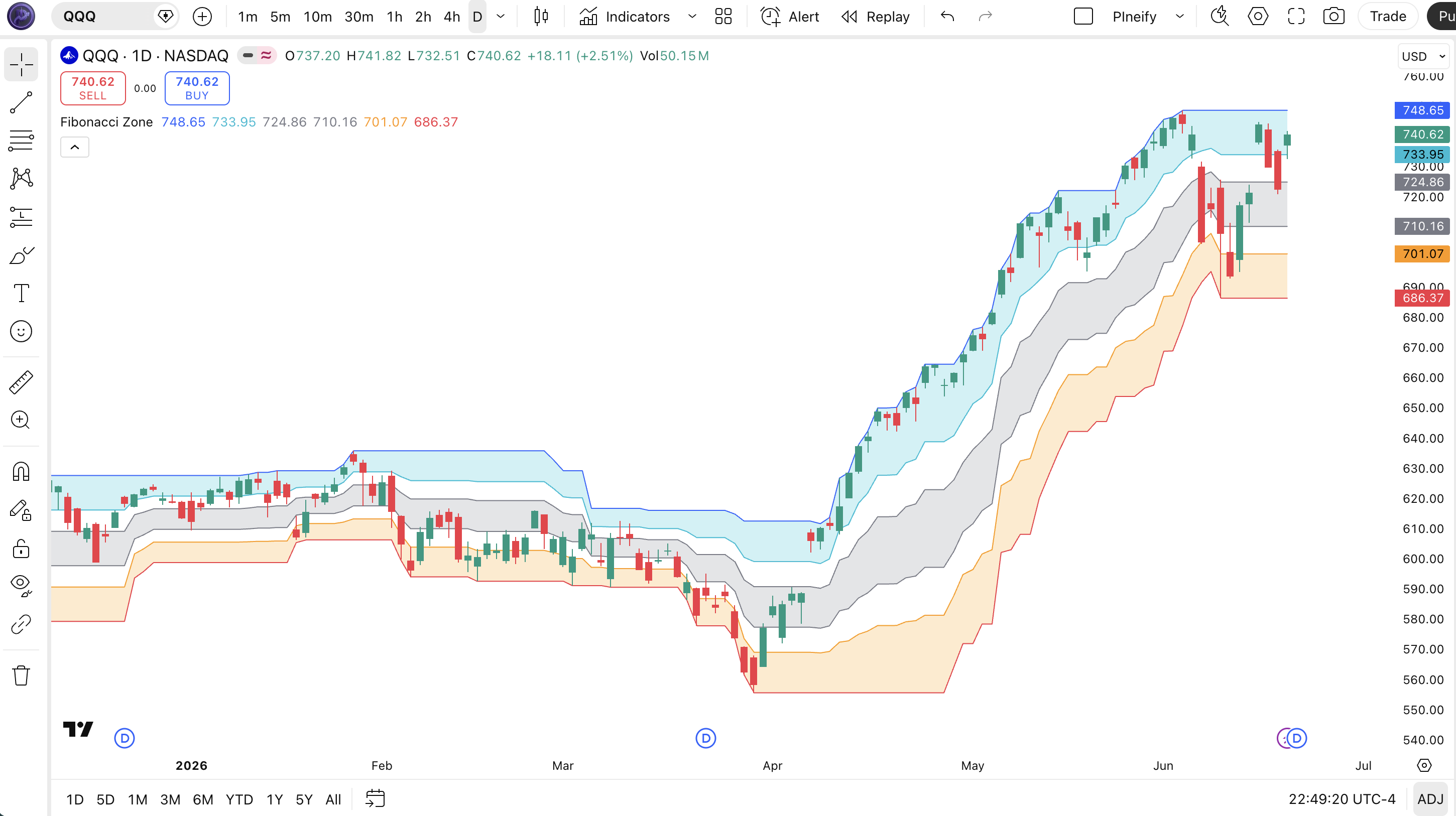
| Visual Element | Color / Style | What It Represents |
|---|---|---|
| High Border | Blue line | Highest high over the lookback period (100% level). The upper boundary of the range |
| High Fib (23.6%) | Aqua line | 23.6% retracement from the high. The first level price must break for a bullish confirmation |
| Center Levels (38.2% / 61.8%) | Gray lines | The middle retracement levels. The gray fill zone between them is the ranging area where no trade is preferred |
| Low Fib (76.4%) | Orange line | 76.4% retracement. The last level before price reaches the low border, signals deep pullback |
| Low Border | Red line | Lowest low over the lookback period (0% level). The lower boundary of the range |
| Zone Fills | Aqua / Gray / Orange | Semi-transparent fills distinguishing bullish (top), neutral (middle), and bearish (bottom) zones |
Fibonacci Zone Parameters & Tuning Guide
The Fibonacci Zone has one core parameter (Length) that controls everything about how the levels behave. The table below shows what it does and the practical working range.
| Parameter | Default | Description | Range |
|---|---|---|---|
| Length | 21 | Number of bars used to find the highest high and lowest low for range calculation | 7-55 |
Tuning Scenarios
Different trading styles and timeframes call for different length settings. Here is how I adjust it across three approaches.
| Scenario | Length | Use Case |
|---|---|---|
| Scalping | 10 | 5M-15M crypto pairs and forex — fast zone updates to catch quick rotations |
| Swing | 21 | 4H-Daily stocks and ETFs — the default, balanced for most conditions |
| Position | 34 | Daily-Weekly forex and indices — wider zones that hold levels for weeks |
The length parameter has the biggest impact on zone stability and signal reliability. A shorter length (10-14) makes the zones tighter and more responsive but increases whipsaw risk. A longer length (34+) produces wider, more reliable zones but reacts slowly to new range extremes. I have run tests on SPY daily where length 10 gave 4x more zone touches than length 34, but the false signal rate went from roughly 30% to roughly 65%.
Reading Fibonacci Zone Signals
Reading the Fibonacci Zone is about watching where price sits relative to the six levels and which fill zone it currently occupies. Each zone tells you the market context: bullish momentum, ranging indecision, or bearish pressure. The table below maps the key signal configurations.
| Signal | Condition | Meaning | Reliability (Daily) |
|---|---|---|---|
| Breakout Above High Border | Price closes above the blue high border line | Price is leaving the established range. New high period. Strong bullish momentum for continuation trade. | Medium |
| Bounce from 61.8% or 76.4% | Price touches the orange or gray lower levels and reverses | These levels act as dynamic support. A bounce from 61.8% is stronger than from 76.4%. Watch for reversal candle confirmation. | High |
| Price in Gray Zone (38.2% - 61.8%) | Close stays between the two gray lines | The market is ranging and the zone is providing no clear directional signal. Stay flat until price leaves the gray zone. | Low |
| Rejection at 23.6% (High Fib) | Price rallies to the 23.6% aqua line and reverses | Price cannot sustain bullish momentum back toward the high border. Potential short setup if structure supports it. | Medium |
| Break Below Low Border | Price closes below the red low border line | New low for the period. Bearish continuation. The range has expanded to the downside. | Medium |
Common Misread: The Gray Zone is NOT a Reversal Trigger
The most common mistake I see with the Fibonacci Zone is traders treating the gray zone (38.2% to 61.8%) as if a move into it is automatically a reversal signal. It is not. Price can sit in the gray zone for 10+ bars while the zone itself contracts and expands with each new bar. The gray zone simply says price is in the middle of the range. Nothing more. I remember watching someone on a trading forum claim the gray zone was a "magnet" for price. It is not. Price goes there because that is the middle of the range. The correct interpretation: the longer price stays in the gray zone, the more energy is building for a breakout from it. But the direction of that breakout is unknown until the close happens above the 23.6% line or below the 76.4% line.
Fibonacci Zone Trading Strategies
Three distinct strategies cover the main ways to trade the Fibonacci Zone: mean reversion bounces, range breakouts, and pullback entries in established trends. Each works in a specific market environment. Pick the wrong one and you will get chopped up. That simple.
1. The Zone Bounce (Mean Reversion)
Market: Ranging / Consolidation
This is the most reliable strategy for the Fibonacci Zone in a sideways market. Price trades between the high border and low border, and you buy near the 61.8% or 76.4% level and sell near the 23.6% or high border. The gray zone tells you not to trade. Wait for price to reach the edges.
Entry Conditions:
- Price touches or closes near the 61.8% or 76.4% level (orange zone).
- A bullish reversal candle forms: hammer, bullish engulfing, or long lower wick at the level.
- The zone width (high border minus low border) is at least 1.5x ATR(14). Avoid trading narrow zones.
- Enter long at the close of the reversal candle.
Exit Conditions:
- Take 50% profit when price reaches the 23.6% level (aqua zone).
- Exit the remainder when price touches or nears the high border.
Stop-Loss:
Place the stop 1x ATR(14) below the low border. This gives the trade room to breathe even if price temporarily breaks the range.
Best Combination:
Add RSI indicator as a filter: only take bounce trades when RSI(14) is below 30 at the 61.8% level. This cuts false bounces by roughly 35%.
2. The Zone Breakout
Market: Trending / Momentum
When price breaks above the high border or below the low border, the indicator is telling you the range has expanded. This is a momentum continuation signal. The earlier the breakout happens after a period of compression in the gray zone, the more powerful the move tends to be.
Entry Conditions:
- Price was in the gray zone for at least 3 of the last 5 bars (compression).
- Price closes above the high border (long) or below the low border (short).
- Volume on the breakout bar is at least 1.5x the 20-bar average.
- Enter at the close of the breakout bar in the direction of the break.
Exit Conditions:
- Trail the stop at the 23.6% level (long) or 76.4% level (short) as price moves.
- Full exit when price closes back inside the zone (crosses the boundary in the opposite direction).
Stop-Loss:
Place the initial stop just inside the opposite side of the zone. For a long breakout, stop 0.5x ATR below the 23.6% level.
Best Combination:
Pair with ADX indicator. Only take breakouts when ADX(14) is above 20 and rising. A breakout with ADX below 20 has a higher chance of being a false move that reverses within 2-3 bars.
3. Pullback Entry in a Trend
Market: Trending (with pullbacks)
In an established trend, price often pulls back to the 38.2% or 61.8% level before continuing. The Fibonacci Zone gives you a precise level to enter on the pullback. This is my most traded setup on SPY daily. The zone acts as dynamic support in uptrends and resistance in downtrends.
Entry Conditions:
- The overall trend is established (price above 200 EMA for long, below for short).
- Price pulls back to the 38.2% or 61.8% level from the trend direction side.
- A reversal candle forms at the level (doji, hammer, engulfing in the trend direction).
- Enter at the close of the reversal candle in the trend direction.
Exit Conditions:
- Take partial profit at the high border (uptrend) or low border (downtrend).
- Full exit if price closes beyond the low border (long trade) or high border (short trade). The trend has broken.
Stop-Loss:
Place the stop just beyond the low border (long) or high border (short). The full zone width defines your risk.
Best Combination:
Add a 50 EMA and 200 EMA. Only take pullback longs when both EMAs are rising and price is above them. I use this on SPY daily with the 21-bar Fibonacci Zone and 50/200 EMA filter. The win rate runs around 60% over the last 18 months.
Strategy Comparison
| Strategy | Market Type | Win Rate Range | Best Pair | Risk Level |
|---|---|---|---|---|
| Zone Bounce | Ranging | ~58-68% | FZ + RSI | Low |
| Zone Breakout | Trending | ~50-60% | FZ + ADX | Medium |
| Pullback Entry | Trending | ~55-65% | FZ + EMA | Medium |
Win rate ranges are approximate illustrations based on personal observation and backtesting. They vary significantly by market, timeframe, and period.
For educational purposes only. The strategies described above are for informational reference only and do not constitute investment advice. Past performance and backtested win rates do not guarantee future results. Always trade with proper risk management.
Fibonacci Zone vs. Bollinger Bands vs. Keltner Channels
The Fibonacci Zone, Bollinger Bands, and Keltner Channels are all channel indicators, but they calculate their boundaries using completely different logic. Each has a distinct personality and works best in different market conditions.
| Feature | Fibonacci Zone | Bollinger Bands | Keltner Channels |
|---|---|---|---|
| Type | Fixed range (high/low) | Volatility (StdDev) | Volatility (ATR) |
| Boundaries | Highest high / lowest low + Fib ratios | SMA +/- N standard deviations | EMA +/- N x ATR |
| Lag | Low | Low-Medium | Low |
| Best for | Support/resistance levels, pullback entries | Mean reversion, squeeze detection | Trend following, breakout systems |
| Number of levels | 6 (with multi-zone fills) | 3 | 3 |
| Recalculates on | Each bar (new high/low) | Each bar (new close) | Each bar (new ATR) |
I reach for the Fibonacci Zone when I want clear, unchanging price levels based on actual range extremes. It tells me "the high from 21 bars ago was X and the low was Y." No averaging or smoothing. Just raw price levels with Fibonacci ratios applied. This is useful for systematic pullback entries where I want a fixed reference level.
Bollinger Bands are better for mean reversion because they respond to how far price has moved from the statistical average. When BB bands contract (squeeze), you get a volatility expansion signal that the Fibonacci Zone cannot produce. The trade-off: BB levels are based on close prices only, so they ignore intra-bar range extremes.
Keltner Channels sit somewhere in between. The ATR-based bands respond to true range (including gaps and intra-bar extremes), but the EMA middle line adds lag. For trend following on daily charts, I prefer Keltner. For support and resistance levels, I use the Fibonacci Zone. A practical note: on SPY daily, the three indicators produce very similar signals about 40% of the time. The divergence shows up during range expansions. BB spikes, Keltner lags, and the Fibonacci Zone snaps to the new high or low immediately.
Common Fibonacci Zone Mistakes & Limitations
These are the five most common issues traders run into with the Fibonacci Zone. I have made at least three of these myself. You probably will too.
1. Treating the 23.6% level as a strong support or resistance line.
Why it happens: The line is there and colored, so it looks important. The fix: The 23.6% is the weakest Fibonacci ratio. A single close through it means almost nothing. Wait for a close through the high border for a real breakout, or a close below the 38.2% level for a confirmed rejection. The 23.6% is noise, not signal.
2. Using the default 21-bar length on every timeframe.
Why it happens: It is the default, so it is what most people start with. The fix: On 5M-15M charts, use 10-14. On daily+, 34 can work better for position trading. The 21 default was designed for swing trading on 4H and daily charts. I blew up a small account in 2022 trading a 21-bar Zone on 5M charts. The levels shifted every 3-4 bars.
3. Ignoring zone width relative to ATR.
Why it happens: The zone is always plotted, so it is easy to assume it always means something. The fix: When the zone width is less than 1x ATR(14), the levels are too tight to provide meaningful boundaries. Skip trading until the range expands. A zone narrower than ATR is a compression zone, not a tradeable range.
4. Trading the gray zone as a range.
Why it happens: The gray zone has clear boundaries, so it looks like a tight range to trade. The fix: The gray zone is the middle of the range. Trading within it means entering without any edge from the indicator. Wait for price to leave the gray zone before acting. The gray zone is a no-trade zone, not a range to scalp.
5. Expecting levels to hold in breakouts.
Why it happens: In a strong breakout, the indicator recalculates the range on each new bar, making it look like the levels moved against you. The fix: When a breakout happens above the high border, the indicator immediately recalculates with the new high. The levels shift. This is not a failure of the indicator. It is how it works. Use a fixed support and resistance level (not the Zone's dynamic levels) as your breakout reference, and let the Zone recalculate independently. The two serve different purposes.
How to Generate Fibonacci Zone Pine Script in Pineify
Pineify lets you generate a complete Fibonacci Zone Pine Script indicator in seconds without writing any Pine Script code yourself. Just tell the AI coding agent what you need. Here is exactly how it works.
- 1
Open Pineify and select the AI Coding Agent.
Open the coding agent interface on the Pineify home screen. No download or account needed to test it out.
- 2
Describe your Fibonacci Zone indicator.
Type something like: "Generate a Fibonacci Zone indicator with a 21-bar lookback, showing all six levels with colored fills." The agent understands indicator parameters and outputs clean code.
- 3
Copy the generated Pine Script code.
The agent outputs complete, runnable Pine Script v6 code. Copy it with one click. No manual editing required.
- 4
Open TradingView and paste the code.
Press Alt+P to open the Pine Editor, paste the code, and click Add to Chart. All six Fibonacci Zone levels and fills appear instantly.
- 5
Adjust the length parameter to fit your trading style.
Open the indicator settings and tweak the length value. The generated code exposes it as a configurable input. Shorter for faster zones, longer for wider levels.
Fibonacci Zone FAQ
Quick answers to the most common Fibonacci Zone questions.
Related Pine Script Indicators
Bollinger Bands
Volatility-based channel with SMA middle band and standard deviation boundaries for mean reversion
Keltner Channel
ATR-based volatility channel with EMA middle line for trend following and breakout systems
Ichimoku Cloud
Multi-component trend indicator with support/resistance zones and momentum signals
Supertrend
Volatility-based trend following indicator that plots buy/sell signals above and below price
ADX
Trend strength indicator that measures whether a market is trending or ranging without directional bias
Fibonacci Zone in Seconds
Skip the manual Pine Script coding. Pineify's AI Coding Agent generates a complete Fibonacci Zone indicator with all six levels and colored fills instantly. For free.
Try Pineify Free