AI futures trading guide

AI Futures Trading Starts With Reviewable Strategy Code

AI futures trading is a workflow for turning explicit futures rules into editable strategy code for human review and platform testing. Choose Pine Script or NinjaScript for the output. AI cannot prove an edge or replace platform testing. Pineify does not connect to a broker or execute trades.

TradingView Pine ScriptNinjaTrader 8 NinjaScriptNo broker execution
Build a futures strategy

Start with code generation. Review and testing remain your responsibility.

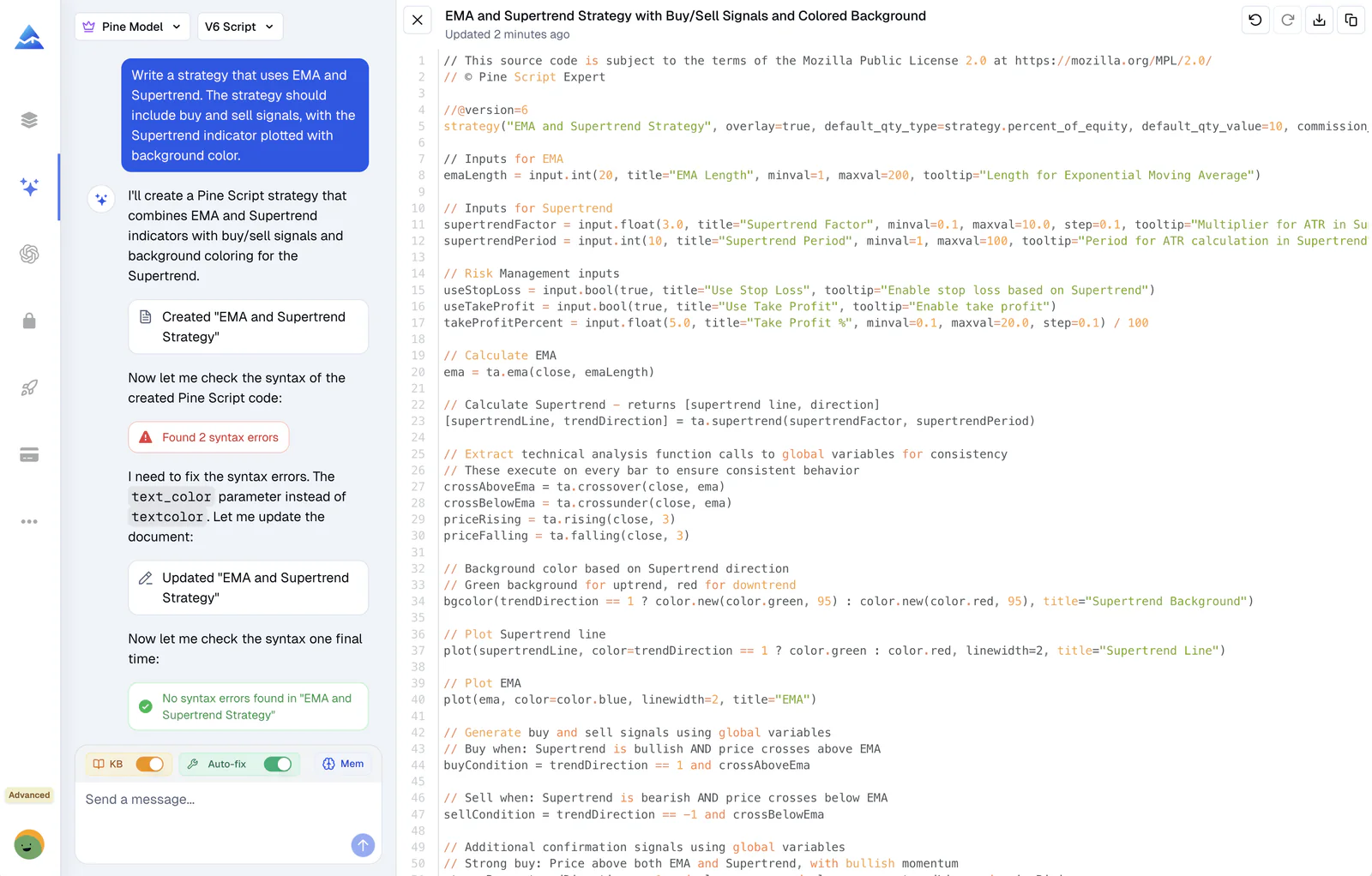
Pineify coding agent creating and checking an editable Pine Script strategy

Product view: the source stays visible while the agent checks and revises it.

Scope before software

Where AI Helps, and Where It Stops

Useful AI futures trading software reduces the distance between a precise idea and testable code. It does not remove market, model, data, or execution risk.

Good use of AI

  • Turn written entry, exit, session, and risk rules into source code
  • Explain generated logic and revise one requirement at a time
  • Check supported syntax or API issues before platform testing
  • Keep the result visible and editable for human review

Not established by AI

  • Predict whether a futures contract will rise or fall
  • Prove that a strategy will remain profitable
  • Replace compilation, backtesting, or simulation in the target platform
  • Connect Pineify to a broker or place live futures orders

Choose the output first

Two Coding Paths for Futures Strategy Research

The best AI for futures trading is the one that produces source code for the platform where you can review and test it. Pineify supports both paths, with different validation boundaries.

Pine Script v6

TradingView

You provide
A written strategy specification with symbol, timeframe, session, signals, exits, and test assumptions.
Pineify returns
An editable Pine Script indicator or strategy that you can inspect and revise.
You still validate
Add the script to TradingView, review compiler feedback, and examine simulated trades in Strategy Tester.
Review the Pine Script agent
NinjaScript C#

NinjaTrader 8

You provide
A bounded Indicator or Strategy brief with lifecycle, bar timing, order, and risk requirements.
Pineify returns
One editable NinjaTrader 8 C# source file with supported static diagnostics.
You still validate
Compile in NinjaScript Editor, then test in Strategy Analyzer and simulation before considering live use.
Review the NinjaTrader agent

A controlled workflow

From Futures Idea to Testable Code

Keep each stage inspectable. A result only moves forward after the previous assumption has been reviewed.

  1. 01

    Write objective rules

    State the contract, data series, session, entry, exit, position sizing, and order timing. If a condition cannot be tested, rewrite it.

  2. 02

    Generate a readable first draft

    Ask the coding agent for named inputs, comments around non-obvious logic, and a list of assumptions that need confirmation.

  3. 03

    Inspect and compile

    Read the source before running it. Resolve syntax and supported API diagnostics, then compile inside TradingView or NinjaTrader.

  4. 04

    Test the behavior

    Check signals, fills, costs, session boundaries, and contract changes. Separate historical fitting from unseen data and simulation.

  5. 05

    Keep a human decision gate

    Treat generated code and test output as evidence to review, not permission to trade. Live execution remains outside Pineify.

Prompt specification

Give the AI Rules, Not a Trading Goal

“Make a profitable futures bot” leaves every important choice undefined. A useful prompt fixes the market, timing, logic, risk, and test assumptions before code generation begins.

Instrument
Contract or continuous symbol, tick size, and rollover assumption
Data
Timeframe, session template, time zone, and bar-close or intrabar timing
Entry
Exact long and short conditions, including filters and precedence
Exit
Stop, target, trailing, time-based, and opposite-signal behavior
Sizing
Contracts or risk formula, plus the maximum allowed exposure
Testing
Commission, slippage, date range, holdout period, and simulation plan
futures-strategy-brief.txt
Template
Build a futures strategy for [platform and language].

Instrument: [contract or symbol]
Chart and session: [timeframe, time zone, trading hours]
Long entry: [complete Boolean rule]
Short entry: [complete Boolean rule]
Exits: [stop, target, trailing, time, opposite signal]
Sizing: [contracts or explicit risk rule]
Test assumptions: [commission, slippage, date range, rollover]

Return editable source code. List every assumption and every item that still requires platform testing.

Verification sources

Platform Tests and Live Trading Are Different Gates

TradingView documents strategy orders as simulated trades handled by its broker emulator. NinjaTrader documents a separate process for compilation, historical analysis, and real-time simulation. Neither process establishes future performance.

Common questions

AI Futures Trading FAQ

Can Pineify AI trade futures for me?

No. Pineify's current AI coding agents generate and revise Pine Script or NinjaScript source. They do not connect to your brokerage account or place futures orders. You remain responsible for reviewing, compiling, testing, and deciding whether to use the code.

Which AI futures trading workflow should I choose?

Choose Pine Script when your research and chart testing happen in TradingView. Choose NinjaScript when you need a NinjaTrader 8 Indicator or Strategy source file and can compile and test it in the desktop platform. The correct choice follows the platform where you will validate the behavior.

Can AI create a profitable futures strategy?

No AI can establish future profitability from a prompt or a historical backtest. Generated logic can be wrong, overfit, or unsuitable for current conditions. Review the source, model realistic costs, use unseen data, and simulate the strategy before making any live-trading decision.

Does AI-generated futures code still need review?

Yes. A clean syntax check only addresses a limited class of code problems. It does not confirm the strategy premise, order behavior, data quality, fill assumptions, or live results. Platform compilation and behavior testing are separate requirements.

What should I include in an AI futures trading prompt?

Include the target platform, contract or symbol, timeframe, session and time zone, exact entry and exit rules, position sizing, order timing, commission, slippage, rollover assumptions, and the test period. Ask the agent to state unresolved assumptions instead of filling gaps silently.

Turn a Defined Futures Rule Set Into Editable Code

Choose Pine Script or NinjaScript, state the assumptions, and keep every generated decision open to review.

Start with a strategy brief

Educational content only. Not investment advice. Futures trading involves substantial risk of loss, and past or simulated results do not guarantee future performance.