

Fibonacci Bollinger Bands Pine Script — Complete TradingView Guide
The Fibonacci Bollinger Bands indicator in Pine Script combines a Volume-Weighted Moving Average (VWMA) basis with 12 dynamic bands placed at Fibonacci ratios — 0.236, 0.382, 0.5, 0.618, 0.764, and 1.0 — of the standard deviation above and below the center line. Unlike standard Bollinger Bands that plot only a single upper and lower band, Fibonacci Bollinger Bands give traders a layered map of statistically significant support and resistance zones derived from both price volatility and the natural Fibonacci sequence. The default configuration uses a 200-bar lookback, an hlc3 source, and a multiplier of 3, making it ideal for 4H and Daily charts across stocks, crypto, and forex. This guide covers the complete Pine Script v6 implementation, all configurable parameters, three concrete trading strategies, and step-by-step instructions for generating it instantly with Pineify.
What Are Fibonacci Bollinger Bands?
The Fibonacci Bollinger Bands indicator is a volatility overlay that plots 13 lines — one VWMA basis and 12 Fibonacci-scaled standard deviation bands — directly on the price chart, used to identify dynamic support, resistance, and mean-reversion zones. The concept was developed by combining John Bollinger's Bollinger Bands (introduced in the 1980s) with the Fibonacci ratios popularised in technical analysis, creating a multi-band structure that adapts to current market volatility.
The indicator is built around a two-step calculation. First, it computes a basis using ta.vwma(src, length) — a Volume-Weighted Moving Average that assigns more weight to bars with higher trading volume, making the center line more responsive to price moves that are backed by real market participation than a plain SMA. Second, it calculates a standard deviation: dev = mult × ta.stdev(src, length). Each of the 12 bands is then placed at a Fibonacci fraction of dev: upper_k = basis + (fib_k × dev) and lower_k = basis − (fib_k × dev), where fib_k ∈ {0.236, 0.382, 0.5, 0.618, 0.764, 1.0}.
The outer bands at ±1.0×dev act like classic Bollinger Bands: price touching them signals statistical overextension. The inner bands at 0.618 and 0.382 align with the golden ratio and its complement, widely observed as natural retracement levels. The 0.5 band is a midpoint pivot, useful for defining trend bias — price consistently above the 0.5 upper band indicates bullish momentum, while price below the 0.5 lower band indicates bearish pressure.
Fibonacci Bollinger Bands are applicable across all major asset classes: equities, cryptocurrency, forex, and futures. They perform best on 4H and Daily timeframes where the 200-bar VWMA has enough data to form a stable baseline. On 1H charts the bands remain useful for intraday level identification. On timeframes shorter than 15 minutes, the 200-bar lookback lags too much to generate actionable signals.
Best Markets
Stocks · Crypto · Forex · Futures
Best Timeframes
1H, 4H, Daily
Overlay
Yes — 13 lines on price chart
Fibonacci Bollinger Bands Pine Script Code
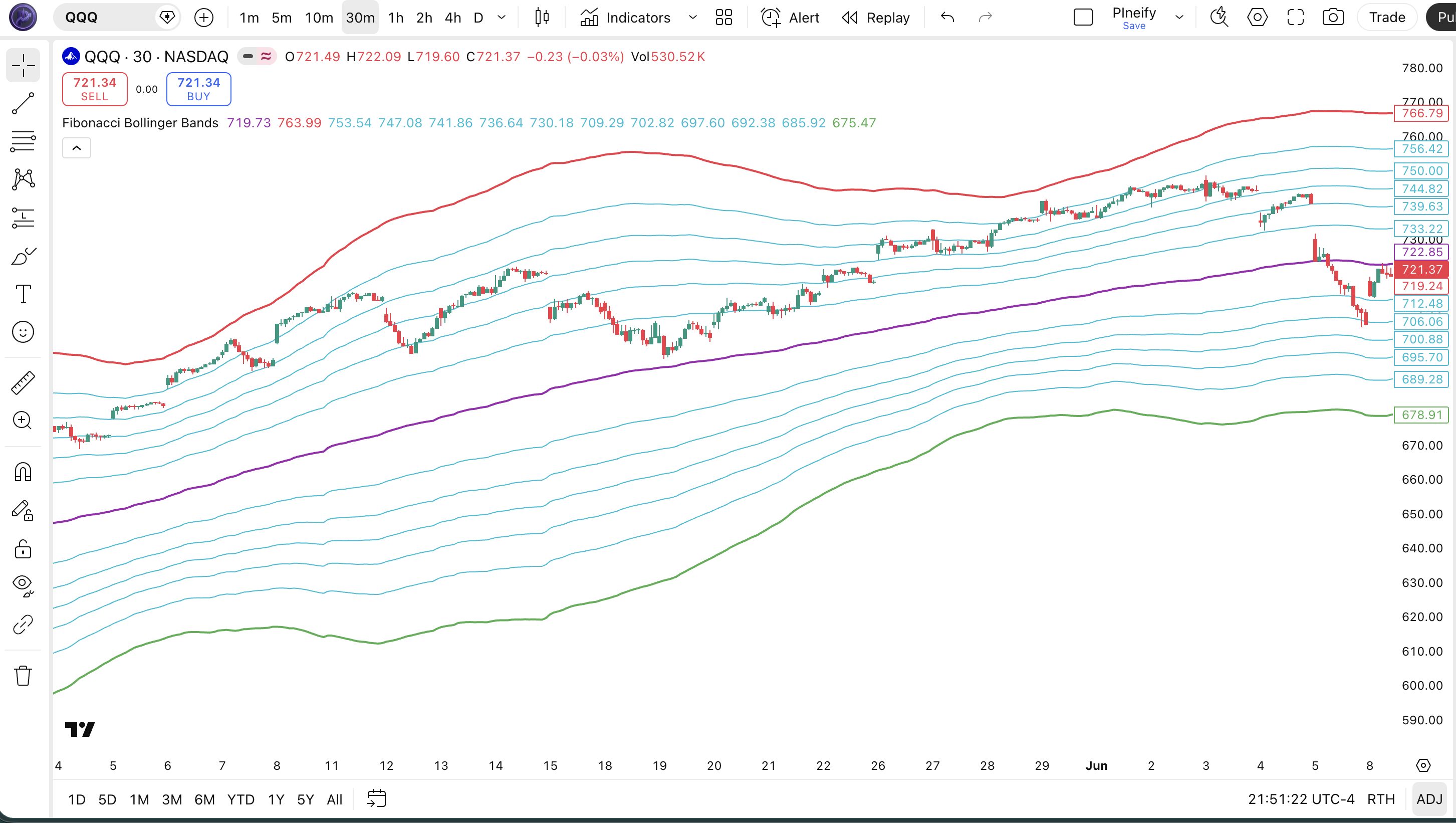
The complete Pine Script v6 code below plots all 13 Fibonacci Bollinger Bands — basis (purple), outer bands (red/green at ±1.0×dev), and 10 inner Fibonacci bands (cyan at 0.236, 0.382, 0.5, 0.618, 0.764) — as overlays on your TradingView price chart. To use it: open the TradingView Pine Script editor with Alt+P, paste the code, and click Add to chart. You can adjust 200, hlc3, or 3 in the p_ta_fbb(200, hlc3, 3) call to change the lookback, source, and multiplier.
// This source code is subject to the terms of the Mozilla Public License 2.0 at https://mozilla.org/MPL/2.0/
// © Pineify

//@version=6
indicator(title="Fibonacci Bollinger Bands", overlay=true, max_labels_count=500)

// Fibonacci Bollinger Bands core function
// basis: VWMA of source over length bars
// dev: standard deviation multiplied by mult
// Bands placed at Fibonacci ratios: 0.236, 0.382, 0.5, 0.618, 0.764, 1.0
p_ta_fbb(simple int length, series float src, simple float mult) =>
    basis = ta.vwma(src, length)
    dev = mult * ta.stdev(src, length)
    upper_1 = basis + (0.236 * dev)
    upper_2 = basis + (0.382 * dev)
    upper_3 = basis + (0.5   * dev)
    upper_4 = basis + (0.618 * dev)
    upper_5 = basis + (0.764 * dev)
    upper_6 = basis + (1     * dev)
    lower_1 = basis - (0.236 * dev)
    lower_2 = basis - (0.382 * dev)
    lower_3 = basis - (0.5   * dev)
    lower_4 = basis - (0.618 * dev)
    lower_5 = basis - (0.764 * dev)
    lower_6 = basis - (1     * dev)
    [basis, upper_6, lower_6, upper_5, upper_4, upper_3, upper_2, upper_1,
     lower_1, lower_2, lower_3, lower_4, lower_5]

[p_ind_1_basis,
 p_ind_1_upper1,  p_ind_1_lower1,
 p_ind_1_upper0764, p_ind_1_upper0618, p_ind_1_upper05,
 p_ind_1_upper0382, p_ind_1_upper0236,
 p_ind_1_lower0236, p_ind_1_lower0382, p_ind_1_lower05,
 p_ind_1_lower0618, p_ind_1_lower0764] = p_ta_fbb(200, hlc3, 3)

// Plot basis and outer bands with stronger color
plot(p_ind_1_basis,    "FBB - Basis",       color.rgb(156, 39, 176, 0), 2)
plot(p_ind_1_upper1,   "FBB - Upper (1)",   color.rgb(242, 54,  69, 0), 2)
plot(p_ind_1_lower1,   "FBB - Lower (1)",   color.rgb( 76, 175, 80, 0), 2)

// Plot inner Fibonacci bands
plot(p_ind_1_upper0764, "FBB - Upper (0.764)", color.rgb(0, 188, 212, 0), 1)
plot(p_ind_1_upper0618, "FBB - Upper (0.618)", color.rgb(0, 188, 212, 0), 1)
plot(p_ind_1_upper05,   "FBB - Upper (0.5)",   color.rgb(0, 188, 212, 0), 1)
plot(p_ind_1_upper0382, "FBB - Upper (0.382)", color.rgb(0, 188, 212, 0), 1)
plot(p_ind_1_upper0236, "FBB - Upper (0.236)", color.rgb(0, 188, 212, 0), 1)
plot(p_ind_1_lower0236, "FBB - Lower (0.236)", color.rgb(0, 188, 212, 0), 1)
plot(p_ind_1_lower0382, "FBB - Lower (0.382)", color.rgb(0, 188, 212, 0), 1)
plot(p_ind_1_lower05,   "FBB - Lower (0.5)",   color.rgb(0, 188, 212, 0), 1)
plot(p_ind_1_lower0618, "FBB - Lower (0.618)", color.rgb(0, 188, 212, 0), 1)
plot(p_ind_1_lower0764, "FBB - Lower (0.764)", color.rgb(0, 188, 212, 0), 1)
Chart Preview
Parameters
| Parameter | Default Value | Description | Recommended Range |
|---|---|---|---|
| length | 200 | Number of bars for both the VWMA basis and the standard deviation calculation. Larger values create wider, slower bands; smaller values react faster to volatility changes. | 50–500 |
| src | hlc3 | Price series used as input. hlc3 (average of high, low, close) balances wick extremes. Alternatives: close, hl2. | Any price series |
| mult | 3 | Standard deviation multiplier. Controls the width of the outermost bands (±1.0 × mult × stdev). Higher values push the outer bands wider, capturing more volatility. | 1.5–4.0 |
Tuning Guide by Trading Style
- Intraday (15m–1H): length 50–100, mult 2.0 — faster bands identify short-term support/resistance zones
- Swing trading (4H–Daily): length 200, mult 3 — the default; captures major volatility cycles over 200 sessions
- Position trading (Daily–Weekly): length 300–500, mult 3–4 — wider bands for long-term trend channels
Trading Strategies Using Fibonacci Bollinger Bands
Fibonacci Bollinger Bands are most effective as a layered support/resistance framework that defines both mean-reversion targets and momentum breakout thresholds. Below are three concrete strategies with specific entry and exit conditions.
Strategy 1 — Fibonacci Band Mean Reversion
Market environment: ranging/consolidating markets · Best timeframe: 4H, Daily
Price that reaches the outer 1.0 band is statistically overextended relative to the 200-bar VWMA. Combine with RSI(14) to confirm the overextension before entering a mean-reversion trade targeting the 0.5 or basis band.
- Long entry: close touches or pierces the lower 1.0 band AND RSI(14) < 35
- Target 1: lower 0.618 band (partial profit)
- Target 2: VWMA basis line (full exit)
- Stop loss: 0.5% below the lower 1.0 band
- Reverse for short: close touches upper 1.0 band AND RSI(14) > 65
Strategy 2 — Fibonacci Band Breakout with Volume
Market environment: trending markets after consolidation · Best timeframe: 4H, Daily
A daily close beyond the outer 1.0 band on above-average volume signals a genuine volatility expansion. Pair with MACD (12, 26, 9) histogram to confirm the momentum direction.
- Long entry: close > upper 1.0 band AND volume >
ta.sma(volume, 20) * 1.5 - Confirm: MACD histogram > 0 (positive momentum)
- Target: upper 1.0 band + (upper 1.0 band − basis) × 0.618
- Stop loss: close back below the upper 0.764 band
- Trail stop to the upper 0.618 band once price reaches target 50%
Strategy 3 — 0.5 Band Trend Bias Filter
Market environment: trending markets · Best timeframe: Daily, Weekly
The 0.5 band divides the total band width in half, acting as a trend pivot. Price consistently closing above the upper 0.5 band confirms bullish trend bias; below the lower 0.5 band confirms bearish bias. Use with EMA(50) for confirmation.
- Calculate EMA(50):
ema50 = ta.ema(close, 50) - Bullish bias confirmed: close > upper 0.5 band AND close > ema50
- Long entry: price pulls back to the upper 0.236 or 0.382 band and bounces (rejection candle)
- Target: upper 1.0 band
- Invalidation: close below the VWMA basis line — exit and wait for new bias signal
Disclaimer: The strategies above are for educational purposes only and do not constitute investment advice. Past performance does not guarantee future results. Always apply proper risk management and position sizing.
How to Generate Fibonacci Bollinger Bands in Pineify
- 1
Open Pineify
Go to pineify.app and sign in — a free account gives you immediate access to the AI Coding Agent and all built-in indicator templates.
- 2
Click "New Indicator"
Select "Indicator" as the script type from the creation menu to start a new Pine Script v6 indicator project.
- 3
Describe your Fibonacci Bollinger Bands setup
Type a prompt such as: "Create a Fibonacci Bollinger Bands indicator with a 200-bar VWMA basis, 12 Fibonacci-ratio bands at 0.236 to 1.0 standard deviations, source hlc3, multiplier 3." Pineify's AI generates the complete code in seconds.
- 4
Copy the generated code to TradingView
Click "Copy to TradingView" to copy the full Pine Script v6 code, open the TradingView Pine Script editor with Alt+P, paste the code, and click "Add to chart" to see all 13 bands on your chart.
- 5
Adjust length, source, and multiplier as needed
In the TradingView indicator settings panel, modify the lookback length (default 200), source (default hlc3), or multiplier (default 3) to match your trading style and timeframe — no code editing required.
Frequently Asked Questions
Related Pine Script Indicators
Build Fibonacci Bollinger Bands in Seconds
Skip the manual coding. Pineify's AI Coding Agent generates complete, ready-to-use Pine Script indicators — including Fibonacci Bollinger Bands with all 12 Fibonacci levels — instantly for free.
Try Pineify Free