

Guppy Multiple Moving Average Pine Script — Complete TradingView Guide
The Guppy Multiple Moving Average (GMMA) is a dual-ribbon trend indicator built from twelve exponential moving averages that reveals the interaction between short-term traders and long-term investors directly on your TradingView chart. Developed by Australian trader Daryl Guppy in the 1990s, GMMA uses a blue ribbon (EMA 3–15) to represent fast-moving speculative activity and a red ribbon (EMA 30–60) to represent slower institutional positioning. When the blue ribbon crosses above and separates from the red ribbon, a confirmed uptrend is in progress. In Pine Script v6, GMMA is implemented with twelve ta.ema() calls and two fill() overlays. Pineify can generate, customise, and deploy this indicator to TradingView in seconds — no coding required.
What Is the Guppy Multiple Moving Average?
The Guppy Multiple Moving Average (GMMA) is a trend-following overlay indicator that plots twelve exponential moving averages in two colour-coded groups to simultaneously track short-term trader sentiment and long-term investor commitment on any price chart. Daryl Guppy, an Australian private trader and author, published the methodology in his 1996 book Share Trading and later popularised it globally through hisTraders and Investors framework.
The Two Ribbon Groups
GMMA divides twelve EMAs into two distinct groups:
- Short-term group (Traders): EMA 3, 5, 8, 10, 12, 15 — plotted in blue, these fast EMAs respond quickly to price changes and represent speculative activity.
- Long-term group (Investors): EMA 30, 35, 40, 45, 50, 60 — plotted in red, these slow EMAs reflect the cost basis of position traders and fund managers.
Core Formula
Each GMMA line is a standard exponential moving average: EMA(n) = Price × k + EMA(n-1) × (1 − k), where k = 2 ÷ (period + 1). In Pine Script v6 this is called with ta.ema(source, length). No additional smoothing or weighting is applied — the diagnostic power comes entirely from the relative position and spacing of the twelve lines rather than from formula complexity.
Reading Ribbon Behaviour
There are four key ribbon states traders use to make decisions:
- Separation (bullish): Blue ribbon is above and moving away from the red ribbon — strong uptrend confirmed.
- Separation (bearish): Red ribbon is above and moving away from the blue ribbon — strong downtrend confirmed.
- Compression: Lines within one or both ribbons are bunching together — consolidation phase, a breakout is imminent.
- Intertwining: Both ribbons are overlapping and tangled — avoid trading; no dominant trend exists.
Applicable Markets and Timeframes
The Guppy Multiple Moving Average works on any liquid trending market. Daryl Guppy originally designed it for Australian equities on the daily chart, but it is now widely used in forex (EUR/USD, GBP/USD), crypto (BTC/USDT, ETH/USDT), and futures. The recommended minimum timeframe is the 15-minute chart for day-trading crypto and the 1-hour or daily chart for swing trading stocks. Avoid the 1-minute and 5-minute charts — the short-term EMA group becomes excessively noisy.
Pine Script Code Example
The code below implements the complete Guppy Multiple Moving Average in Pine Script v6 with both ribbon groups and fill areas for visual clarity. Copy the entire script, open TradingView Pine Script Editor (Alt+P), paste it in, and click Add to chart — the two coloured ribbons will appear immediately as an overlay on your price chart.
// This source code is subject to the terms of the Mozilla Public License 2.0 at https://mozilla.org/MPL/2.0/
// © Pineify

//@version=6
indicator(title="Guppy Multiple Moving Average", overlay=true, max_labels_count=500)

// Short-term group EMAs (representing traders)
short_ema_3  = ta.ema(close, 3)
short_ema_5  = ta.ema(close, 5)
short_ema_8  = ta.ema(close, 8)
short_ema_10 = ta.ema(close, 10)
short_ema_12 = ta.ema(close, 12)
short_ema_15 = ta.ema(close, 15)

// Long-term group EMAs (representing investors)
long_ema_30 = ta.ema(close, 30)
long_ema_35 = ta.ema(close, 35)
long_ema_40 = ta.ema(close, 40)
long_ema_45 = ta.ema(close, 45)
long_ema_50 = ta.ema(close, 50)
long_ema_60 = ta.ema(close, 60)

// Short-term group plots (Traders) — blue ribbon
p_short3  = plot(short_ema_3,  title="GMMA - Short EMA 3",  color=color.rgb(0, 102, 255, 0), linewidth=1)
plot(short_ema_5,  title="GMMA - Short EMA 5",  color=color.rgb(0, 102, 255, 0), linewidth=1)
plot(short_ema_8,  title="GMMA - Short EMA 8",  color=color.rgb(0, 102, 255, 0), linewidth=1)
plot(short_ema_10, title="GMMA - Short EMA 10", color=color.rgb(0, 102, 255, 0), linewidth=1)
plot(short_ema_12, title="GMMA - Short EMA 12", color=color.rgb(0, 102, 255, 0), linewidth=1)
p_short15 = plot(short_ema_15, title="GMMA - Short EMA 15", color=color.rgb(0, 102, 255, 0), linewidth=1)

// Long-term group plots (Investors) — red ribbon
p_long30  = plot(long_ema_30, title="GMMA - Long EMA 30", color=color.rgb(255, 0, 51, 0), linewidth=1)
plot(long_ema_35, title="GMMA - Long EMA 35", color=color.rgb(255, 0, 51, 0), linewidth=1)
plot(long_ema_40, title="GMMA - Long EMA 40", color=color.rgb(255, 0, 51, 0), linewidth=1)
plot(long_ema_45, title="GMMA - Long EMA 45", color=color.rgb(255, 0, 51, 0), linewidth=1)
plot(long_ema_50, title="GMMA - Long EMA 50", color=color.rgb(255, 0, 51, 0), linewidth=1)
p_long60  = plot(long_ema_60, title="GMMA - Long EMA 60", color=color.rgb(255, 0, 51, 0), linewidth=1)

// Fill ribbons for visual clarity
fill(p_short3,  p_short15, title="GMMA - Short Group Fill", color=color.rgb(0, 102, 255, 90))
fill(p_long30,  p_long60,  title="GMMA - Long Group Fill",  color=color.rgb(255, 0, 51, 90))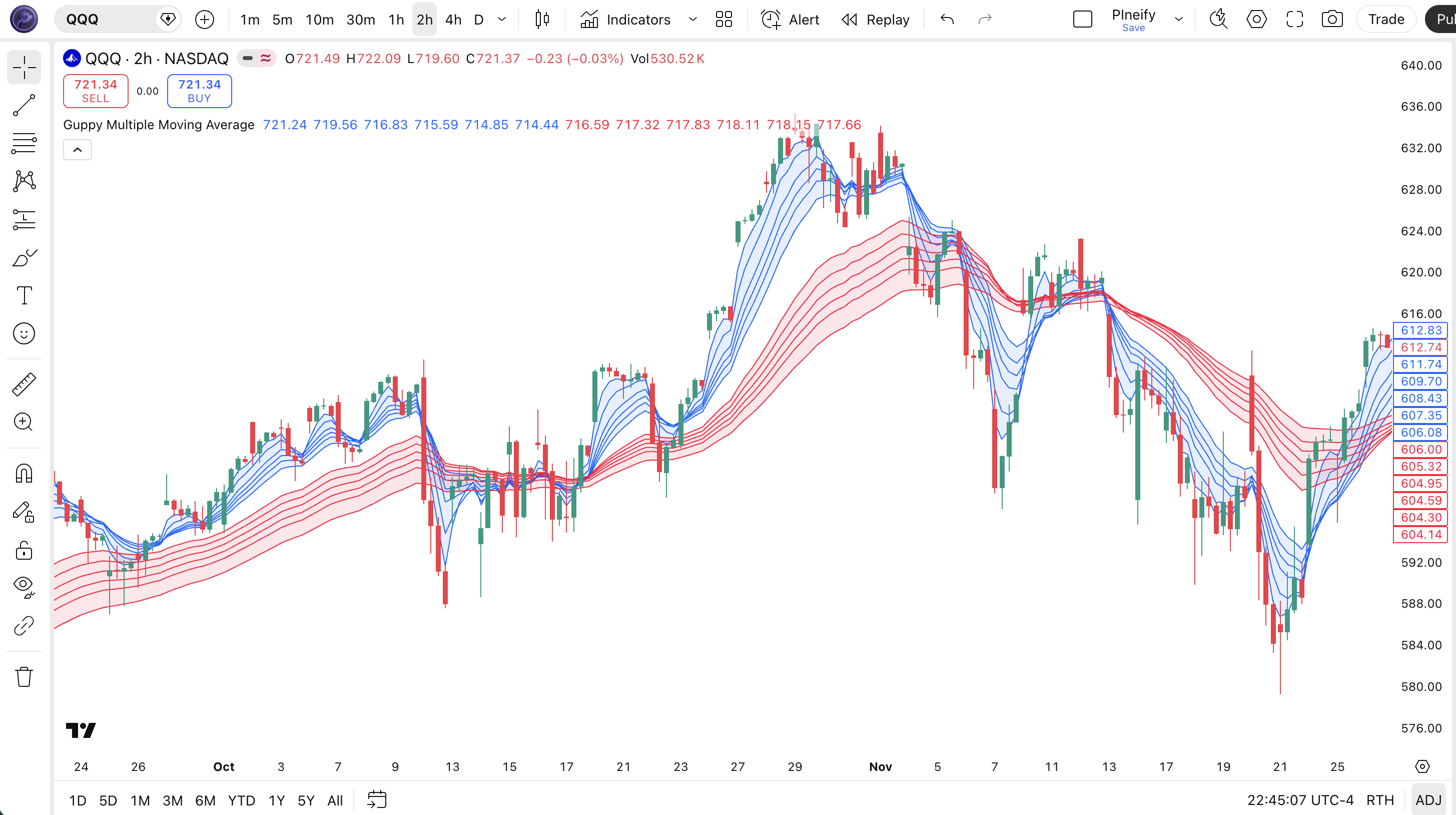
Parameters
The classic GMMA uses fixed period values defined by Daryl Guppy. The table below documents each EMA group and its role.
| Parameter | Default Value | Description | Recommended Range |
|---|---|---|---|
| Short EMA 1 | 3 | Fastest trader EMA; most responsive to price | 3–5 |
| Short EMA 2 | 5 | Second short-term EMA for ribbon width | 5–8 |
| Short EMA 3 | 8 | Middle short-term EMA | 8–10 |
| Short EMA 4 | 10 | Fourth short-term EMA | 10–12 |
| Short EMA 5 | 12 | Fifth short-term EMA | 12–14 |
| Short EMA 6 | 15 | Slowest trader EMA; outer boundary of short ribbon | 15–21 |
| Long EMA 1 | 30 | Fastest investor EMA; inner boundary of long ribbon | 25–30 |
| Long EMA 2 | 35 | Second long-term EMA for ribbon width | 33–38 |
| Long EMA 3 | 40 | Middle long-term EMA | 38–44 |
| Long EMA 4 | 45 | Fourth long-term EMA | 43–48 |
| Long EMA 5 | 50 | Fifth long-term EMA | 48–55 |
| Long EMA 6 | 60 | Slowest investor EMA; outer boundary of long ribbon | 55–65 |
| source | close | Price series used as EMA input | close / hlc3 |
- Daily swing trading (stocks/forex): Use the default Guppy periods (3–15, 30–60) on the 1-hour or daily chart for the cleanest signals.
- Crypto scalping (15-min chart): Halve all periods (2–8 short, 15–30 long) to speed up ribbon response while keeping separation logic intact.
- Weekly trend analysis: Double all periods (6–30 short, 60–120 long) to filter out medium-term noise and focus on multi-month trend direction.
Trading Strategies
The Guppy Multiple Moving Average generates three high-probability strategies based on ribbon interaction, compression, and cross-confirmation with other indicators.
Strategy 1: Ribbon Crossover Trend Entry
Market environment: trending (applies to stocks, crypto, forex)
Entry conditions:
- The blue short-term ribbon (EMA 3–15) crosses above the red long-term ribbon (EMA 30–60).
- The short-term ribbon is expanding (lines spreading apart), not compressing.
- ADX is above 20, confirming trend strength (combine with ADX indicator).
- Enter long on the close of the candle that completes the crossover.
Exit conditions:
- The short-term ribbon crosses back below the long-term ribbon.
- The long-term ribbon begins to slope downward or compress significantly.
Strategy 2: Compression Breakout
Market environment: transitioning from consolidation to trend
Entry conditions:
- Both the short-term and long-term ribbons are compressed (EMAs within each group are close together).
- A strong breakout candle closes outside the compressed ribbon zone with above-average volume.
- The short-term ribbon begins expanding in the direction of the breakout.
- Confirm with Bollinger Bands: price closes outside the upper/lower band on the same candle.
- Enter in the direction of the breakout on the next candle open.
Exit conditions:
- The short-term ribbon re-enters and overlaps with the long-term ribbon.
- Price closes back inside the compression zone.
Strategy 3: Pullback to Long-Term Ribbon
Market environment: established uptrend, suitable for stocks and crypto daily charts
Entry conditions:
- Both ribbons are separated bullishly (blue above red, both pointing up).
- Price pulls back and touches or enters the top of the red long-term ribbon (EMA 30).
- RSI on the same timeframe is between 40 and 55 (oversold without trend reversal).
- A bullish reversal candle (hammer, engulfing) forms at the long-term ribbon level.
- Enter long on the close of the reversal candle with a stop below EMA 60.
Exit conditions:
- Price closes below EMA 60 (long-term ribbon lower boundary), invalidating the trend.
- RSI diverges bearishly at a new price high.
How to Generate GMMA in Pineify
Pineify generates, customises, and deploys the Guppy Multiple Moving Average to TradingView without writing a single line of Pine Script manually.
- 1
Open Pineify at pineify.app
Navigate to pineify.app and sign in with your TradingView account to access the indicator builder.
- 2
Click "New Indicator" and select GMMA
From the indicator library, search for "Guppy Multiple Moving Average" or browse the Moving Averages category to find the GMMA template.
- 3
Describe any customisations you need
Tell Pineify's AI agent exactly what you want: custom EMA periods, different source inputs (HLC3 instead of close), alerts for ribbon crossovers, or combined conditions with RSI or ADX.
- 4
Copy the generated Pine Script v6 code
Pineify generates a complete, ready-to-paste Pine Script v6 file with all your customisations applied. Click the copy button to get the code.
- 5
Adjust parameters and publish to TradingView
Paste the code into TradingView Pine Script Editor (Alt+P), click "Add to chart", and fine-tune ribbon colours or period values using the indicator settings panel.
Frequently Asked Questions
Common questions about the Guppy Multiple Moving Average in Pine Script and TradingView.
Related Indicators
Explore other Pine Script indicators commonly used alongside the Guppy Multiple Moving Average.
Build Your Own GMMA Indicator — Free
Pineify generates custom Pine Script v6 code for the Guppy Multiple Moving Average and 100+ other indicators. No coding required — describe what you want and deploy to TradingView in seconds.