Pineify: The Unusual Whales Alternative for Options Trading

Pineify is the Unusual Whales alternative that goes further than raw options flow data. It scores thousands of stocks daily (1-10), maps max pain levels, projects expected moves, and delivers full Greeks chains -- all inside TradingView. I've spent months testing both platforms side by side. When I screened SPY last week, Pineify gave it an 8/10 with an expected move of +/- $4.50. That told me options were pricing a contained move, so I skipped the premium-heavy strangle I was considering. If Unusual Whales leaves you asking "what now?" after seeing the flow, this is worth a serious look.

Pineify's AI Stock Picker scores every stock from 1 to 10 by combining technical patterns, fundamentals, and sentiment signals. For options traders, it provides live chains with Greeks and IV, Max Pain, Put/Call ratios, and Expected Move projections. You can spot a high-rated stock and check its options setup without switching tabs. Try Pineify's AI-powered options analysis platform for free.
Why Traders Are Exploring Alternatives to Unusual Whales
Unusual Whales gives you real-time options flow, dark pool activity, the Greeks (Delta, Gamma, etc.), and market positioning like GEX. You can set alerts for unusual trades and filter for block orders. A few patterns keep coming up:
- Limited features on lower tiers. At $50/month, key data like dark pool prints and full flow coverage sit behind higher plans.
- No free trial. You can't test it before committing.
- Data-heavy, light on guidance. You get great flow info but no built-in strategy helper, backtesting, or AI scoring to guide your next move.
- Monthly cost adds up. The subscription becomes a real part of your trading expenses over time.
These gaps leave room for a platform that helps you use the data, not just see it. That's what Pineify does.
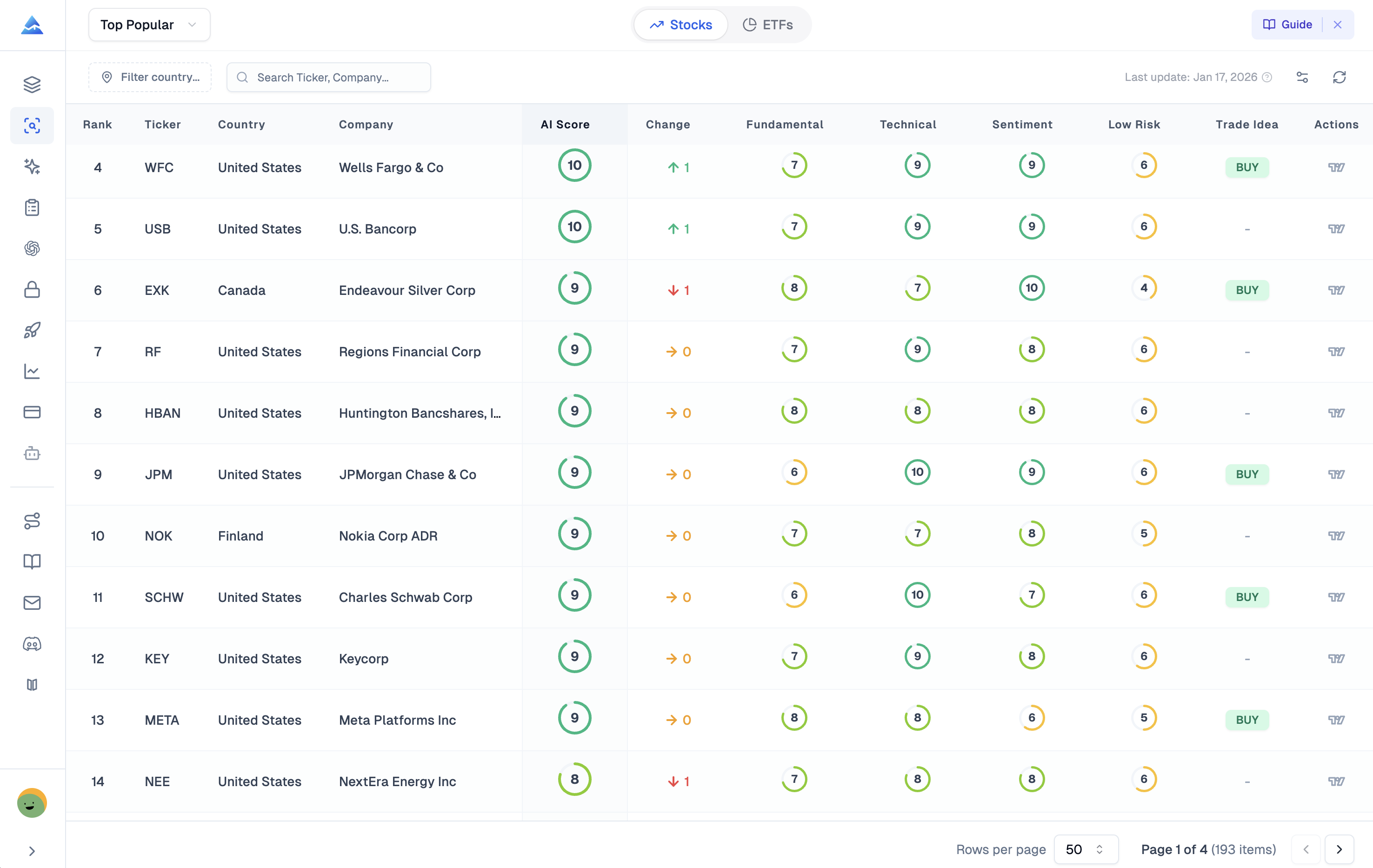
Pineify's AI Stocks & Options Picker is designed to cut through the noise. Instead of manually checking earnings, chart patterns, and news, the system does it all at once. It assigns each stock a simple score:
- 7-10: Strong potential based on the AI's analysis.
- 4-6: Worth monitoring, but no strong signal yet.
- 1-3: Lowest signals for movement right now.
The real value is that you can act on that AI insight immediately. Once you find a high-scoring stock, you can check its options chain, max pain, and expected move -- all in the same view. You don't need one tab for research, another for charts, and a third to place a trade. For anyone looking to test their own strategies, our guide on How to Backtest on TradingView: The Complete 2026 Guide That Actually Works provides a practical framework.
Here is the feature breakdown:
| Feature | Unusual Whales | Pineify AI Stock & Options Picker |
|---|---|---|
| Options Flow Data | Real-time across all U.S. exchanges | Unusual Activity Scanner + AI interpretation |
| AI Stock Scoring | AI-assisted filter creation only | Predictive 1-10 score per stock, daily |
| Options Chain | Full options chain with Greeks | Real-time calls & puts, full Greeks, ITM/OTM highlighting |
| Max Pain & P/C Ratios | Limited | Max Pain, Put/Call Volume & OI ratios |
| Expected Move Analysis | Not featured prominently | IV-based price range projections by expiration |
| Deep Financials | Not included | 10+ years of financial statements, Piotroski & Altman Z scores |
| Analyst Consensus | Not included | Buy/Sell/Hold ratings, analyst price targets |
| TradingView Integration | No native integration | Full TradingView charting with custom indicators |
| Pricing Model | $50/month (entry tier, restricted) | One-time lifetime payment from $99 |
| Free Trial | None | Free tier available |
The main difference is clear. Unusual Whales specializes in tracking options flow as it happens. Pineify covers the full process -- from finding ideas with AI scores and deep financials to planning trades with expected moves and max pain, all the way to charting on TradingView. I prefer having everything in one place with a single lifetime payment instead of a recurring bill.
A Closer Look: Pineify's Options Intelligence Suite
Live Options Chain with Full Greeks Data
Pineify's live options chain shows calls and puts side by side. You get real-time bid and ask prices, the last trade, and the full set of Greeks -- Delta, Gamma, Theta, and Vega -- right next to implied volatility and open interest. Contracts are color-coded by ITM/OTM status, so active trading areas jump out without endless scrolling.
Finding Smart Money Moves with the AI Activity Scanner
This is a big draw for traders looking for an alternative to platforms like Unusual Whales. Pineify's scanner automatically flags unusual options volume, block trades ("sweeps"), and other signals that may indicate informed trading. It pairs this with put/call ratios (volume and open interest based) for a layered sentiment picture. Start tracking unusual options activity with Pineify's scanner to spot moves before the crowd.
Understanding Max Pain
Max pain is the stock price at expiration that causes the most options buyers to lose money. Why does that matter? Market makers have an incentive to push the stock toward that level. Pineify calculates and shows this level for every upcoming expiration. It's especially useful when you're holding weekly options with time running out.
Visualizing the Expected Move
Pineify's Expected Move projection uses current implied volatility to estimate a stock's probable trading range through an option's expiration. You see the range as a band on an interactive chart overlaid on price action. A table lets you sort and compare these ranges across all expiration dates. I checked AAPL before its last earnings, and the expected move band was $5.80 wide. That told me IV was pricing in more risk than I wanted, so I bought a call spread instead of a naked call.
Seeing the Whole Board: Why More Than Flow Data Matters
Flow data tells you what is happening. Pineify helps you understand the why by bringing the rest of the picture together.
Built-In Fundamental Research
Instead of just tracking big money flows, Pineify gives you the company's actual report card: income statements, balance sheets, and cash flow for over a decade. It calculates proven health scores like the Piotroski F-Score and Altman Z-Score. Before I place an options bet, I check whether the company's fundamentals support the direction I'm betting on. When I looked at GME's Altman Z-score in January, it was deep in the distress zone -- that made me reconsider the bullish options flow I was seeing. That extra check has saved me from a few bad trades.
What Are the Analysts Saying?
Pineify aggregates Wall Street ratings into a simple Buy/Sell/Hold consensus, plus low, average, and high price targets for the next year. When I'm building an options spread, I check where analysts see the stock heading as context for strike selection and timing.
Professional Charts, Already Connected
Pineify includes TradingView's charting built right in -- advanced indicators, drawing tools, any timeframe. The integration is natural if you already use TradingView. Since Pineify also has an AI Pine Script helper, you can research a stock, build a custom indicator to test an idea, and chart it without leaving the platform. To keep your workspace organized, our guide on How to Hide Indicators in TradingView shares practical tips.
Real-Time News and Market Mood
Pineify aggregates the latest news, SEC filings, and press releases per stock, then uses AI to gauge sentiment (positive, negative, neutral). When you're trading options around earnings or major announcements, having a curated news feed helps you spot catalysts early.
Flow data tells you someone placed a big bet. Pineify helps you figure out if they're betting on a strong horse. By combining fundamentals, analyst views, charting, and news, you get the full story.
Here's who gets the most out of Pineify's stock and options tool:
- Swing and day traders who want a daily starting point. The AI ranks stock ideas with BUY signals and risk assessment so you know where to focus.
- Options traders tired of juggling five websites. This bundles unusual activity scans, max pain, expected move, and the options chain on one screen.
- Fundamental traders who use options to express directional views. Check a stock's financial health score first, then set up the trade.
- TradingView power users. Pineify runs inside it, so you get AI-powered picks without leaving your charts. To extend your analysis further, the Best CPR Indicator in TradingView: Complete Guide for Day Traders is a solid pivot-based tool.
- Anyone tired of monthly subscriptions. One-time lifetime payment vs. another recurring $50+ fee. I'll take the lifetime option every time.
Pricing: Pay Once, Use Forever vs. Monthly Subscriptions
This is where Pineify really stands out. Instead of a monthly fee, it works as a one-time purchase. Pay once, access for life.
| Plan | One-Time Price | What's Included |
|---|---|---|
| Plus | $99 | Core features for tracking unusual trading activity. |
| Advanced | $149 | Everything in Plus, plus the AI Stocks & Options Picker, Strategy Optimizer, and Trading Journal. |
| Expert | $259 | The complete toolkit, adding the AI Finance Agent and AI Trading Agent. |
Compare that to a typical monthly model. Unusual Whales starts at about $50/month for basic access:
- $50/month becomes $600 every year.
- Over two years, that's $1,200 -- and you keep paying.
Pineify's Advanced Plan at $149 is less than three months of that other service. After that, it's yours. The long-term math is straightforward. I've burned through more than $1,200 on trading subscriptions in the last two years, so the lifetime pricing was an easy decision. Explore Pineify's lifetime pricing plans to see the savings.
Common Questions: Pineify vs. Unusual Whales
Q: Does Pineify show real-time options flow like Unusual Whales? A: Yes, but with added context. Pineify's Unusual Activity Scanner uses AI to highlight abnormal volume and potential smart money movement. You get real-time flow, options chains, and Greeks, plus interpretation. Unusual Whales gives you the raw feed. Pineify gives you the data and helps you understand it.
Q: Is Pineify good for beginners? A: I'd say yes. The core feature is an AI that scores each stock 1-10. That alone cuts through the noise for new traders who don't know where to start. It also offers daily lists like "Top Growth" or "Top Dividend" stocks to point you in a direction.
Q: Can I use Pineify for earnings plays? A: Yes. The Expected Move calculator shows how much a stock is predicted to swing. Combined with real-time news and past earnings surprises, you can plan options strategies around earnings reports with more confidence.
Q: Does Pineify replace Unusual Whales entirely? A: For most everyday traders, yes. If you look at Unusual Whales' data feed and wonder "what do I do with this?" Pineify is likely a better fit. It wraps similar flow data into a full toolkit with analysis, charts, and fundamentals. Unusual Whales stays a specialized, power-user data feed, and I still check it for specific things like dark pool prints.
Q: Is there a free version of Pineify? A: Yes. Sign up for a free account and test the platform first. Unusual Whales does not offer a free trial, which makes Pineify easier to evaluate before spending any money.
Try Pineify's AI Stock & Options Tool
If raw data feeds feel overwhelming and you're looking for a clearer path, Pineify is worth testing. It's a single platform that uses AI to suggest stocks and provides detailed options analysis.
Here's how to start:
- Go to Pineify's AI Stock Picker and try the free version. No credit card needed.
- Browse the daily AI picks. Sort by sector, risk level, or score to find ideas that match your style.
- Click any stock to open its options dashboard. You'll see the full options chain, Max Pain level, unusual activity alerts, and expected move projections.
- Review the fundamentals. Financial health scores and analyst ratings help validate your own research.
- If it fits, choose a one-time payment plan. The Expert lifetime plan gives full access to AI tools and all options features.
One limitation I'll flag: Pineify doesn't offer direct broker integration for trade execution yet. You'll still need your brokerage platform to place the actual trades. I've been asking the team about this, and it's not on the near-term roadmap. That said, having research, analysis, and charting in one place saves enough time that I don't mind the extra click. For those interested in the technology behind automated trading, our AI Genius Trading Bot Complete Guide to Automated Trading Technology covers the fundamentals.
Frequently Asked Questions
What makes Pineify a better Unusual Whales alternative?
Pineify combines AI stock scoring, real-time options flow scanning, max pain analysis, full Greeks data, and fundamental research inside TradingView. Unusual Whales focuses on raw options flow. Pineify adds predictive stock scores, expected move projections, and financial health metrics -- plus a one-time lifetime payment instead of monthly fees.
How do I use Pineify's unusual activity scanner?
The scanner automatically detects abnormal options volume, block trades (sweeps), and potential smart money moves. It combines this with put/call ratios based on volume and open interest for a complete sentiment view. Every signal comes with context from Pineify's AI stock scoring system.
What options Greeks does Pineify provide?
Pineify's live options chain shows Delta, Gamma, Theta, and Vega alongside implied volatility, open interest, and bid/ask prices. Contracts are color-coded by ITM/OTM status so you can quickly identify active trading areas across strikes and expirations.
Can Pineify help with earnings season options trading?
Yes. The Expected Move calculator projects price ranges from implied volatility. The platform also provides real-time news aggregation, earnings surprise history, and sentiment analysis -- all useful for planning options strategies around earnings reports.
How does Pineify's pricing compare to Unusual Whales?
Pineify offers lifetime plans starting at $99. Unusual Whales charges $50/month for its entry tier ($600/year). Pineify's Advanced plan at $149 covers the AI Stock & Options Picker as a single payment. Over two years, the savings exceed $1,000.
Does Pineify require a TradingView subscription?
No. Core features like AI stock scoring, options chain, max pain analysis, financial fundamentals, and analyst ratings work inside Pineify's own interface. TradingView integration adds advanced charting and custom indicator support but is optional.