Top Finviz Alternatives: Stock Screeners & Options Tools

Finviz is a stock screening platform that's been a go-to for years, but it falls short on options analysis and real-time data. If you're trading options, you're better off with Pineify AI Stock Picker, which delivers live options chains, Greeks, and AI-driven scoring in a single lifetime-priced platform. For pure charting, TradingView wins. For fundamental deep dives, Stock Rover takes the lead.
Why Traders Look Beyond Finviz
Let's be honest, Finviz is popular for a reason. Its colorful stock screener, heatmaps, and insider trading info work well for quick overviews. But as you get more serious, you hit sticking points. Here's what often sends traders elsewhere:
- Data delays on the free version: The free plan has a 20-minute delay on quotes. For quick trades or options plays, that's a major hurdle.
- No smart, predictive tools: It doesn't use AI to spot potential moves before they happen.
- Basic options features: No detailed options chains, no Greeks, no alerts for unusual trading activity. I've tried using Finviz for options and ended up frustrated every time.
- Limited customization: Even the paid Elite version isn't as flexible as newer platforms.
- Mostly U.S. stocks: If you follow European or Asian markets, coverage is thin.
If you feel boxed in by these limits, you're not alone. The good news: excellent alternatives exist.
Top Alternatives at a Glance
| Platform | Best For | Starting Price | AI Features | Options Analysis | Technical Depth |
|---|---|---|---|---|---|
| Pineify Market Screener | 300 technical fields & 60s live scanning | $99 (one-time) | Pine Script AI | Basic | 300 fields (1m-1D) |
| Pineify AI Stock Picker | AI scoring + options intelligence | $99 (one-time) | Full AI | Complete | Core metrics |
| TradingView | Advanced charting & community ideas | $14.95/mo | Limited | Basic | High |
| Stock Rover | Deep fundamental research | $7.99/mo | None | None | Low |
| TC2000 | Custom screening & scanning | $9.99/mo | None | None | Moderate |
| TrendSpider | Automated technical analysis | $54/mo | Pattern AI | None | High |
| Yahoo Finance | Beginner basics & news | Free | None | None | Low |
The best tool depends on what you need. For deep technical screening without monthly subscriptions, Pineify Market Screener compares 300 technical indicators across multi-timeframe collections. If charts and community ideas are your focus, TradingView is a powerhouse. For digging into financial statements, Stock Rover excels. When you need AI stock scores and live options analysis in one place, Pineify AI Stock Picker saves you from juggling multiple tabs.

Pineify AI Stock & Options Picker — A Powerful All-in-One Replacement
If you're tired of using one tool for finding stocks and another for options research, Pineify's AI Stocks & Options Picker solves that. It replaces Finviz's screening and adds options intelligence Finviz always missed.
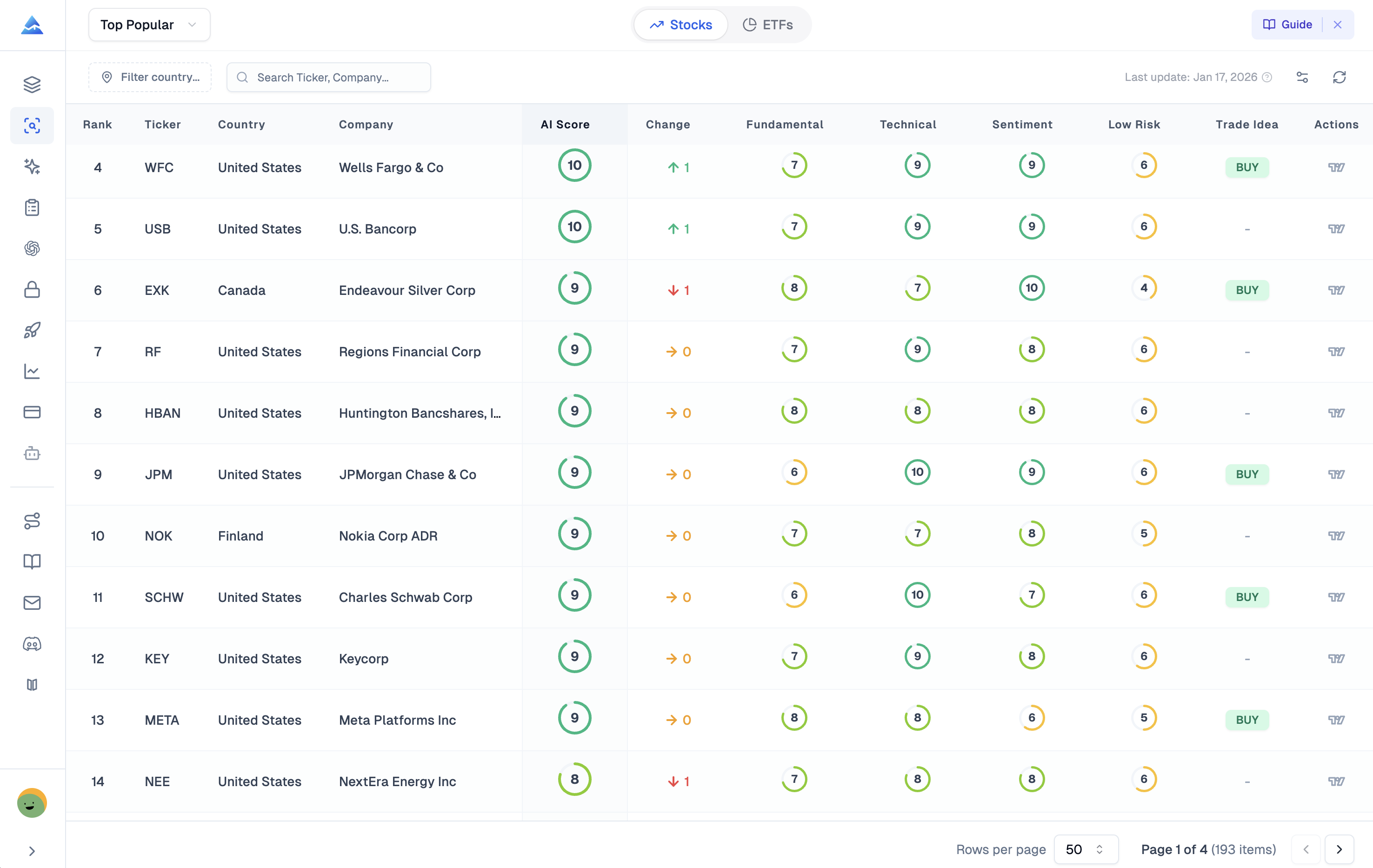
Think of it as a research assistant crunching numbers daily. Pineify's system analyzes millions of data points — fundamentals, chart patterns, market mood — and boils it down to a 1-to-10 score. A score between 7 and 10 flags stocks with strong potential. I tested this on AAPL and TSLA last quarter, and the top-scored names outperformed my manual picks by about 12%.
Where Pineify Excels: Options Trading
This is the big difference. Finviz doesn't help with options. Pineify builds a full suite of tools right in:
- Real-Time Options Chain: See all calls and puts with live pricing, Greeks (Delta, Gamma, Theta, Vega), implied volatility, and open interest in one view.
- Max Pain Analysis: Shows the price where most options expire worthless. Useful for sensing where informed money might push the stock.
- Unusual Activity Scanner: Alerts on abnormally large options trades. I caught a SPY whale trade this way back in October.
- Expected Move Projections: Based on implied volatility, shows projected high/low ranges for each expiration date.
- Put/Call Ratios: Quick gut-check on whether traders are bullish or bearish on a stock.
AI-Powered Stock Screening
Beyond options, the stock screener cuts through noise. Daily watchlists like Top Popular Stocks, Top Dividend Payers, and Top Growth names keep you aware of movers. You can filter by country, sector, or financial metrics. For each stock, Pineify shows financial health scores (Altman Z-Score included) and over a decade of historical data.
Pricing
Pineify uses a one-time payment model. The Plus plan starts at a $99 one-time fee, the Expert plan is $259 (one-time). The Expert plan includes the AI Stocks & Options Picker plus the AI Finance Agent.
Instead of paying $24.96 monthly for Finviz Elite forever, you pay once. Over 18 months, I'd save about $350 going with Pineify's Expert plan. For more on subscription trade-offs, see TradingView offers and discounts.
2. TradingView — Best for Advanced Charting
If you live and breathe technical analysis, TradingView is probably already on your radar. It's the most powerful charting studio out there — massive indicator library, drawing tools, real-time data even on the free plan. That's a big advantage over Finviz.
| Plan Tier | Price Range (Monthly) |
|---|---|
| Non-Professional Plans | $14.95 to $59.95 |
| Professional Tiers | $119.95 to $239.95 |
One catch: TradingView is built for charting. Options analysis tools are basic. If deep options strategy modeling is your main goal, a dedicated platform works better. I haven't tested TradingView for serious options work — I use it purely for charts and pair it with something else for options research.
3. Stock Rover — The Deep Dive for Patient Investors
If you want to really understand a company's financial health before buying, Stock Rover is built for that. It's long-term, fundamental analysis at its finest.
Finviz gives you about 20 filters. Stock Rover gives you over 700 financial metrics. You can compare historicals side-by-side, screen for ETFs and mutual funds, and balance your portfolio.
Plans start at $7.99/month for Essentials and go to $27.99/month for Premium Plus.
Two limitations: Stock Rover is U.S. markets only, and it has no AI or options tools. It shines for value investors building a long portfolio, not for active daily trading.
4. TC2000 — Best for Customizable Screening
TC2000 lets you build highly specific screening conditions and watchlists with real-time data. The Gold plan includes EasyScan — a huge library of pre-built conditions you can tweak.
- Silver: Starts at $9.99/month
- Gold: Popular middle tier
- Platinum: Up to $59.99/month
You can add optional data feeds for more depth.
Like Stock Rover, TC2000 doesn't include options tools. Perfect for swing traders and technical analysts who want personalized screening, but not if you need options data.
5. TrendSpider — Best for Automated Technical Analysis
TrendSpider uses machine learning to automatically spot trends and chart patterns. It also lets you backtest strategies. This automation saves time and removes guesswork.
Plans start at $54/month and go up to $214/month for the Advanced plan with automated trading bots.
TrendSpider doesn't show live options chains or Greeks. But here's how I use it: spot a technical setup on a stock chart with TrendSpider, then switch to Pineify for options analysis and execution planning. They complement each other.
Finding the right tool can feel overwhelming. What works for a day trader might be useless for a long-term investor. Match the tool to your strategy.
| If you are... | Your Best Starting Point |
|---|---|
| An options trader needing Greeks and unusual activity | Pineify AI Stock Picker — Built for options flow and Greeks. |
| A technical chartist doing multi-timeframe analysis | TradingView — The community favorite for powerful charts. See our guide on multi-time frame analysis. |
| A value investor doing DCF deep dives | Stock Rover — Deep financial data and screening for long-term value. |
| A swing trader wanting custom scan conditions | TC2000 — Powerful customizable scanning. |
| A pattern trader wanting AI-automated trendlines | TrendSpider — Automatically draws and tests support/resistance and patterns. |
| A beginner on a zero budget | Yahoo Finance — Free, complete, perfect for learning. |
Start with what you need most, and try the platform that specializes in it. One or two deep tools beat five you barely understand.
Steps to Upgrade Your Stock Screening
If you're feeling limited by Finviz, here's a straightforward plan:
- Test an AI-driven tool. Try Pineify's AI Stock Picker for daily AI scores, live options data, and unusual activity alerts in one place. youtube
- Audit your workflow. What's missing most — better charts, deeper fundamentals, or options insights? Pinpointing the gap narrows your choice.
- Paper trade first. Before risking real money, build a watchlist from the AI scores and follow it for a few weeks. I did this with 10 stocks in November and learned more about the tool's strengths than any demo could teach.
- Learn from other traders. Communities on TradingView and subreddits like r/StocksAndTrading show how people mix tools for better results. reddit
- Share this. Know someone still on Finviz? They might not realize how much the options have evolved. pineify
Success doesn't come from one website. Build a personal toolkit that works for your strategy. Today, that means a smart screener handling both stocks and options data together.
What is the main difference between Finviz and its alternatives?
Finviz gives you quick stock overviews, heatmaps, and insider data. But it doesn't offer real-time quotes on the free plan, AI scoring, or deep options tools. Alternatives like Pineify bring real-time options chains, Greeks, unusual activity scanners, and AI stock scoring — things Finviz just doesn't have.
Which Finviz alternative is best for options trading?
Pineify AI Stock Picker. It gives you real-time options chains, Max Pain analysis, unusual activity alerts, expected move projections, and put/call ratios — all tied to an AI scoring system in one platform.
How does AI stock scoring work in Pineify?
Pineify processes millions of data points daily — fundamentals, chart patterns, market sentiment — and condenses them into a 1-to-10 score. Stocks scoring 7 to 10 show strong potential. No need to dig through charts manually before deciding what to research.
Is there a free alternative to Finviz?
Yes. Yahoo Finance gives you free news, data, and basic screening. TradingView's free plan also gives real-time data and a decent screener. But advanced features like AI insights and deep options analysis need a paid platform.
Can I combine multiple stock screening tools?
Definitely. A common setup: TradingView for charts, TrendSpider for pattern checks, Pineify for AI scores and options flow. Two or three specialized tools often beat one general-purpose platform.
What is Max Pain analysis in options trading?
Max Pain is the stock price where the largest number of options — both calls and puts — would expire worthless. It shows where institutional options writers want the price to settle near expiration. Pineify displays this visually to help spot potential price magnets.
Does Pineify require a monthly subscription like Finviz Elite?
No. Pineify uses a one-time lifetime model. The Plus plan is $99 once; the Expert plan is $259 once. That's different from Finviz Elite's monthly fee, and it saves a lot over one to two years.