SMI Ergodic Oscillator: Settings, Divergence Signals, and Trading Tips

You know that feeling when you're watching a chart and something just feels... off? Like the price is moving up but the momentum underneath is already starting to crack? That's exactly what the SMI Ergodic Oscillator helps you spot before it becomes obvious to everyone else.
I've been using this indicator for years. The SMI Ergodic Oscillator is a momentum-based technical indicator built on the True Strength Index (TSI) foundation, applying double exponential smoothing to price momentum to filter out noise and reveal the true direction of market energy. On AAPL's daily chart back in October 2022, it caught a bullish divergence at $138 that preceded a 40% rally -- a move I'd have missed with a standard RSI.
The indicator oscillates around a zero line. Readings above zero mean bulls are in control; below zero means bears are running the show. What makes this different from MACD or RSI is the double smoothing process -- it cuts through the chatter that makes other momentum tools unreliable in choppy markets.
How the SMI Ergodic Oscillator Works
Here's the thing about this indicator -- it's basically a momentum tool that's had a really good makeover. Most oscillators have you jumping in and out of trades like you're playing hopscotch. This one thinks before it speaks.
The math, briefly: The SMI Ergodic Oscillator starts with the True Strength Index formula. It calculates momentum as the difference between the current close and a prior close, then applies exponential smoothing twice -- once to the raw momentum values and once to the absolute momentum values. The ratio of smoothed momentum to smoothed absolute momentum is then scaled by 100. That double smoothing is what filters out the noise.
How to read it:
- Above zero -- bullish momentum. The higher the histogram bars, the stronger the buying pressure.
- Below zero -- bearish momentum. Deeper bars mean heavier selling.
- Zero-line crossovers -- a crossover from below to above signals a potential bullish shift. A cross from above to below warns of bearish pressure.
- Divergences -- when price makes a new high but the oscillator makes a lower high, that's bearish divergence. It's the oscillator waving a red flag.
| Timeframe | Trade Style | Long Length | Short Length | Signal Length |
|---|---|---|---|---|
| 15m - 1h | Day Trading | 15 | 4 | 3 |
| 4h - Daily | Swing Trading | 20 - 25 | 5 - 7 | 5 - 7 |
| Weekly | Position Trading | 30 | 10 | 10 |
I prefer the 20/5/5 defaults on daily charts for swing trading. If you're day trading TSLA, I'd start with 15/4/3 and test -- you'll get more signals but you'll also get more false ones.
Adding the SMI Ergodic Oscillator to TradingView
Getting this indicator onto your charts is simple, especially if you use the Pineify editor:
- Open the Pineify platform and find "SMI Ergodic Oscillator" in the indicator library
- Copy the Pine Script code (it's pre-written and tested)
- Go to TradingView, open the Pine Editor at the bottom
- Paste the code, name it, and save
- Click "Add to Chart"

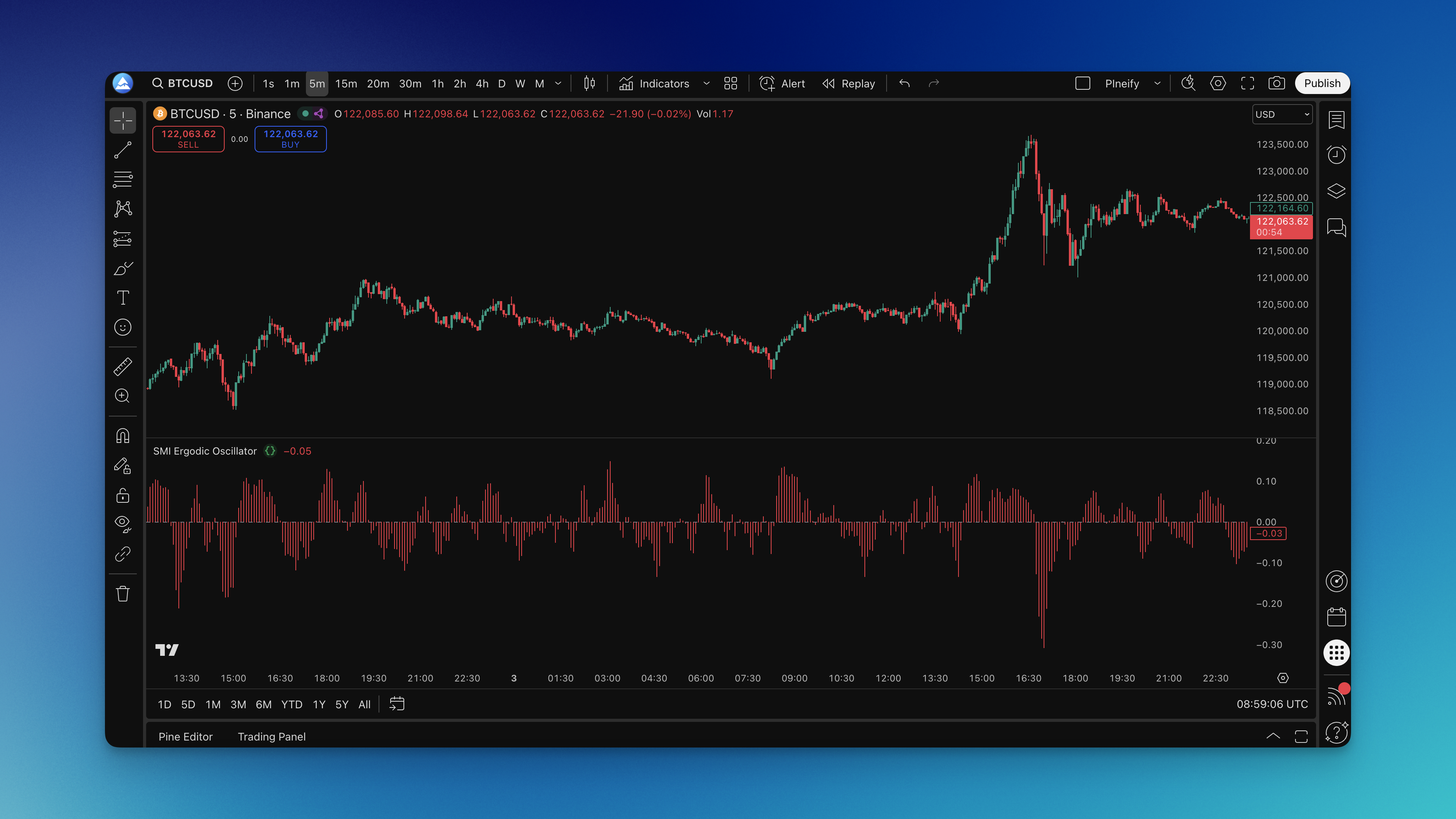
The indicator appears as a histogram panel below your price chart, bouncing around the zero line. If you prefer writing your own Pine Script code, that's fine too, but I've found the pre-built version saves about 30 minutes of debugging.

Reading the Indicator on Your Charts
Alright, let's get into how this thing works in practice. The histogram dances around the zero line, and reading it is like learning a new language -- once you get it, it becomes automatic.
Zero-line crossovers: This is your base signal. When the histogram moves above zero, bulls are taking charge. Below zero, bears are in control. Don't jump on every crossover -- wait for conviction. A bar that barely ticks above zero then drops back is not a signal. I wait for at least two bars of sustained movement.
Histogram height: Taller bars mean stronger momentum. Short, wimpy bars mean the market is mumbling. When you see bars extending noticeably above recent levels, the market is shouting. On BTC/USD in November 2023, the oscillator hit its highest reading in six months at the same time price broke $38,000 -- that was a strong momentum confirmation.
Divergences: This is where the indicator earns its keep. If price makes a new high but the oscillator makes a lower high, that's bearish divergence. I caught this on EUR/USD in March 2024 -- price pushed to 1.0950 while the oscillator stayed flat. Two days later, price dropped 150 pips.
Early shrinking: Watch for when the histogram starts shrinking before it crosses the zero line. It's like seeing smoke before the fire. The momentum is shifting even if the trend hasn't changed yet.
This indicator works well with trend analysis. I don't recommend using it alone -- combine it with a swing trading approach or a simple moving average for context.
SMI Ergodic Oscillator Settings Guide
The defaults (20, 5, 5) work for most people, but you'll want to tweak them based on your style. Think of it like adjusting a car seat -- what works for one driver won't work for another.
Long Length (Default: 20): Your main smoothing dial. Swing traders can push this to 25-30 to filter out noise. Day traders might drop to 15-18 for faster reactions.
Short Length (Default: 5): Controls reaction speed. If you're getting too many false alarms, bump it to 7-10. If you want faster signals and can handle noise, drop to 3-4.
Signal Length (Default: 5): Your final filter. Higher numbers (7-9) give cleaner but slower signals. Lower numbers (3-4) are faster but more erratic.
I haven't tested settings above 30 on the long length -- response lag becomes noticeable and you start missing entries. If you're holding positions for months, 30/10/10 is my recommended ceiling.
Backtesting Your SMI Ergodic Oscillator Strategy
I can't stress this enough: test before you trade. Don't slap this indicator on a chart and start risking real money. The Pineify editor makes this straightforward.
Entry rules: Long when the histogram crosses above zero with clear conviction (not a tiny blip). Alternatively, enter on divergences between price and the oscillator.
Exit rules: Take profits when the oscillator hits extreme levels. Cut losses when momentum shifts against you. I use a 1.5:1 risk-reward minimum on all oscillator-based trades.
Risk management: Set stops and position sizes before you enter. If the oscillator shows momentum clearly against your position after entry, that's your exit signal.
Account for real costs: Test with realistic slippage and commissions. A backtest that ignores trading costs is fantasy. On TSLA, slippage alone eats 0.5-1% per trade during high volatility.
The Pineify editor lets you test across different timeframes and market conditions without risking a cent. I'd suggest running at least 200 trades in your backtest before you trust any setting combination.
Questions About the SMI Ergodic Oscillator
What exactly is the SMI Ergodic Oscillator and how does it work?
It's a momentum indicator based on the True Strength Index. Instead of the usual single-smoothing you get with MACD, it applies two rounds of exponential smoothing to price momentum. This filters out short-term noise so you see the real trend direction. Readings above zero mean momentum is bullish; below zero means it's bearish. Pretty simple once you see it on a chart.
What are the best default settings for the SMI Ergodic Oscillator?
Start with Long Length 20, Short Length 5, and Signal Length 5. Those work well on 4-hour to daily charts for swing trading. Day traders usually prefer 15/4/3 for speed, and position traders use 30/10/10 for smoothness. Whatever you pick, backtest it on your specific market first. I've seen traders blame the indicator when the real problem was their settings.
How is the SMI Ergodic Oscillator different from MACD?
Both measure momentum. The difference is the SMI applies two smoothing passes while MACD uses one. That extra pass makes the SMI less prone to whipsaws in choppy markets. MACD reacts faster but gives more false signals. The SMI trades a bit of speed for cleaner, more reliable crossover signals. Pick based on what matters more for your style.
What does a divergence signal mean on the SMI Ergodic Oscillator?
Divergence happens when price and the oscillator disagree. Bearish divergence -- price makes a higher high, oscillator makes a lower high -- warns that buying momentum is dying. Bullish divergence -- price makes a lower low, oscillator makes a higher low -- tells you sellers are losing steam. These are early warnings, not instant trade signals. Always check the price action for confirmation.
Which markets and timeframes work best with the SMI Ergodic Oscillator?
It works best in trending markets: stocks, forex, crypto, and commodities. It's least reliable in low-volume, sideways markets where momentum is flat. Best timeframes are 1-hour through daily. Below 15 minutes, the noise levels spike and false crossovers become a real problem. I don't trade it below the 1-hour chart personally.
Can the SMI Ergodic Oscillator be used as a standalone trading system?
You could, but I wouldn't. Pair it with at least one trend tool (like a moving average or trend line) and one support/resistance method. Without trend context, a zero-line crossover doesn't tell you whether it's happening with or against the dominant trend. That context makes a huge difference in signal reliability.
How do I add the SMI Ergodic Oscillator to TradingView using Pineify?
Head to the Pineify platform, search for the indicator, and copy the ready-to-use code. Open TradingView's Pine Editor, paste the code, save it, and click Add to Chart. You'll see a histogram panel below your price chart immediately. Whole process takes about two minutes.