Free TradingView Indicators: Built-in Studies and Public Scripts

Free TradingView indicators can describe trend, momentum, volatility, and trading activity without a separate script subscription. That does not make every TradingView feature free, or establish that an indicator produces profitable trades. Start with a calculation you can explain, then check its timing and the account features it requires.
The selection below combines built-in studies with identifiable public scripts. It is a functional comparison, not a ranking based on an unpublished trading experiment.
What “free” covers
A freely accessible script and a free TradingView account are different things. A script can cost nothing while your intended chart layout, alert type, historical data, or exchange feed requires payment. TradingView's current plan comparison lists two indicators per chart for Basic; other limits and access conditions depend on the plan. Check the comparison and the feature inside your account before building a workflow around it.
In particular, do not assume Basic includes one built-in Volume Profile. Built-in profile access is a separate plan feature. Community volume-profile scripts can have different calculations and data limitations. Their availability does not establish equivalence with TradingView's built-in implementation.
An open-source label lets you inspect a publication's code. A protected script can still be free to use, but its implementation is hidden. An invite-only publication requires permission. Neither popularity nor source visibility establishes future returns, and no article can promise that access terms will remain unchanged forever.
Built-in indicators by purpose
| Indicator | What it measures | Starting configuration to inspect | Main interpretation limit |
|---|---|---|---|
| RSI | Relative magnitude of smoothed gains and losses | 14 bars, close source, 70/30 levels | An extreme can persist in a trend |
| MACD | Difference between fast and slow moving averages, plus signal smoothing | 12/26/9 with the intended moving-average types | Crossovers lag the price inputs and can reverse repeatedly |
| Bollinger Bands | Moving-average center with standard-deviation bands | 20 bars and two standard deviations | A band touch does not imply a reversal |
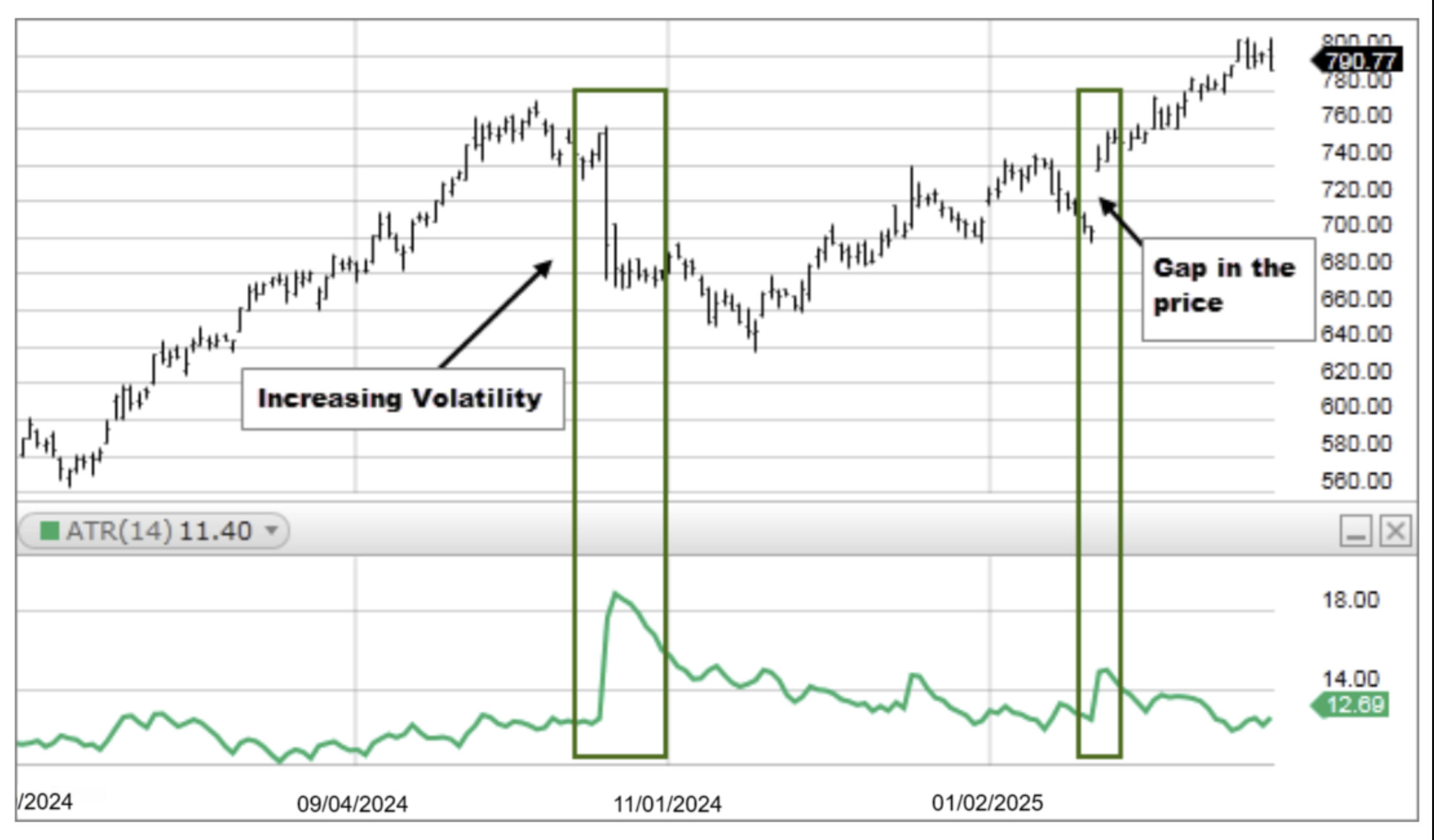
| ATR | Smoothed true range, including gaps from the previous close | 14 bars; inspect smoothing | Measures movement size, not direction |
| Supertrend | ATR-based bands and a directional state | Record ATR period and multiplier | Sideways conditions can produce repeated state changes |
| Stochastic RSI | RSI's position within its own recent range | Record RSI, stochastic and smoothing lengths | It is another transformation of price, not independent confirmation |
These settings are reference configurations, not universal optima. “14 periods” means 14 chart bars; it does not mean 14 days on an intraday chart.
RSI and divergence
TradingView's RSI documentation describes the standard calculation and optional divergence display. A bearish divergence pairs a higher price high with a lower RSI high; the bullish case pairs a lower price low with a higher RSI low. Define which pivots qualify before evaluating examples.
If a pivot needs later bars for confirmation, the signal only becomes available after those bars. A marker drawn back on the earlier high does not make an entry at that high possible. Record the confirmation time and avoid treating an attractive historical divergence as evidence of a reliable forecast. The RSI divergence guide discusses the additional choices involved.
MACD and Bollinger Bands
MACD's histogram is the MACD line minus its signal line. A shrinking positive histogram means that difference is narrowing; it does not by itself mean price is falling. Compare crossovers, zero-line conditions, and divergence as separate rules. See the MACD settings guide for the distinction.
Bollinger Bands describe dispersion around a moving center. Price can continue along a band during a trend. Adding an extreme RSI reading does not turn the combination into a guaranteed reversal, because both studies depend on price. A squeeze describes reduced recent dispersion without specifying the direction of a later move. A Fibonacci Bollinger Bands setup is a different band construction; do not silently substitute it for standard Bollinger Bands.

ATR for distance and sizing
ATR takes the largest of the current high-low range and the absolute distances from the previous close to the current high and low, then smooths those values. It changes with the symbol, interval, session, and market conditions. A fixed claim about how many pips EUR/USD “usually” moves is not a substitute for checking the current series and pip convention.
For a hypothetical stock trade, a $100 risk budget and a $2 stop distance produce 50 shares before costs: $100 divided by $2. Slippage, fees, gaps and an unfilled order can change the loss. Futures and FX sizing also require contract or point value and currency conversion. ATR does not supply those details or guarantee execution at a stop.
Public scripts with identifiable sources
| Script | Publisher and access at review | Why inspect it | What still needs testing |
|---|---|---|---|
| %R Trend Exhaustion | upslidedown; open source | Combines shorter and longer Williams %R readings and marks defined exhaustion conditions | Whether signal timing and exits suit the intended market; an exhaustion label does not establish a top |
| WaveTrend Oscillator | LazyBear; open source | Oscillator and signal-line crossings with upper/lower reference bands | Closed-bar behavior, repeated crossings, and sensitivity to inputs |
| WaveTrend with Crosses | lonestar108; open source, based on LazyBear's WaveTrend | Makes crossings visible and adds bar-color highlights | Whether the extra display changes decision quality; it is not a separate independent signal |
Other names such as multi-timeframe RSI, Traders Dynamic Index, liquidity zones and anchored VWAP describe families with multiple implementations. Match the exact author and publication before comparing them. Liquidity-zone drawings infer areas from price structure; they do not reveal every participant's stop orders. Anchored VWAP depends on the chosen start point and available volume; it does not identify an institutional fair value.
A workable setup and review process
- Choose a question: trend direction, momentum, volatility distance, or activity. Select one study that addresses it.
- Open Indicators on the chart. For a community script, match the publication title and author to its linked page, then add it to the chart.
- Record the symbol including exchange, interval, session, chart type, script version, inputs, and price source. Use ordinary candles when testing execution from traded prices.
- Observe the current bar as well as historical bars. Read how higher-timeframe values, pivots, and alerts are confirmed. TradingView's repainting documentation explains why historical and realtime behavior can differ.
- Write entry, exit, position-size and cost rules separately. An indicator plot is not automatically a strategy report. Use a strategy implementation or a timestamped manual record for performance analysis.
- Compare candidates on the same data and assumptions. Keep a later period out of parameter selection, and include failed signals rather than only chart examples that look convincing.
Two indicators answering different questions can be easier to review than several versions of the same oscillator. That is a workflow choice, not an empirically established optimum. TradingView's Compare feature adds other instruments; it does not automatically score competing scripts or prove which predicted a move.
When a custom script helps
Pineify can help generate Pine Script from a written specification or configured visual rules. A useful request specifies the source, crossover condition, confirmation bar, session and alert behavior. For example, distinguish “the close crosses above the 21-bar EMA” from “the close remains above it.”
Review generated code and compare its outputs against the original calculation. Respect source licenses and access restrictions when adapting another author's work. Combining studies into one script still leaves TradingView's computational limits, account restrictions and the need to create and test alerts. A generator does not establish that the combined rules improve returns.
Frequently asked questions
What RSI setting is best for day trading?
There is no universal best setting established here. Start by documenting a reference such as 14 bars and 70/30, then test a defined rule on the intended symbol, interval and costs. Extreme readings and divergence are different conditions.
Can Bollinger Bands and RSI be used together?
Yes. They describe dispersion and momentum, but they share price inputs. Define what their agreement means and test that rule; agreement alone does not prove a reversal is more likely.
Are the scripts free forever?
The linked public publications were open source and free to use at review. Future access terms and platform features can change. Check the exact publication and current account plan.
How many indicators can a free account use?
The current plan comparison lists two per chart for Basic. Choose studies within your account's allowance and check alert and data access separately.
Does Supertrend replace MACD?
No. Supertrend uses ATR-based bands to define a state; MACD compares moving averages and signal smoothing. Either can be part of a specified rule, but neither establishes profitability without a trading and execution model.