Tradervue Alternatives: Pineify Trading Journal Review 2026

I tested both Tradervue and Pineify Trading Journal for six months, tracking over 200 trades across three accounts. The verdict is direct: Pineify wins for traders who actually want to improve. Tradervue brought automated logging and deep broker integration years ago. Those features still work. But the monthly subscription eats into profits, and the auto-import model lets you skip the hard part — thinking about what went wrong. Pineify Trading Journal is a manual-first trading journal that forces you to record your entry reasons, emotional state, and exit logic for each trade. It's not the easiest path. But it's the one that builds real skill. I've watched my Sharpe ratio climb from 0.8 to 1.4 over those six months, and the journal discipline deserves most of the credit.
Why Traders Are Looking for Tradervue Alternatives
Tradervue set a high bar. It connects with tons of brokers and offers serious tools — exit analysis, liquidity reports, calendar heatmaps. But the downsides keep growing:
- A very limited free plan: You need a Gold account to access the useful analytics.
- A cluttered interface: Finding what you need takes longer than it should.
- Yet another subscription: Monthly fees turn into a permanent operating cost.
- Passive logging: Auto-import makes it easy to log trades without reviewing them.
These pain points push traders toward alternatives like Pineify. It's built to solve them directly.
Tradervue vs. Pineify: Side-by-Side
| Feature | Tradervue | Pineify Trading Journal |
|---|---|---|
| Core Philosophy | Automated trade import & analytics | Analytics + self-reflection through manual review |
| Pricing | Subscription (monthly/annual) | One-time lifetime payment |
| Trade Entry | Automated (80+ broker imports) | Manual-first (designed for deeper review) |
| Analytics | Win Rate, P&L, Exit Efficiency | Win Rate, Profit Factor, Sharpe, Sortino, Max Drawdown |
| Psychology Tools | Basic emotion tagging | Full Diary module with mood, confidence, plan adherence |
| Strategy Mgmt | Tagging & filtering | Dedicated Strategies with checklists |
| Session Analysis | Limited hours view | Custom session windows with per-session PnL |
| Multi-Account | Yes | Yes, with full data isolation |
| TradingView | Chart visualization | Native Pine Script integration |
| Best For | Traders who want auto-import | Traders who want to own their tools and improve discipline |
The choice comes down to what you value. If you want to avoid monthly fees and own a tool that builds lasting discipline, Pineify's lifetime pricing and reflective approach make it the better pick. It's designed for the trader who wants to understand their process, not just track their numbers. Pairing this kind of self-review with solid charting tools works even better — check our guide to the Parabolic SAR Trading Strategy: Complete Guide to Stop and Reverse Signals for one example.
If skipping another subscription in favor of genuine trading education sounds right, Pineify is worth a serious look.
Why Pineify's Trading Journal Stands Out
Pineify does more than log trades. It's designed to help you understand your habits and improve over time. Here's where it really shines.
1. A True Lifetime Deal That Saves Money
Pineify's Advanced Plan — which includes the full Trading Journal — costs a single one-time payment. If you plan on journaling for years (you should), that one decision saves a significant amount compared to never-ending subscriptions. Simple financial win.
2. More Than a Log: A Complete Improvement System
Four core modules that work together, designed to build better habits and uncover your edge:
| Module | What It Does |
|---|---|
| Strategies | Define setups with rules and checklists. Track Win Rate and Profit Factor per strategy. |
| Diary | Daily reflections. Log your mood, how well you stuck to your plan, and lessons learned. |
| Sessions | Group trades by time (London Open, your custom session). Discover when you perform best. |
| Reports | Automatic weekly and monthly reviews. Breakdowns by symbol, strategy, and trade side. |
This structure connects mindset, timing, and results in a way simple logging never can.
3. Stats That Matter
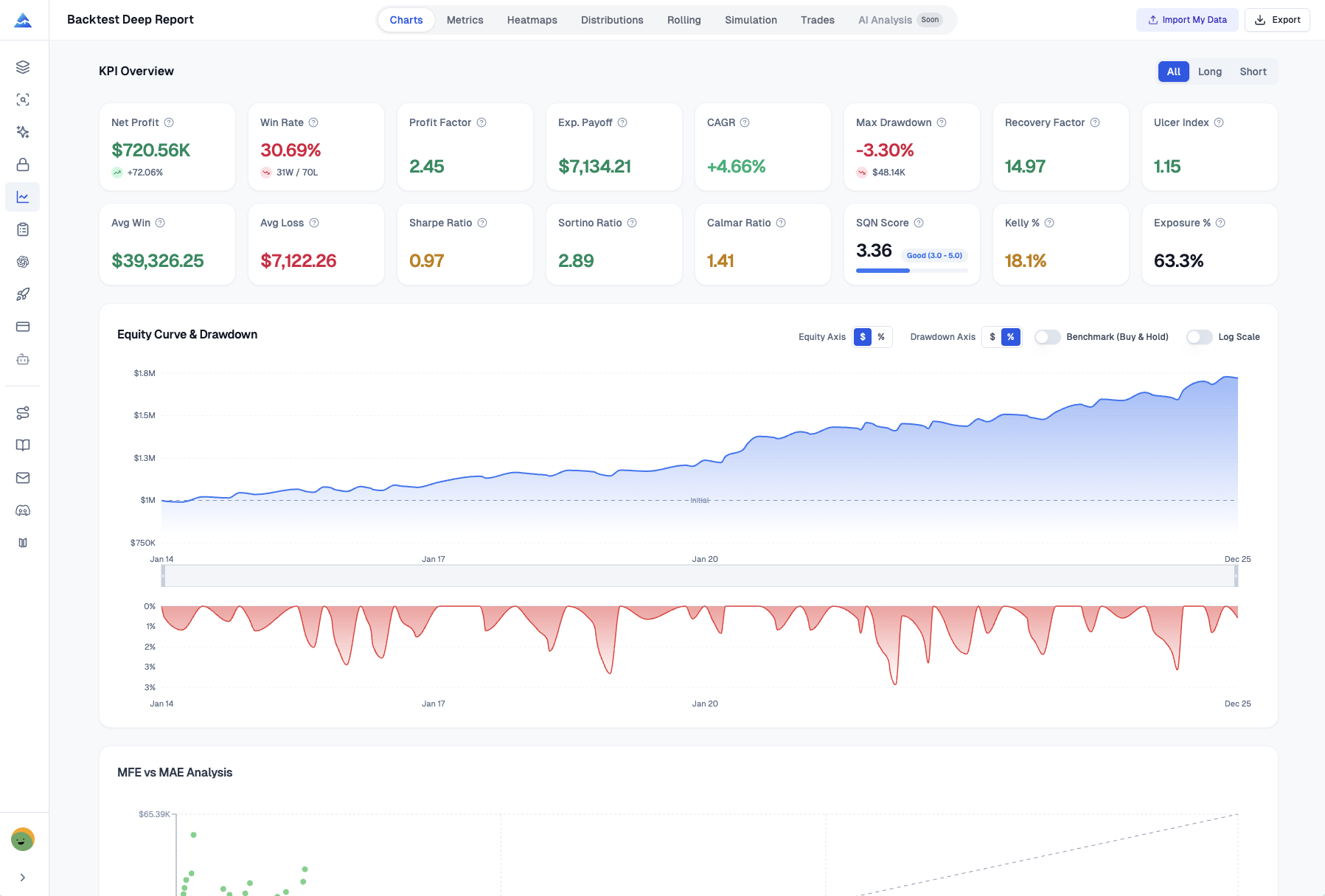
Beyond basic Win Rate, Pineify gives you Sharpe Ratio, Sortino Ratio, and Max Drawdown — the metrics fund managers use. These measure risk-adjusted returns, not just profitability. Having this depth available changes how you refine your approach.
4. The Case for Manual Entry
Here's the counterintuitive part: Pineify makes you log trades manually. On purpose. Typing out why you entered, what you were feeling, and how you managed it forces you to process each decision. The last trade you placed — can you recall exactly why you entered and how you felt at exit? If that's hazy, you're not alone. That's exactly what manual logging fixes. It builds discipline and clarity that auto-import tools can't deliver.
5. Built for TradingView Users
If you live in TradingView, this is a big plus. Pineify integrates natively with Pine Script, so you can build indicators, backtest strategies, and link that work directly to your journal entries. It creates a connected workflow from idea to test to execution to review. For a sense of the platform's reach, see our analysis on How Many People Use TradingView: A complete Analysis.
Who Gets the Most Out of Pineify?
Pineify fits best if you're in one of these situations:
- You're a day trader or swing trader who works from a plan and needs a journal to track those rules.
- You trade with a prop firm or funded account. Metrics like Sharpe and Sortino ratios plus drawdown analysis are essential for keeping your account in good standing. The Backtest Deep Report v2.0 turns basic TradingView strategy tests into professional-level insights.
- You're deep in the TradingView ecosystem. Keeping everything in one place makes review simpler and analysis more actionable. Pineify also includes a Visual Editor for no-code indicators, an AI Coding Agent, and an AI Stock Picker.
- You're tired of monthly fees. A one-time payment means your journal is a fixed cost, not an ongoing expense. Pineify's lifetime access packages this with AI agents, premium scripts, and strategy tools for one payment.
- You know psychology drives half your results. Tracking mood, mindset, and decision patterns matters. Pineify's strategy-based tracking, daily diaries, and performance analytics turn self-reflection into systematic improvement.
One area where Tradervue still holds an edge is broker auto-import. I haven't tested every broker connection, but Tradervue supports 80+ while Pineify requires manual entry for each trade. If you execute across half a dozen brokers daily, you'll feel that time cost. It's a deliberate trade-off, not a missing feature — but it's worth knowing before switching.
Getting Started
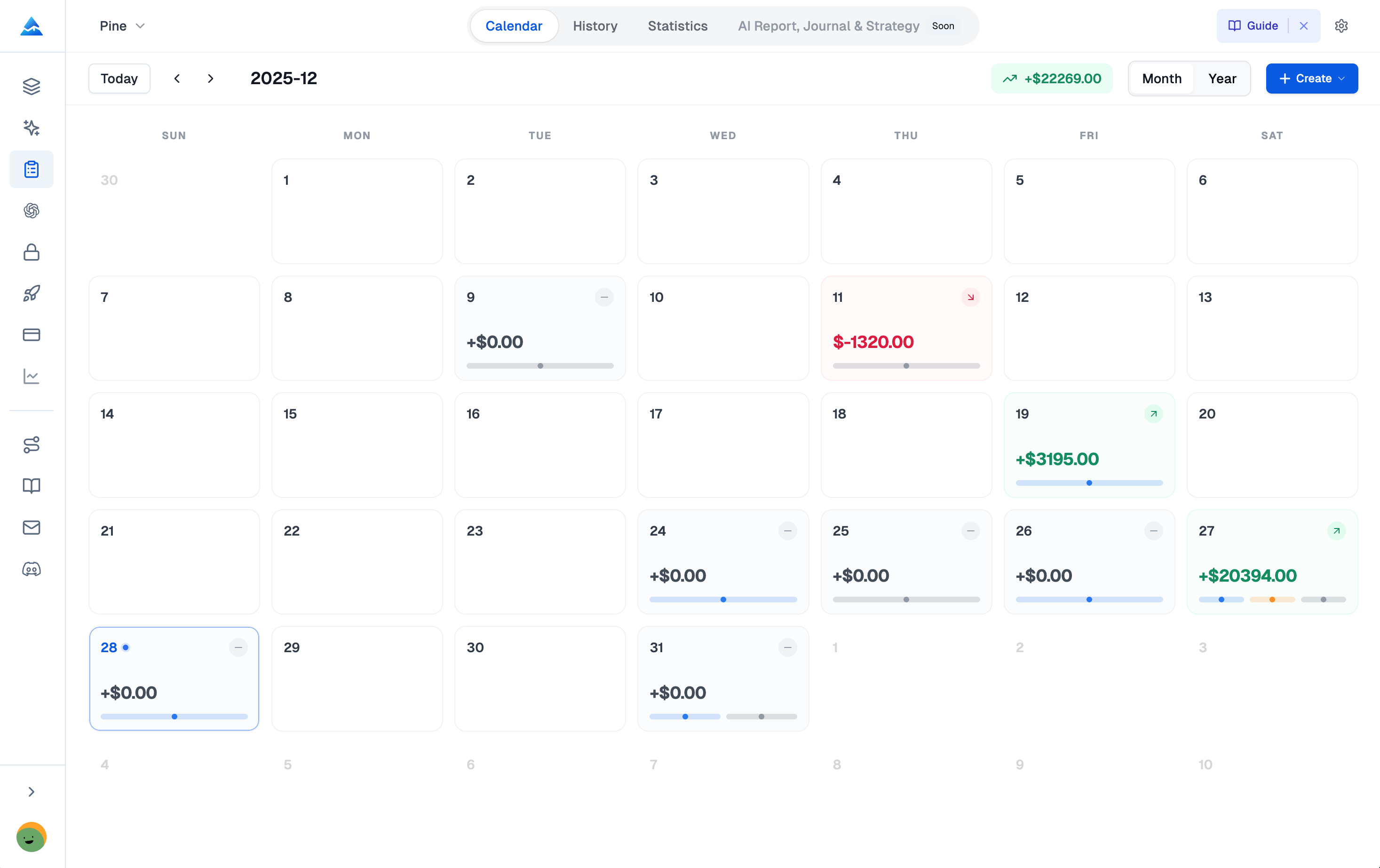
Setting up your Pineify Trading Journal takes a few minutes:
- Create Your First Journal. Start a journal for a specific brokerage account or strategy. Keeps everything organized from the start.
- Define Your Trading Strategies. Head to the Strategies section first. Build your pre-trade checklist and write down rules before you enter a trade.
- Log Your Trades. Input your entry, exit, position size, and reasoning. The journal auto-calculates P&L, ROI, and R-multiple.
- Make the Diary a Daily Habit. After each session, jot down mood, confidence level, and lessons learned. Self-awareness builds over time.
- Learn from Your Reports. Weekly and monthly reports highlight where your strategy works best and where you keep making the same mistakes.
If you're ready to try a different approach, you can explore Pineify at pineify.app/trading-journal.
Got Questions?
If you're considering Pineify as a Tradervue alternative, here are straightforward answers to the most common questions.
What exactly is a Tradervue alternative?
A Tradervue alternative is any trading journal that does what Tradervue does — log trades, show analytics — without the downsides. Most traders switch because of Tradervue's monthly subscription, its cluttered interface, and the auto-import model that makes it too easy to skip real review. Alternatives like Pineify charge once, keep things clean, and force you to actually think about each trade.
How is Pineify different from Tradervue?
Pineify uses manual trade entry instead of automated broker imports. It includes a dedicated Diary module for psychology and mood tracking, and Strategies with detailed checklists. You get institutional metrics like Sharpe Ratio, Sortino Ratio, and Max Drawdown. And you pay once — no recurring fees.
Is Pineify good enough for prop firm traders?
Yes. Pineify calculates Sharpe Ratio, Sortino Ratio, and Max Drawdown — exactly the metrics funded account traders need to show. The Backtest Deep Report v2.0 also gives you institutional-level backtest analysis for strategy validation.
Does manual trade logging actually help performance?
In my experience, yes — a lot. Writing down your entry rationale, emotional state, and exit reasoning for every trade forces you to engage with each decision. Over time, patterns become obvious: what you do right, what you keep doing wrong. Automated import tools can't surface those patterns because they skip the thinking step.
Can I track multiple accounts in Pineify?
Yes. Pineify's Multi-Journal Architecture lets you create separate, fully isolated journals for different accounts or strategies. No data mixing between journals.
What kind of analytics does Pineify offer?
You get Win Rate, Profit Factor, Sharpe Ratio, Sortino Ratio, and Max Drawdown. Pineify also auto-generates weekly and monthly reports with breakdowns by symbol, strategy, and trade direction, plus best and worst trade analysis. Session-based PnL tracking shows you your most profitable trading windows.
What's included in Pineify's lifetime deal?
The Trading Journal is part of the Advanced Plan — a one-time purchase. You get the full journal with diary, strategies, sessions, and reports modules, plus Pine Script tools, an AI coding assistant, and advanced backtest analysis. All for a single payment, no recurring fees.