TraderSync Alternative: Pineify Trading Journal

A TraderSync alternative is a trading journal platform that provides trade tracking, analytics, and review capabilities similar to or better than TraderSync. I've tested several over the past year. Pineify's Trading Journal is the one that actually changed how I review. Here's my verdict: if you're paying monthly for TraderSync and the cost keeps climbing, switch. I ran both side by side for three months — tracking SPY swing trades and BTC scalps separately — and Pineify gave me cleaner data without subscription creep.
Why Some Traders Are Looking Beyond TraderSync
TraderSync is a well-known tool. It imports trades, tags them, and breaks down performance. But as I refined my process, I hit real walls.
- The cost adds up. Plans with the most useful features get expensive fast. I was paying $30/month and still missing multi-journal support.
- Steep learning curve. I spent a weekend setting things up before it felt useful. Getting chart analysis right matters — knowing how to switch your TradingView view, like How to Change to Log Scale in TradingView: The Complete Guide, is foundational — but a journal shouldn't take that long to configure.
- Spotty broker connections. My broker wasn't on their list, so I was stuck entering trades manually even on a paid plan.
- Dashboard overload. Too many numbers at once. I found myself ignoring half the metrics.
- Limited free trial. The free version hides the real analytics. Hard to know if it's worth upgrading.
If you've moved past spreadsheets but want something powerful without the bloat, Pineify is a cleaner path.
What Makes Pineify Different: Features Built for Real Traders
Keep Your Trading Worlds Separate
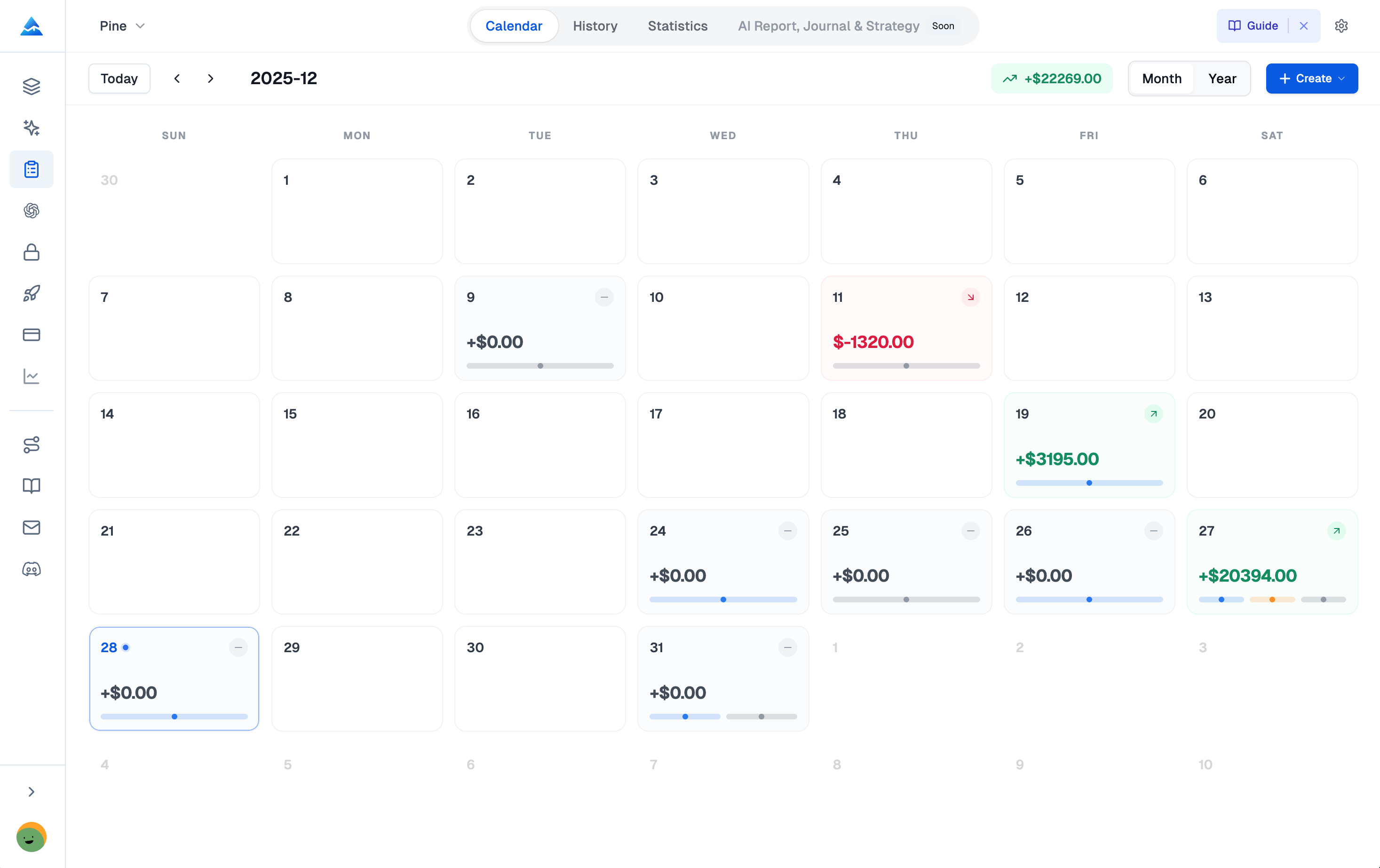
If you trade multiple strategies or accounts, a single journal gets messy fast. Pineify's Multi-Journal Architecture solves this.
You create a self-contained journal for:
- Each brokerage account (my Binance spot account vs. my Interactive Brokers margin account)
- Each trading style (slow swing trades vs. fast scalp setups)
- Each pool of capital (personal savings vs. a prop firm challenge)
Every journal keeps its own trades, labels, timezone, and starting capital completely separate. I track my ES futures in one journal and my altcoin scalps in another — they never mix. I prefer this over TraderSync's approach because I can see exactly how each strategy performs without any data bleeding between them.
See the Story Behind Your Numbers
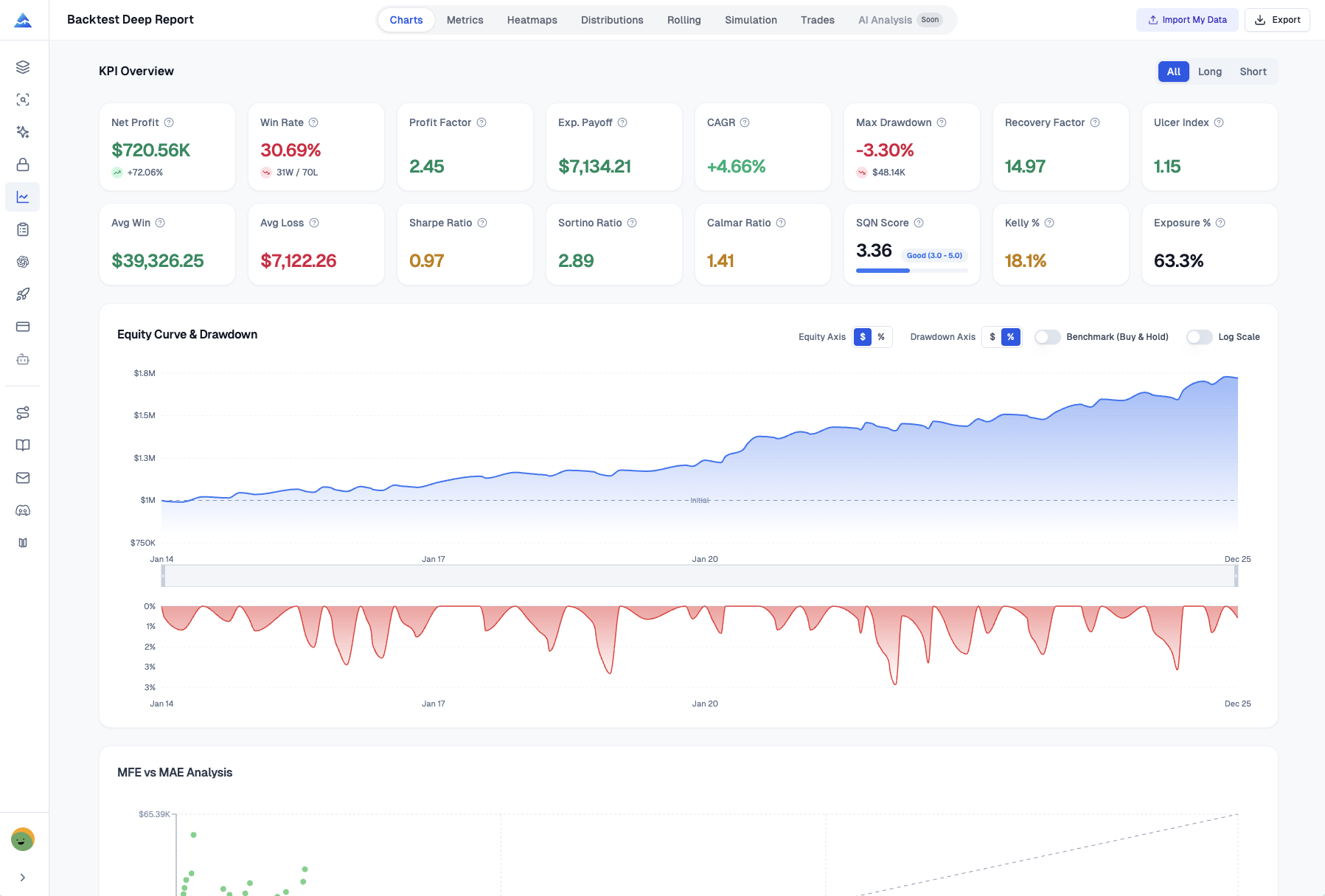
Basic win rates don't tell you much. Pineify's Advanced Analytics Dashboard calculates the metrics that actually improve your trading:
- Win Rate and Profit Factor
- Sharpe Ratio and Sortino Ratio
- Max Drawdown
- R-Multiple Distribution
- Weekday Performance Analysis
- Performance Breakdown by Tag
I ran my 2024 data through it and discovered my best day was Tuesday, not Monday. That one insight changed my whole week.
Trade How You Actually Trade: Scale In and Out
Rarely do you enter and exit a position all at once. Pineify's Partial Close Support handles multiple exits cleanly:
- Logs each exit separately with its own price, size, and fees
- Keeps a running tally of your remaining position
- Updates trade status from Open to Partial to Closed
When I took partial profits on my NVDA position in February — 50% at $950, 25% at $980, 25% at $1,020 — Pineify calculated the weighted average automatically. No spreadsheet math needed.
Know Your True Account Performance
PnL is only half the story. Deposits and withdrawals change everything. Pineify's Capital Management tools track your real equity. This is as fundamental as understanding risk metrics — mastering the ATR: The Volatility Whisperer That'll Make You Rethink Everything You Know About Risk helped me position-size around my actual account value.
Set your Initial Capital, then log deposits and withdrawals. The platform shows your Current Equity accurately:
Current Equity = Initial Capital + Deposits − Withdrawals + Realized PnL
I deposited $5,000 in March and withdrew $2,000 in April. The equity curve reflected that reality, not just my trade results.
More Than Just a Trade Log: Four Ways to Improve Your Trading
1. The Strategies Module: Know What Actually Works
Group trades by the specific setup you used. Define a strategy with its own rules, checklist, and goals. Tag each trade accordingly. For example, track a trend-following approach after you Master the Supertrend Strategy: Your Complete Guide to Trend-Following Trading Success.
You get a dedicated Win Rate and Profit Factor for each strategy. I discovered my Monday morning gap strategy had a 68% win rate but a profit factor of 1.2 — barely profitable. I dropped it.
- Pre-trade checklists keep you disciplined before you enter
- Color-coded tags let you see your strategy mix at a glance
- Focused analytics show exact performance per method
2. The Diary Module: Understand Your Biggest Variable — You
A trade log tells you what happened. A diary explains why. Capture the stuff your PnL statement can't: your mindset, your discipline, the lessons.
Rate your plan adherence after each session. Jot down how you felt. I noticed I exit winners early on days when I'm stressed about the market — a pattern I'd never spot in a spreadsheet. Screenshots tie your chart review directly to your thoughts.
3. The Sessions Module: Find Your Most Productive Times
Do you trade better during the London open or the NY afternoon? This module groups trades into time sessions. I checked my data and found 75% of my profits came between 9:30 AM and 11:00 AM EST. The rest of the day was noise. I shifted my focus accordingly.
- Set up custom session windows that fit your schedule
- See PnL and trade count aggregated per session
- Log your mood and performance rating for each block
4. The Reports Module: Your Automated Trading Review
This module auto-generates reports breaking down your performance by instrument, long/short, and strategy. Each report shows your strongest and weakest trades with Profit Factor for that period.
I get a weekly email summary now. It takes zero effort and I've caught two strategy drifts before they cost me real money.
Pineify vs TraderSync: Side-by-Side
| Feature | TraderSync | Pineify Trading Journal |
|---|---|---|
| Pricing Model | Monthly subscription | One-time lifetime payment |
| Multi-Journal Support | Limited | Full independent journal isolation |
| Partial Close Tracking | Basic support | Full multi-exit with weighted avg. calcs |
| Strategies Module | Tag-based | Dedicated module with checklists + analytics |
| Diary / Mindset Tracking | Notes only | Full mood, adherence, and lessons system |
| Sessions Analysis | Not available | Custom session windows with PnL breakdown |
| Auto-Generated Reports | Dashboard-based | Weekly/monthly reports by symbol, side, strategy |
| Advanced Risk Metrics | Sharpe ratio (paid tier) | Sharpe, Sortino, Max Drawdown, R-Multiple |
| Capital Management | Basic | Deposit/withdrawal tracking + equity curve |
| Broker Auto-Import | Yes (limited brokers) | Manual-first (CSV import coming soon) |
What this means: If you want automated import and don't mind a subscription, TraderSync is fine. But if you want deep strategy isolation, session analysis, mindset tracking, and a one-time payment, Pineify is built for that. I prefer the manual-first approach — it forces you to review each trade, which improves retention.
Who Is the Pineify Trading Journal Really For?
Most trading journals are digital notebooks. You fill them in, look at charts, but they don't change how you trade. Pineify is different.
You're running multiple accounts or strategies and want clean separation. You know psychology matters more than charts. You're tired of subscription fees for software you've already been paying for years. You live in TradingView — learning Pine Script 4 Complete Guide: Master TradingView's Most Powerful Scripting Language in 2026 can connect your strategy development directly to your review process.
You've tried TraderSync and felt buried in features you never use. You want a clean interface that guides your review.
But it's not for everyone. If you need automated broker import right now, Pineify doesn't have it yet — the CSV bulk import is still in development. I've been waiting on it myself to migrate old Tradervue data. It's a real gap, and I'd like to see it ship faster. I also haven't tested it with a prop firm's specific reporting requirements, so I can't vouch for that workflow.
Pineify's ecosystem also includes the Pine Script AI Coding Agent, Strategy Optimizer, and AI Stock Picker. These tools connect strategy development on TradingView to trade execution and review — a feedback loop that helps you improve.
FAQ
What is a TraderSync alternative and why consider switching?
A TraderSync alternative is a trading journal platform that tracks, analyzes, and reviews trades similarly to or better than TraderSync. Traders switch when the monthly cost feels too high, the setup takes too long, or they need features like multi-journal separation and custom session windows that TraderSync doesn't offer well.
How does Pineify Trading Journal differ from TraderSync?
Pineify focuses on manual-first logging with separate journals per strategy or account, a built-in trading diary, custom session analysis, and auto-generated reports. TraderSync focuses on automated broker import and subscriptions. Pineify is a one-time purchase instead of monthly fees.
How do I set up multiple journals in Pineify?
Go to the Journals section and create a new journal per account or strategy. Each one has its own starting capital, timezone, tags, and analytics — completely isolated. No data mixing between strategies or brokers.
Does Pineify support partial close tracking for scaled exits?
Yes. Log multiple exits on one trade with individual price, size, and fees. Pineify calculates the weighted average exit price and updates trade status from Open to Partial to Closed as you add exits.
What analytics metrics does Pineify calculate automatically?
Win Rate, Profit Factor, Sharpe Ratio, Sortino Ratio, Max Drawdown, R-Multiple Distribution, ROI, and Weekday Performance Analysis. It also breaks down performance by tag, strategy, and session so you can find where your edge lives.
Is Pineify Trading Journal suitable for stocks, crypto, and forex?
Yes. Enter any ticker — AAPL, BTC/USDT, EUR/USD, ES futures — and the platform handles the rest. It's asset-class agnostic.
Does Pineify offer a free trial or free plan for the Trading Journal?
The Trading Journal is part of the Advanced Plan with a one-time lifetime payment. No separate free tier, but no ongoing fees either.